
|
Listen Now
Getting your Trinity Audio player ready...
|
Document Management System: Complete 2026 Guide Best and Most Secure DMS
The deepest, plainest explanation of a document management system on the internet. What it is, how it really works, how to pick the best and most secure one, the new threats coming in 2026 and 2027, and how MaMITs DMT becomes a quiet protection layer around your business.
If you have ever lost a file, sent the wrong version of a contract, or felt a small knot in your stomach wondering who can actually see your documents, this guide is written for you. We will keep it simple, honest, and genuinely useful from the first line to the last.
A document management system (DMS) is secure software that stores, organizes, protects and tracks every document a person or business owns, all in one place. The simplest way to picture it: a smart, locked, self-organizing filing cabinet that never loses a paper, opens only for the right people, remembers every change, and quietly guards everything inside it.
The best document management system is the one built to protect documents first and be convenient second. A secure document management system adds strong encryption, precise access control, a complete activity record, controlled backups, and a promise that your files are not handed to outside AI by default. That combination is exactly what MaMITs DMT is built to deliver.
Part 1What Is a Document Management System, Really?
Most explanations of a document management system are written by software companies for other software companies. They are full of phrases like “enterprise content lifecycle orchestration.” That is not how a normal human thinks about their own files. So let us throw that away and start fresh, in plain words.
Picture an old metal filing cabinet in an office. It works, but it has problems. Anyone with the key can open any drawer. If someone takes a folder home, nobody knows. If a page goes missing, it is gone forever. If two people scribble on the same form, you cannot tell who wrote what. And finding one specific paper means flipping through hundreds of others.
A document management system, also called document management software or simply DMS, is what happens when that filing cabinet becomes intelligent. Here is the same cabinet, upgraded:
- It never loses anything. Every file goes into one secure place, and a copy of every earlier version is kept automatically.
- It finds things instantly. You type a few words and the right document appears in seconds, even if the words are written inside the file and not in its name.
- It only opens for the right people. Each person sees exactly what they are allowed to see, and nothing more.
- It remembers everything. Who opened a file, who changed it, who downloaded it, and at what time. Nothing happens in the dark.
- It protects what is inside. Files are encrypted, backed up, and shielded from people who should never have touched them.
That is the entire idea. A DMS is not scary technology. It is simply the difference between storing documents and actually controlling and protecting them. A folder on a laptop or a shared drive stores files. A document management system guards them.
DMS, DMT, document management software: are they different?
You will see the term written several ways, and the difference is small. DMS means document management system. Document management software is the same thing, named after the software itself. MaMITs DMT is our document management tool, the product built around all of the protection and control above. When people say they need “a DMS,” “document management software,” or “a document management tool,” they are describing the same need: one safe, organized, trusted home for everything they cannot afford to lose.
What counts as a “document”?
More than you think. A document is any recorded piece of information you might need again. That includes contracts, invoices, quotations, identity proofs, bank papers, HR records, policies, scanned paper, photos of whiteboards, signed PDFs, spreadsheets, project files, even certain emails. If losing it, leaking it, or showing the wrong version of it would cost you money, time, or trust, it belongs inside a document management system.
Part 2How a Document Management System Works, Step by Step
People are often told a DMS is “complex.” It is not, once you see the journey a single file takes. Every document moves through six simple stages. We will walk each one in plain language.
- Capture: getting the file in. A document enters the system. You upload it, drag it in, scan a paper copy, or send it from another tool. The system takes it and treats it as one safe unit from that moment on.
- Read and label: understanding the file. The system reads the document and adds quiet labels to it, called metadata. Think of metadata as sticky notes the system writes for itself: what type of file this is, who added it, the date, the client name, the amount. For scanned paper or images, a feature called OCR (optical character recognition) turns the picture of text into real, searchable words. This is why you can later find an invoice by typing a name that was only printed inside it.
- Store: putting it in the right drawer. The file is placed into one organized, secure repository. You do not have to remember a folder path. The labels do the organizing for you, so the same file can be found many different ways.
- Secure: locking the drawer. The system applies the rules. It encrypts the file, decides who is allowed to open it, and starts recording everything that happens to it. Security is not a setting you add later. In a good DMS it is applied the moment the file lands.
- Retrieve: finding it again in seconds. When someone needs the file, they search by words, by label, by date, or by content inside the document. The right version appears immediately, and only if that person is allowed to see it.
- Govern: managing the whole life of the file. Documents do not live forever. The system can keep a file for as long as the law or your policy says, then archive or safely remove it on schedule. This is called retention, and it quietly keeps you compliant without anyone having to remember to do it.
That is the full journey: capture, read and label, store, secure, retrieve, govern. Every serious document management system, including MaMITs DMT, is just a very careful, very secure version of those six steps repeated for every file you own.
Part 3Every Core Feature, Explained in Plain English
When you read DMS feature lists, the words sound technical. They are not. Here is what each one actually means for a normal business day.
Version control
The system keeps every past copy of a file and shows a clean history. You always know which version is current, and you can go back to an older one in one click. The “Agreement_final_USE_THIS_ONE_v3.docx” problem disappears completely.
Role-based access control
Instead of giving everyone access to everything, you set roles. A role is just a job description for permissions. The accounts role sees invoices. The HR role sees salary sheets. The intern role sees almost nothing. People reach only what their job needs, and not one file more.
Audit trail
This is the black box flight recorder of your documents. It silently records who viewed, edited, downloaded, printed or shared every file, and exactly when. If something ever goes wrong, you do not guess. You read the record.
Content search and indexing
Because the system read and labelled every file, you can search the way you actually think. Type a client name, an invoice number, a few words from inside a contract, and the document appears. Searching stops being a treasure hunt.
Workflow and approvals
A document can move on a set path automatically. A quotation goes to a manager for approval, then to the client, then into the signed-contracts area, with no one chasing anyone over email. The work moves, not the people.
Retention and disposal rules
You decide how long each type of document must be kept, and the system enforces it. Important records are protected from early deletion. Old records that should go are handled on schedule. This keeps you on the right side of legal and tax rules without effort.
Backup and recovery
Copies of your data are kept safely so a failed device, a lost laptop, or a ransomware attempt does not erase years of work. Recovery means you can get back to a good state instead of starting from nothing.
Integrations
A DMS does not live alone. It can connect to the other tools you use so documents flow in and out cleanly, without copy-paste and without files scattering across ten places again.
Part 4The Real Problems a DMS Solves
Nobody wakes up wanting “a document management system.” People want the pain to stop. These are the problems that quietly cost businesses time, money, and sleep, every single day.
The lost hours nobody counts
Research on workplace productivity has repeatedly found that staff can spend a large slice of every week just looking for information instead of using it. When a finance manager spends twenty minutes hunting for the right invoice, the cost is invisible on paper but very real. Multiply it across a team across a year, and an entire salary is being spent on searching.
The “which version is final” problem
You know the files. When the wrong version of a contract, quotation, or policy goes out, it can cost real money or real trust. A DMS keeps one true copy with a clean history behind it, so there is never a guessing game again.
The people who can see what they should not
In most small and mid-sized businesses, sensitive files sit in shared folders that far too many people can open. Salary sheets, client contracts, identity documents, legal papers. Not because anyone is dishonest, but because nobody ever set the right boundaries. A DMS makes those boundaries automatic.
The disaster you only notice when it is too late
A failed hard drive. A laptop left in a taxi. A staff member who leaves and takes a folder of client data. A ransomware lock on the one machine that held everything. Without a managed system, any of these can erase years of work in an afternoon.
A document management system solves four problems at once: wasted time, version chaos, uncontrolled access, and the risk of permanent loss. Every other feature is built on top of fixing these four.
Part 5What Makes the Best Document Management System
Search for the best document management system and you will get long feature checklists. Features matter, but they are not what separates the best from the rest. After fixing the four problems above, the best document management system is judged on five deeper qualities. Use this as your scorecard.
- It is secure by design, not by add-on. Protection is applied the moment a file enters, not bolted on later. If security is an upgrade tier or an afterthought, it is not the best choice for documents that matter.
- You keep control of your own data. The best system lets you stay the owner of where data lives and who can ever touch it. If you cannot answer “where exactly is my data and who can read it,” that is a warning sign.
- It is genuinely simple to use. A powerful system that staff avoid is a failed system. The best DMS feels obvious. People add and find files without training manuals, so the rules are actually followed.
- It proves everything. Complete audit trails and clean version history mean you can always show what happened, when, and by whom. In a dispute or an audit, proof is power.
- It respects your privacy by default. The best document management system in 2026 does not quietly feed your files to outside AI or third parties. Private should be the default, not a setting you have to discover.
Notice that only one of these five is about features. The best document management system is mostly about trust, control and security. That is the lens this entire guide is built around, and it is exactly where MaMITs DMT is designed to win.
Part 6The Security Conversation Nobody Is Having Honestly
Here is where most articles about document management get quiet, so we will not. When you choose where your documents live, you are not just choosing software. You are choosing who, in the end, has power over your information.
Many popular document and storage platforms are excellent at convenience. That is the point of them. But convenience and control are not the same thing, and a few uncomfortable truths sit underneath the polished interfaces. We will speak about the market in general, not about any single competitor by name, because the pattern matters more than the logos.
Your files often live on shared ground
On many low-cost or consumer-grade platforms, your documents sit on infrastructure shared with countless other organizations. You rarely know which country the data physically rests in, who the sub-vendors are, or what their internal access rules look like. When a shared third-party vendor is breached, every business resting on that vendor inherits the breach. Through 2026, large supply chain and third-party vendor compromises became one of the fastest growing causes of serious data exposure, with multiple organizations discovering on the same day that they were affected by a single shared vendor failing.
The terms can change under you
Free and low-cost services pay for themselves somehow. Their terms of service can be updated, and what was private by default last year can quietly become opt-out this year. Most people never read the update email. The risk is not that a company is evil. The risk is that you no longer control the rules, and the rules can move.
“Encrypted” does not always mean “only you can read it”
Many platforms encrypt your files, which is good. But if the provider also holds the keys, then the provider, its staff with access, its sub-processors, and anyone who can legally compel the provider may be able to read your data. Encryption only fully protects you when the keys are not in someone else’s hands.
Part 7The Part Nobody Warned You About: Your Documents May Be Feeding AI
This is the section we most want you to read slowly.
Wherever you currently keep documents online, whether it is your email inbox, a messaging app like WhatsApp, or a general purpose cloud drive, there is now a real and growing chance that the content can be processed by artificial intelligence systems, sometimes to personalize services and in some cases to help improve AI models.
Through 2025 and 2026, several of the largest platforms in the world shifted their AI features toward an opt-out model. In plain language: the AI access is switched on by default, and the job of turning it off falls on you, usually buried in a settings menu most people never open. Independent reporting and even legal challenges in 2025 and 2026 highlighted how policy changes gave AI assistants default access to private content such as emails and attachments unless the user manually disabled it. Privacy researchers in 2026 went further, warning that even paid personal plans of popular AI tools often default to using your content unless you explicitly opt out.
Pattern observed across major consumer mail, chat and AI platforms through 2025 and 2026.
Think about what actually sits in a typical business inbox or chat history. Signed contracts. Identity documents. Bank details. Salary information. Client lists. Legal disputes. Now ask a simple question: would you be comfortable if any of that became raw material for a system you do not own and cannot audit?
This is not a reason to panic. It is a reason to be deliberate. The cleanest way to remove this uncertainty entirely is to stop keeping your most sensitive documents in general consumer tools, and instead keep them inside a private document management system whose whole job is to protect them and never hand them to an outside AI by default.
Part 8The New Document Threats of 2026 and 2027
Document security is not standing still, and the next two years change the picture. These are the threats every business owner should understand, explained without jargon.
AI-powered ransomware that moves faster than you can react
Ransomware used to be a slow, clumsy crime. It is now an industry. Threat research published in 2026 reported that a large majority of ransomware attacks now use AI tooling to speed up reconnaissance, customize their attacks, and slip past detection. Several security forecasts for 2026 describe ransomware becoming increasingly automated, with AI handling parts of the attack chain on its own.
Agentic AI attacks
The newest concern for 2026 and into 2027 is “agentic” AI: software that can plan and carry out an entire intrusion with very little human direction, adjusting itself as it goes. Senior threat-intelligence voices in early 2026 publicly predicted that at least one major enterprise would suffer a breach significantly driven by an autonomous AI system within the year. Smaller businesses are not exempt, because lower-skill attackers can now rent these capabilities cheaply.
Supply chain and connected-app abuse
More businesses connect more apps to more services every year. Each connection is a door. In 2026, abuse of connected app permissions and compromises through shared third-party vendors became a leading way attackers got in without ever attacking you directly. They attacked something you trusted.
- 2026 reality: AI is now the accelerant for most serious attacks, not a future worry.
- 2026 to 2027 trajectory: attacks become more automated, cheaper for criminals, and harder to trace.
- The exposed: organizations relying only on consumer-grade storage and weak access rules.
Part 9What a Secure Document Management System Actually Means
The phrase “secure document management system” gets used loosely. Here is what it should actually mean, in plain words, so you can test any system you are shown. A genuinely secure DMS has all seven of these, not just some.
- Encryption that travels with the file. Documents are protected both while stored and while moving, so a stolen file is useless without the key.
- Key control that stays on your side. Encryption only protects you fully when the keys are not casually held by an outside party. The fewer hands on the key, the safer the file.
- Access that is precise, not generous. Role-based permissions so each person reaches only what their job needs. No “everyone can open everything” folders.
- A complete, tamper-aware record. Every view, edit, download and share is logged. If you cannot prove what happened to a file, it is not truly secure.
- Backup and tested recovery. Copies that let you survive a failed device or a ransomware attempt, and a real way to get back, not just a hope.
- No default hand-off to third parties or AI. Your files are not quietly shared or used to train outside systems unless you explicitly choose it. Private is the default.
- Retention and safe disposal. Records are kept exactly as long as needed, then handled correctly, which protects you legally and shrinks what an attacker could ever steal.
Run any product against these seven. The number it can honestly tick is its real security score. This is the exact standard MaMITs DMT was built to meet.
Part 10How MaMITs DMT Becomes a Protection Layer in Your Life
Everything above leads to one practical conclusion. The safest place for a document is a system designed first to protect it, and only second to be convenient. That is the philosophy behind MaMITs DMT.
We did not build MaMITs DMT to be one more place to dump files. We built it to sit around your business like a protection layer, so that the four core problems and the new 2026 threats stop being your problem.
- One controlled home, not scattered chaos. Every document lives in a single managed repository with full version history, so the “which file is final” problem disappears.
- Access that is precise, not generous. Role-based permissions mean each person reaches only what their job requires. Salary sheets stop being one careless click away from the wrong person.
- A complete memory. Audit trails record who viewed, edited, downloaded or shared every file, so nothing happens in the dark and accountability is automatic.
- Encryption with control that stays yours. Sensitive documents are protected so that exposure does not equal disaster.
- No quiet hand-off to outside AI. Your documents are not surrendered to third-party AI systems by default. What is yours stays yours.
- Resilience against the bad day. Structured backup and recovery mean a failed device, a lost laptop, or a ransomware attempt does not erase years of work.
The difference is simple to say out loud. Most tools are built to hold your documents. MaMITs DMT is built to defend them. In a year where attacks are automated and data quietly feeds AI by default, that difference is no longer a luxury. It is the baseline for the best and most secure document management system.
| What matters | Typical consumer storage or inbox | MaMITs DMT |
|---|---|---|
| Single controlled repository | Often scattered | Yes |
| Version history | Limited or manual | Built in |
| Role-based access control | Coarse, easy to misconfigure | Precise |
| Full audit trail | Rarely complete | Complete |
| Encryption with controlled keys | Provider often holds keys | Control stays yours |
| Protection from default AI use | Often opt-out | Not handed off by default |
| Designed first for security | Designed first for convenience | Security first |
Part 11Who Actually Needs a Document Management System
Short answer: almost anyone who handles documents that matter. But some groups feel the pain, and the protection, far more than others.
- Professional firms (legal, accounting, consulting) live and die by documents, versions, and proof of who did what.
- Finance and operations teams drown in invoices, approvals and records that must be found fast and kept correctly.
- HR teams hold the most sensitive personal data in the company and need tight access and clean retention.
- Healthcare, manufacturing and regulated industries face strict document-control rules where mistakes mean fines.
- Small and mid-sized businesses often carry more risk per person, not less, because they rely on uncontrolled shared folders and personal chat apps.
- Directors and multi-business owners carry personal exposure across every entity they sign for. The next part is written for them.
Part 12For Directors, Owners, and People Running More Than One Business
If you are a director, a business owner, or an entrepreneur running two or more companies, document risk is not an IT topic. It is a personal exposure topic. Here is the short, direct version, written for people who do not have time for the long version.
- Your signature is your liability. Every contract you signed across every entity is a future legal risk if it cannot be found, proven, or shown in its correct version. A DMS gives you one defensible record per company, instantly retrievable.
- Two businesses means two attack surfaces. Running multiple companies multiplies the doors. A single controlled system with clean separation per entity shrinks that risk instead of doubling it.
- You will be asked to prove things. Audits, due diligence, investors, disputes, tax authorities. The person who can produce the right document, with its history, in minutes, negotiates from strength. The person who cannot negotiates from weakness.
- Director-level data should never sit in a personal chat app. Board papers, shareholder agreements, and personal identity documents in a consumer messaging app are an avoidable exposure. Move them into a system built to guard them.
- Continuity is your responsibility, not luck. If a key person leaves or a device fails, the business must continue. Managed access and recovery mean the company does not depend on one laptop or one employee’s goodwill.
If you run more than one business, a document management system is not an expense, it is professional indemnity you actually control.
Part 13How to Choose and Roll Out the Best Secure DMS
You do not need a six-month project. You need five clear steps done well. This is the simplest reliable path.
- List your documents and your risks. Write down the document types you handle. Mark the ones that would hurt most if lost, leaked, or used without permission. That short list is your priority.
- Decide who should see what. List the roles in your business. For each role, write what it is allowed to open, edit, download and share. This becomes your access map.
- Check security and data control. Use the seven-point test from Part 9. Confirm encryption, key control, audit trails, backup, recovery, retention, and no default AI hand-off.
- Test with a small set first. Move one department or one document type in. Confirm it works in real daily use. Then expand. Never move everything on day one.
- Train people and write the rules. Show staff how to add, find and share files correctly. Put the simple rules on one page everyone can read. Adoption is what makes the system actually protect you.
Do these five and you will not just have a document management system. You will have one that people use and that genuinely protects the business.
Part 14Cost and Return, Explained Honestly
We will not throw fake numbers at you. Instead, here is an honest way to think about it. A document management system has a clear cost: the software, the setup, and a little time to move files in and train people. The return is harder to see on an invoice but larger, and it comes from four places.
- Recovered time. Hours that were spent searching turn back into productive work. Across a team across a year, this alone often covers the cost.
- Avoided mistakes. One wrong-version contract or one leaked salary sheet can cost far more than years of the software.
- Avoided disaster. The value of not losing everything to a ransomware lock or a dead drive is enormous and only obvious after it would have happened.
- Stronger negotiating position. In audits, deals and disputes, fast proof has real financial value that never appears as a line item.
The honest framing: a DMS is not a cost you hope pays off. It is risk you remove and time you get back. The best document management system pays for itself the first time it prevents a single serious problem.
Part 15Where People Find Answers in 2026: Search and AI Engines
A quick, useful reference, because where you search now shapes the answer you get. As of 2026, discovery is split between traditional search engines and a fast-growing layer of AI answer engines.
The top 10 search engines in 2026
Based on global market-share data tracked through early 2026, Google remains overwhelmingly dominant at roughly 89 to 90 percent of global search, with the rest serving important regional and privacy-focused audiences.
- Google: roughly 89 to 90 percent global share, the default starting point for almost everyone.
- Microsoft Bing: around 4 to 5 percent globally, stronger on desktop and inside the Microsoft ecosystem.
- Yahoo: around 1.5 percent, powered by Bing, kept alive by its news, finance and mail portal.
- Yandex: around 1 to 2 percent globally, dominant across the Russian-speaking world.
- DuckDuckGo: under 1 percent globally but the best-known privacy-first brand.
- Baidu: small globally, but the leading engine inside mainland China.
- Brave Search: privacy-first with its own independent index.
- Ecosia: privacy-aware engine known for its environmental mission.
- Startpage: positions itself as a highly private search experience.
- Ask.com: a long-standing question-and-answer style search brand.
The top 5 AI answer engines in 2026
AI engines now answer questions directly instead of returning ten links, and they increasingly shape what businesses get discovered. The five that matter most in 2026:
- ChatGPT Search: the largest AI assistant by usage, a serious search alternative.
- Google Gemini and Google AI Mode: AI answers built directly into the world’s biggest search engine.
- Microsoft Copilot: AI search woven through Windows and Microsoft productivity tools.
- Perplexity: the citation-focused answer engine favored for research.
- Claude: known for careful, long-document reasoning and grounded answers.
The practical takeaway for any business: it is no longer enough to be findable on one engine. The content that wins in 2026 is clear, well-structured, genuinely helpful, and trustworthy enough that both Google and AI engines are willing to put it forward as the answer.
Part 16Plain-English Glossary
- DMS
- Document management system. Secure software that stores, controls and protects your documents in one place.
- DMT
- Document management tool. MaMITs DMT is our document management system product.
- Metadata
- The quiet labels the system attaches to a file, like type, date, client and amount, so it can be organized and found easily.
- OCR
- Optical character recognition. Technology that turns a picture of text, like a scanned paper, into real searchable words.
- Version control
- Keeping every past copy of a file with a clean history so you always know which one is current.
- Role-based access control
- Giving people permissions by their job role, so each person reaches only what they need.
- Audit trail
- A complete record of who did what to each file and when. The black box recorder for your documents.
- Retention
- The rule for how long a document is kept before it is archived or safely removed.
- Encryption
- Scrambling a file so it is unreadable to anyone without the key.
- Opt-out
- A setting that is switched on by default, where stopping it is your responsibility, not the provider’s.
- Ransomware
- An attack that locks your files and demands payment. Increasingly automated and AI-driven in 2026.
- Agentic AI attack
- An attack where AI software plans and carries out an intrusion with little human direction.
Part 17Frequently Asked Questions
What is a document management system in simple words?
It is secure software that works like a smart, locked, self-organizing filing cabinet for your business. It keeps every file in one place, finds any document in seconds, controls exactly who can open or edit each file, records every change, and protects everything from loss, theft and unauthorized access.
What is the best document management system?
The best document management system is the one built to protect documents first and be convenient second. Judge it on five qualities: security by design, you keep control of your data, genuine ease of use, complete proof through audit trails and version history, and privacy by default with no quiet hand-off to outside AI. MaMITs DMT is built specifically around that standard.
What makes a document management system secure?
A secure document management system has seven things: encryption that travels with the file, key control that stays on your side, precise role-based access, a complete activity record, backup with tested recovery, no default hand-off to third parties or AI, and proper retention and safe disposal. If a system cannot honestly tick all seven, it is only partly secure.
How is a DMS different from just using a cloud drive?
A cloud drive stores files. A document management system controls and protects them. A DMS adds version history, precise role-based permissions, full audit logs, retention rules, search inside file content, and security policies a basic shared folder cannot enforce. With a private system like MaMITs DMT, you also keep ownership of where the data lives and who can ever touch it.
Can documents in my email or cloud drive be used to train AI?
Increasingly, yes, it is possible. Through 2025 and 2026 several major platforms moved their AI features to opt-out by default, meaning connected mail, chat and drive content can be processed by AI systems unless you actively change settings. A private, self-controlled document management system removes that uncertainty because your files are not handed to a third party’s AI by default.
What new document security threats are expected in 2026 and 2027?
The biggest emerging threats are AI-driven and increasingly automated ransomware, agentic AI attacks that can run an entire intrusion with little human input, supply chain and third-party vendor compromises, and abuse of connected app permissions. Industry research in 2026 reported that a large majority of ransomware attacks now use AI tooling to operate faster.
Is a document management system only for large companies?
No. Small and mid-sized businesses, professional firms, and directors running multiple companies often face more risk per person, not less, because they rely on uncontrolled shared folders and personal chat apps. A DMS is arguably more important for them.
How long does it take to set up a DMS?
It does not need a long project. The reliable path is five steps: list your documents and risks, decide who sees what, check security and data control, test with a small set first, then train people and write the rules. Most businesses can start protected quickly by moving one department or document type in first.
Why is MaMITs DMT a strong choice?
MaMITs DMT is built as a protection layer first. It keeps documents under your control with precise access rules, complete audit trails, encryption, retention and structured recovery, and it does not surrender your files to outside AI systems by default. That reduces exposure to breaches, vendor risk, and accidental data sharing, which is exactly what the best and most secure document management system should do.
Part 18Key Takeaways
- A document management system is a smart, secure home that stores, organizes, controls and protects every document you cannot afford to lose.
- Every file moves through six simple stages: capture, read and label, store, secure, retrieve, govern.
- It solves four core problems: wasted time, version chaos, uncontrolled access, and the risk of permanent loss.
- The best document management system is judged mostly on trust, control and security, not feature count.
- A secure document management system must pass all seven security points, not just some.
- In 2026, documents in email, chat apps and general drives can be processed by AI by default unless you opt out.
- 2026 and 2027 bring AI-driven ransomware, agentic AI attacks, and supply chain risk to businesses of every size.
- MaMITs DMT is built to defend documents, not just hold them, which is now the baseline, not a luxury.
Stop storing your documents. Start protecting them.
See how MaMITs DMT becomes a quiet protection layer around your business, so the four core problems and the new 2026 threats stop being yours to worry about.
Request a MaMITs DMT walkthrough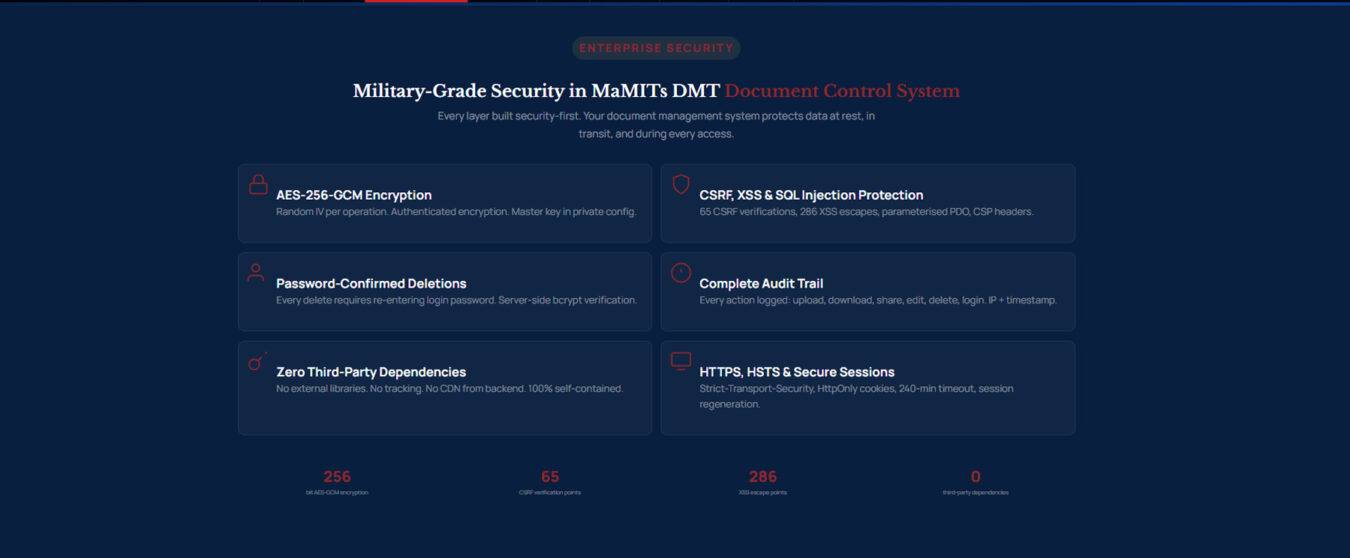

About this guide. Written and reviewed by the MaMITs Engineering Team at MaMITs PVT. LTD. Security and market figures referenced here reflect public industry research and market-share tracking reported through early 2026 and are summarized in plain language for business readers. This article is educational and does not constitute legal advice.
© 2026 MaMITs PVT. LTD. All rights reserved. · MaMITs DMT, secure document management system