×

App Development Company in Bhopal- MaMITs

Website designing in Bhopal 10+ Years dynamic experience in website designing and ecommerce development. App development company Bhopal MaMITs.

1We Support 24x7.
2Call Now - +91-860-2741312
3 Address -

144, Durgesh Vihar, Ayodhya Nagar, Bhopal, Madhya Pradesh ,India : 462022

If you still have problems, please let us know, by sending an email to info@mamits.comThank you!

GET A FREE QUOTE

Please fill this for and we'll get back to you as soon as possible!

Desktop, mobile, TV, watch, kiosk and the hardware around them

Custom software development company in Bhopal for every screen and device your business runs on

MaMITs is a custom software development company in Bhopal that builds one secure backend and the apps around it: Windows and Mac desktop, Android and iPhone, tablets, smart TVs, smartwatches and self-service kiosks. We also connect the hardware your team already uses, from barcode scanners and thermal printers to weighing scales and PLCs.

  • Rated 4.9 on Google from 182 reviews
  • 100+ software deployed and 30+ mobile apps
  • In-person meetings across Madhya Pradesh with 3 days notice
Google rating from 182 reviews4.9
live websites180+
software deployed100+
mobile apps30+

Quick summary

What does a custom software development company actually build?

A custom software development company designs and builds software around your process instead of selling you a fixed product. That usually means one secure backend with web, desktop, mobile, tablet, TV, watch or kiosk front ends, connected to your scanners, printers, payment terminals and existing systems.

Platforms
WindowsMacAndroidiPhoneiPadTVwatchkioskweb
Hardware
ScannersRFIDprintersbiometricscalescamerasPLC
Meetings
Madhya Pradesh in person with 3 days notice
Overseas
USAUKCanadaAustralia over online meetings

Start with the device, not the framework

Which devices can custom software run on, and why one backend matters

Most businesses do not need one app. They need a set of screens that each fit a person and a place: a billing desktop at the counter, a phone app for the field team, a tablet for the supervisor, a TV dashboard on the shop floor, a kiosk at the entrance and perhaps a watch alert for the manager who is never at a desk.

The mistake we see most often is buying each of these separately. Three vendors, three databases, three logins, and a spreadsheet in the middle that someone reconciles every evening. A good custom software development company starts the other way round. It designs one backend that holds the rules, the data and the permissions, and then builds thin front ends that talk to it through a documented API.

That single decision is what makes later work cheap. Adding a kiosk in year two becomes a new screen, not a new system. Changing a GST rule or a discount policy happens in one place. Reports are correct because there is only one copy of the truth.

  • Web and PWA for anyone with a browser, no install
  • Windows and Mac desktop for heavy daily data entry and local hardware
  • Android and iPhone apps for staff and customers on the move
  • Tablet, TV, watch and kiosk screens where a phone is the wrong size
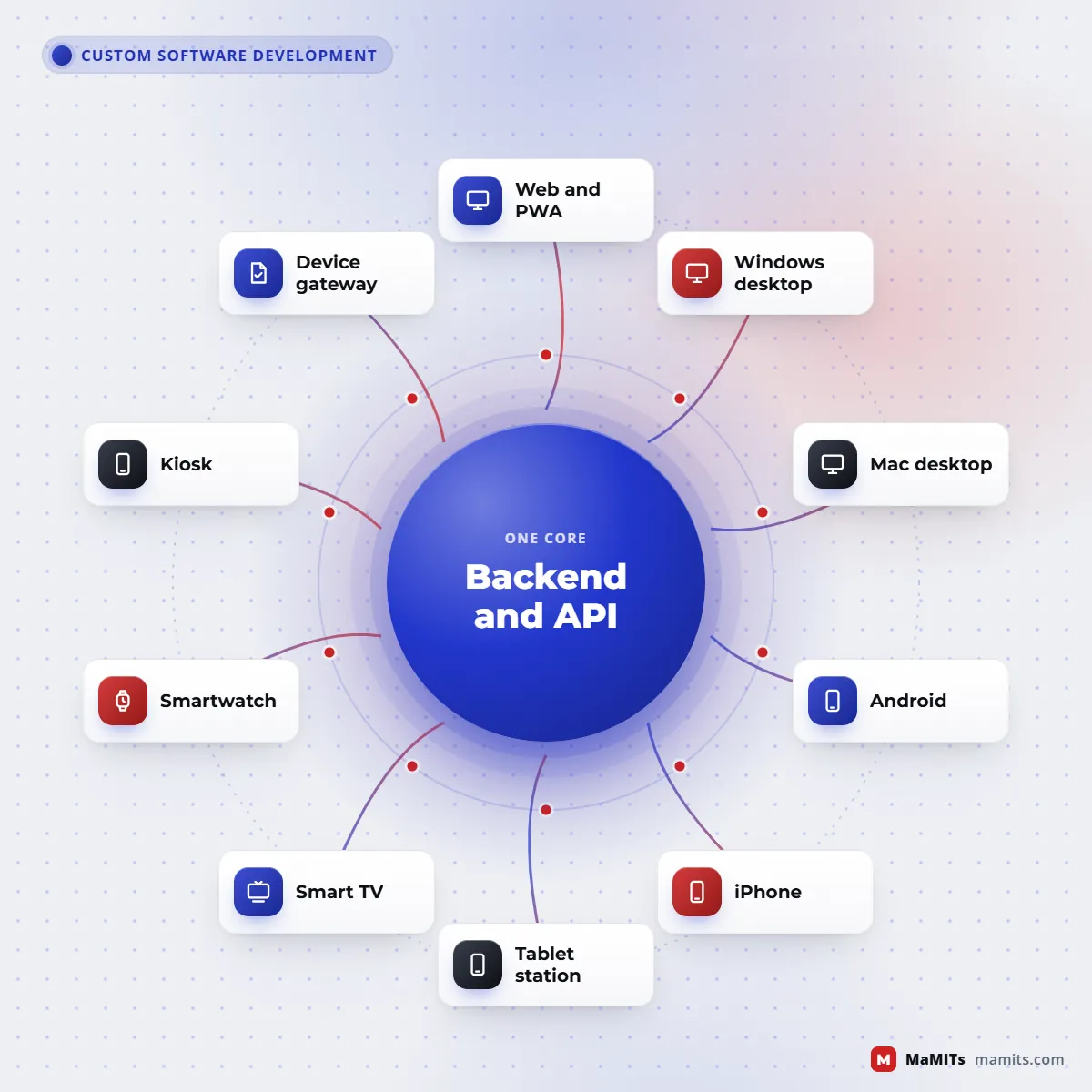
Hub diagram of one custom software backend connected to web, desktop, mobile, tablet, TV, watch, kiosk and hardware
Every front end talks to the same API, so rules and data live in one place.

Platform by platform

What each platform is good at, and where it struggles

Every screen has a natural job. Picking the platform by habit, rather than by the job, is how projects end up with a phone app that nobody opens or a desktop tool that the field team cannot reach.

01

Desktop application development for Windows and Mac

Desktop application development still makes sense when users type all day, work with large files, need several windows at once or have to talk to USB and serial devices without a browser in the way. Billing counters, design and estimation tools, lab instruments and factory stations are typical. The trade-off is distribution: every update has to reach every machine, so we build an auto-update channel and version checks from the first release instead of emailing installers around.

02

Android and iPhone apps

Phones are for short, frequent tasks: approve, capture a photo, scan, check status, get a push alert. Android dominates field teams in India because devices are affordable and easy to manage; iPhone matters for customer apps in the USA, UK, Canada and Australia. Our mobile app development page covers the app side in detail, with separate guides for Android app development and iPhone and iOS apps.

03

Tablet app development

Tablet app development is not a stretched phone layout. Tablets work best as shared stations: a waiter order pad, a clinic intake form, a warehouse picking screen, a sales catalogue in front of a customer. They need split views, larger touch targets, a locked-down mode for shared use and often a stand with a printer or card reader beside it.

04

Smart TV app development

Smart TV app development is mostly about dashboards, digital signage and video. Each TV platform is its own target: Android TV and Google TV apps must declare TV support and work entirely with a D-pad remote, Samsung TVs run Tizen web applications and LG TVs run webOS web apps. Business logic can be shared, but packaging, remote control focus handling and store review differ, so plan budget per platform. For an internal office dashboard, a locked browser on a cheap Android TV box is often simpler than a store app.

05

Smartwatch app development

Smartwatch app development on Wear OS and watchOS is about glances that last a few seconds: a delivery approaching, a machine stopped, a patient call, a quick yes or no. A watch app is nearly always a companion to a phone app and a backend, not a product on its own. If the only need is a notification, a well designed phone push that mirrors to the watch may be enough, and we will tell you so.

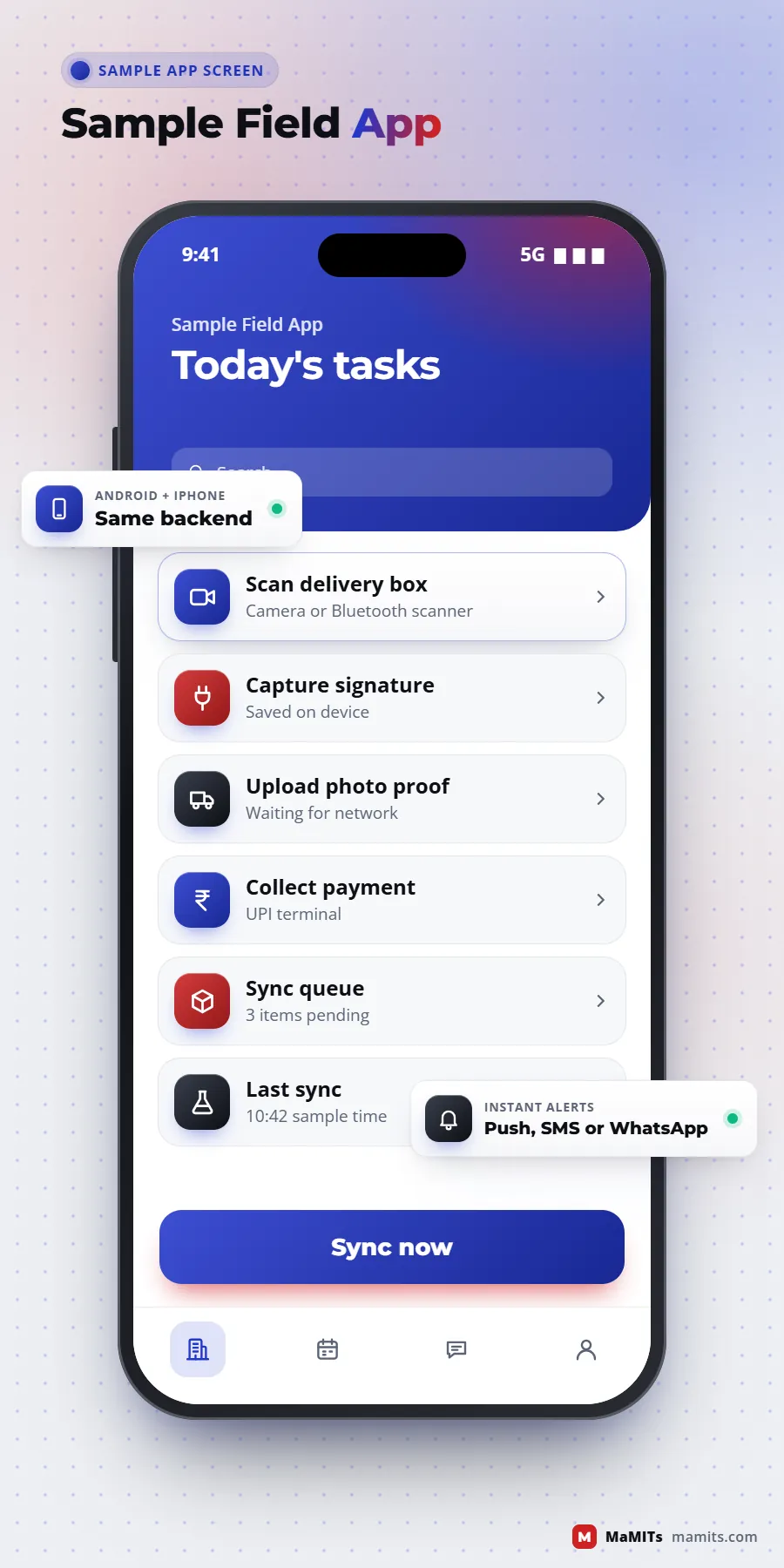
Sample field staff mobile app screen with barcode scan, offline queue and sync status
Sample screen: a field app that scans, saves offline and syncs later.
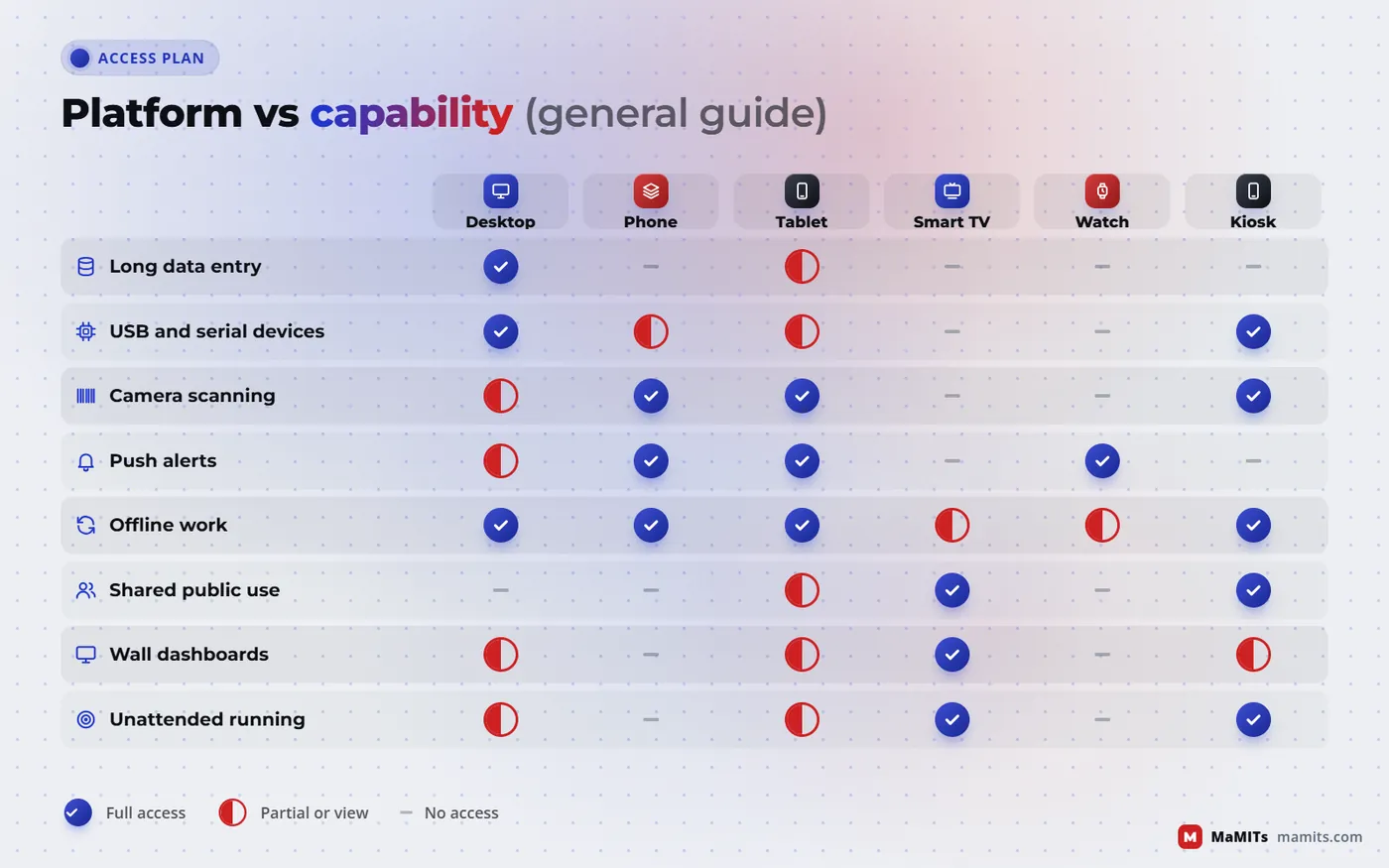
Matrix comparing desktop, phone, tablet, smart TV, smartwatch and kiosk on offline use, hardware access and typing
Which platform suits which job: a general guide, not a rule.

Trade-offs, side by side

Native, Flutter or React Native, web and PWA, or Electron and Tauri: which should you choose?

Cross-platform app development saves money when the screens are similar across devices. It costs money when the app leans on device features each platform does differently. This is how we weigh the options before writing a line of code.

Native (Kotlin for Android, Swift for iPhone, .NET or native code for Windows)

Best for

Heavy device use: Bluetooth printers, camera processing, background location, watch and TV targets

Watch out for

Two or more codebases to build and maintain

Flutter or React Native

Best for

Business apps with the same screens on Android and iPhone, one team, faster releases

Watch out for

Hardware plugins vary in quality; some devices still need native modules

Web app or PWA

Best for

Admin panels, portals, reports, anything that must open instantly with no install

Watch out for

Limited hardware access on iPhone; iOS added web push only for Home Screen web apps from 16.4

Electron

Best for

Desktop apps from a web codebase that need full Node.js access to files and ports

Watch out for

Bundles its own Chromium, so installers are large and memory use is higher

Tauri

Best for

Light desktop apps using the system webview; version 2 also targets Android and iOS

Watch out for

Rust knowledge for native parts; rendering differs slightly by OS webview

Browser with Web Serial, WebUSB or WebHID

Best for

Simple scanner, scale or printer links from a web app on Chrome or Edge

Watch out for

Not supported in Safari, and the user must grant device permission

Our default:

Our default for most business apps: a web admin, one cross-platform mobile app, and native code only where a device demands it. That default changes the moment hardware or offline needs say otherwise.

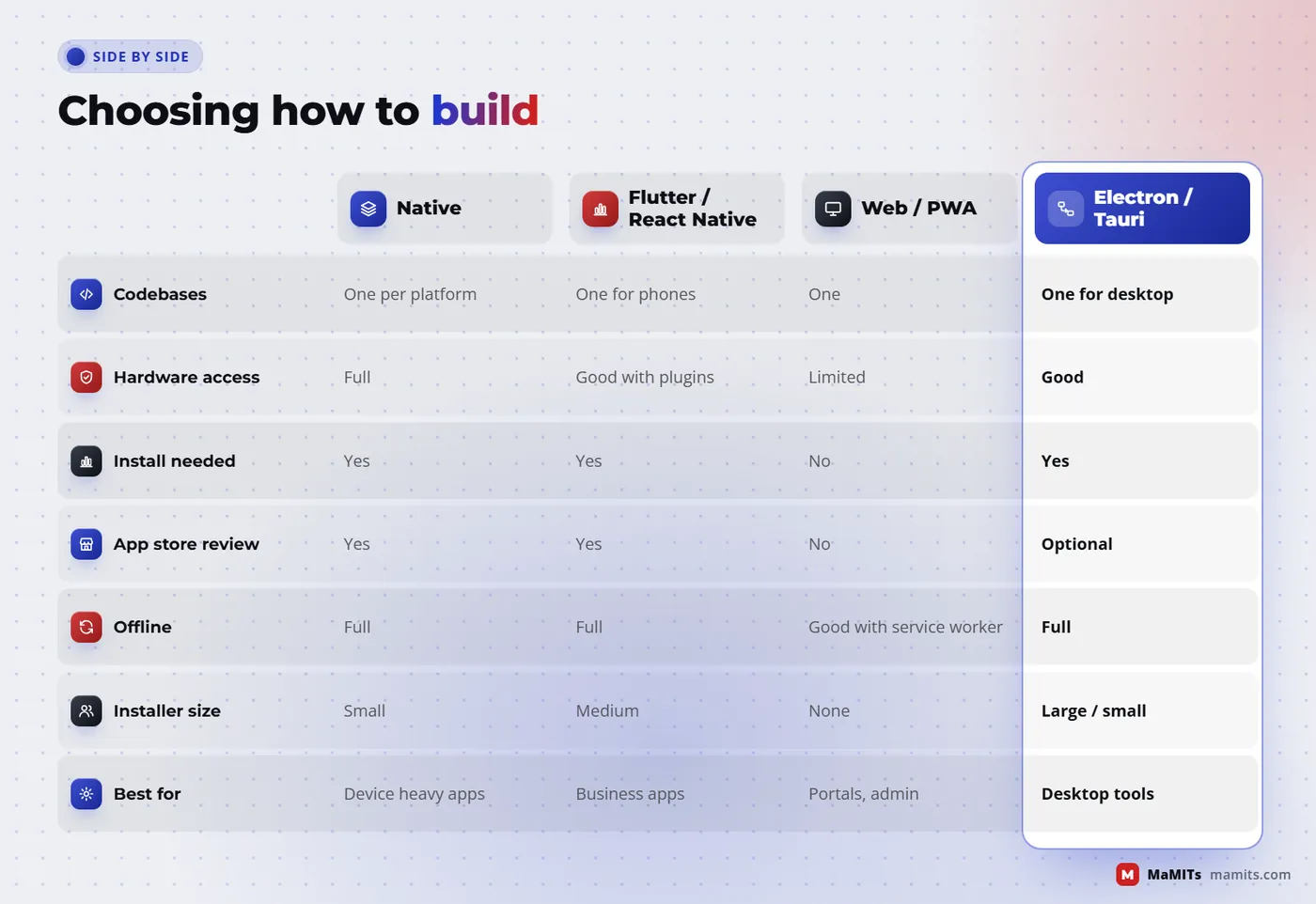
See the comparison as a chart
Comparison of native, cross-platform, web PWA and desktop framework approaches for custom software development
No approach wins everywhere; the device needs decide.

Unattended screens

Kiosk software development: self-service, token and check-in machines

Kiosk software development looks like a simple touchscreen app until the machine has to run alone for twelve hours in a lobby with a curious child, a weak network and a printer that has just run out of paper.

Typical kiosks we scope

  • Self-service ordering and bill payment in restaurants and retail
  • Token and queue machines for clinics, banks and government-facing offices
  • Hotel and hostel check-in with ID scan and key or receipt print
  • Visitor registration with photo capture and badge print
  • Feedback and survey stands
  • Price checkers and product information points in stores

Lockdown: making sure the kiosk stays a kiosk

On Android, the right tool is lock task mode, which pins the device to one app or an allowlisted set when the app is provisioned as a device owner or managed through the Android Management API. On Windows, Assigned Access runs a single app or Microsoft Edge full screen and restarts it if it closes, and is available on Pro, Enterprise and Education editions. Hiding the navigation bar with a full-screen flag is not lockdown; a long press or a swipe usually gets past it.

Designing for failure

A kiosk must assume something will break. We build a watchdog that restarts the app, an idle timer that clears personal data after each user, an offline queue for orders and tokens, a paper-out and cash-drawer status check, and remote health reporting so staff see a stuck machine on a dashboard before customers complain. Accessibility matters too: large type, high contrast, a language switch and a reachable height for wheelchair users.

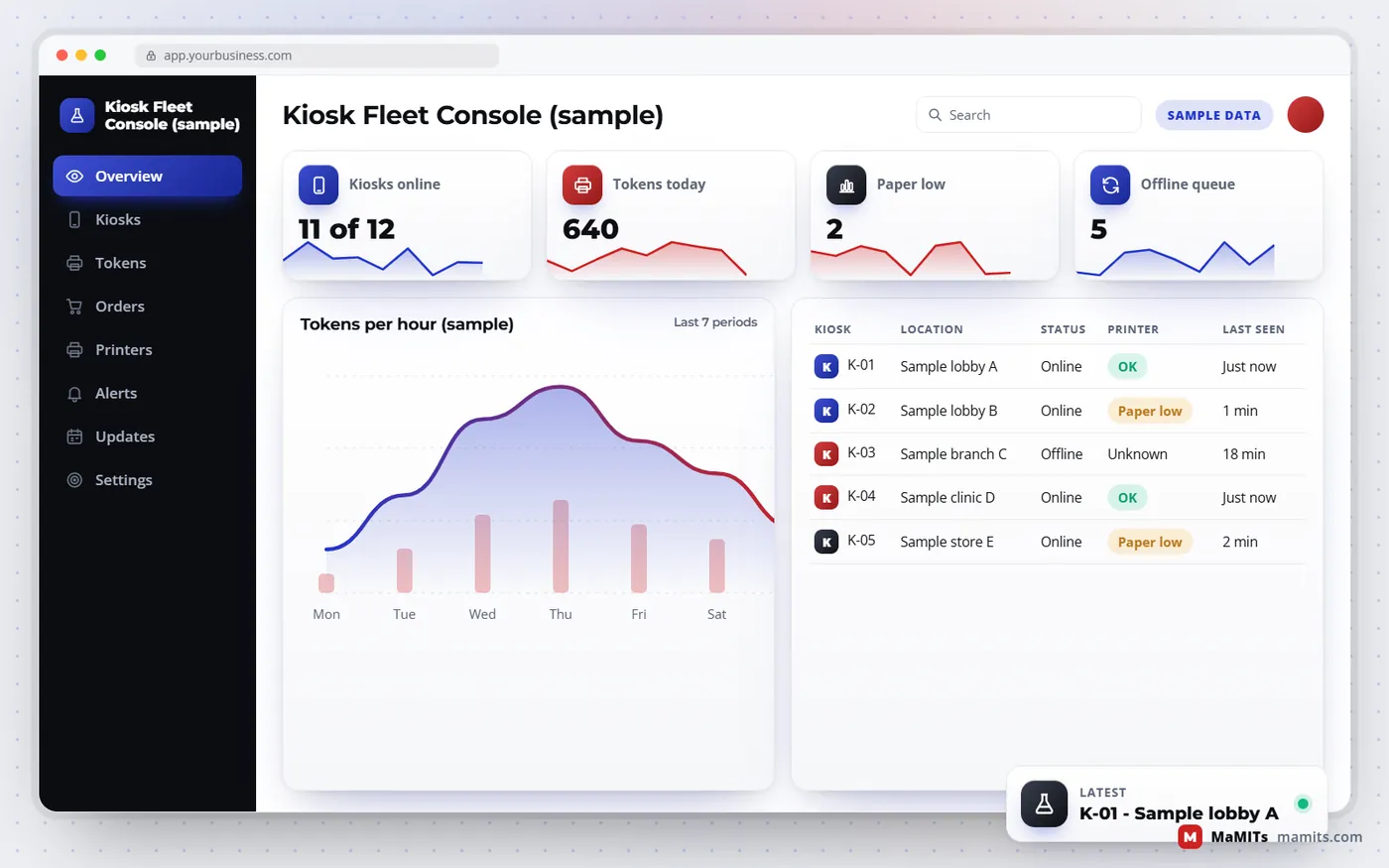
Sample kiosk fleet dashboard showing machine status, paper levels, offline queues and daily token counts
Sample data: remote monitoring tells staff which kiosk needs attention.

From the device to the cloud

How hardware integration actually works, from the scanner to the report

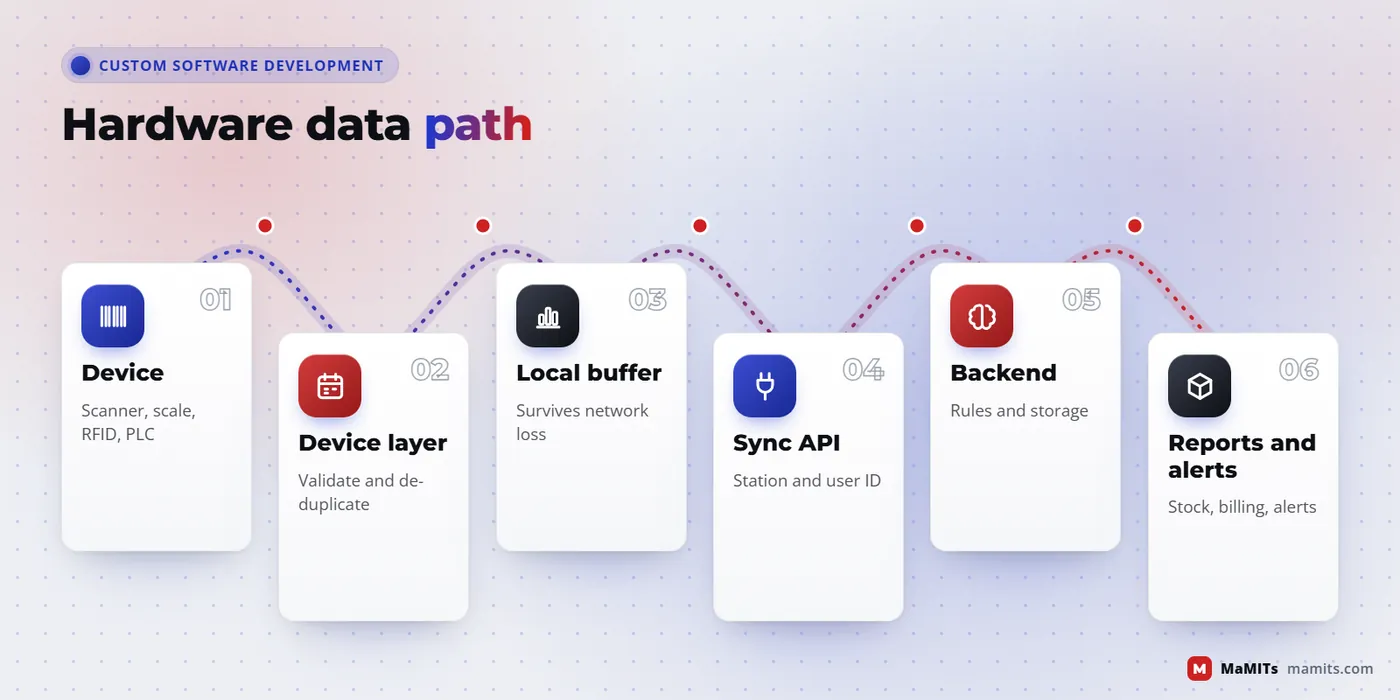
  1. Capturescanner, scale, reader or sensor produces a raw value
  2. Validatedevice layer checks format, stability and duplicates
  3. Bufferreading saved locally so nothing is lost offline
  4. Syncsent to the backend API with the station and user ID
  5. Actstock, billing, alerts and dashboards update

Hardware integration is where projects usually lose time. A barcode scanner looks trivial, yet the same model can act as a keyboard, a virtual serial port or a Bluetooth device depending on how it was configured, and each mode needs different code. A weighing scale might stream readings continuously over RS-232 or answer only when asked, in a format that differs by manufacturer.

The reliable pattern is a small device layer close to the hardware. It reads the raw signal, checks it (is the weight stable, is the barcode a valid check digit), stores it locally with a timestamp and then sends it to the backend. If the network drops, the reading waits in the local queue instead of disappearing. Reports and alerts are built on the backend, never on the device.

Before quoting, we ask for the exact make and model of every device, its connection type and, where possible, one unit on our desk in Bhopal or a remote session with it connected. Testing with the real device in week one saves weeks later.

Flow diagram of hardware integration from barcode scanner or scale through device layer and local buffer to cloud backend
The device layer validates and buffers readings so nothing is lost offline.

Devices we connect

Hardware we integrate with custom software

Barcode and QR scanners

Keyboard-wedge, serial and Bluetooth scanners, plus phone camera scanning for 1D and 2D codes. Used for billing, picking, attendance and asset tags.

RFID readers

UHF readers for bulk stock counts and gate reads, HF and NFC for cards and access. The hard part is filtering repeat reads, which we handle in the device layer.

Thermal and label printers

Receipt printers through the ESC/POS command set that most receipt printers emulate, plus label printers for barcodes, shelf tags and courier labels.

Biometric and fingerprint devices

Attendance and access devices through the maker's SDK or their sync service. We store templates or IDs only as the device vendor allows.

Weighing scales

Counter, platform and weighbridge scales over RS-232, USB or Ethernet, with stable-weight detection so a moving load never gets billed.

Cameras and ANPR

IP cameras for photo capture and number plate reading at gates and weighbridges. Many cameras follow ONVIF, which makes the video and event side far easier.

PLC, serial and Modbus

Machine counters and sensors over Modbus RTU on RS-485 or Modbus TCP, read by a small gateway on the shop floor. Plant-level depth sits on our manufacturing software page.

Payment terminals and POS devices

Card and UPI terminals connected through the provider's SDK or app-to-app intent, so card data never touches your software. That keeps your PCI DSS scope small.

IoT sensors

Temperature, humidity, door and energy sensors over Wi-Fi, LoRa or GSM gateways, with thresholds and alerts on the backend rather than on each sensor.

Bad networks are normal

Offline-first software: what it means and when you need it

An offline-first app treats the local device as the place where work happens and the server as the place where work is shared. The user never waits for the network to save a bill or a delivery. Changes are written locally, given a unique ID, and synced in the background when a connection returns.

You need it when a counter cannot stop billing because the broadband is down, when a field agent works in a basement godown or a village with patchy 4G, or when a kiosk must keep issuing tokens. You probably do not need it for an admin panel used on office Wi-Fi.

The hard part is conflicts, not storage

Saving offline is easy. Deciding what happens when two people change the same record offline is not. We decide rules per record type during design: stock movements are appended, never overwritten; a customer address uses last edit wins with a history; an invoice number is reserved from a per-device series so two counters never issue the same number. These rules belong in the scope document, because they are business decisions as much as technical ones.

Counter 2
Online: bills sync instantlyOffline: bills saved on this device
Waiting to sync0

    Interactive sample. Turn airplane mode on, create bills, then turn it off.

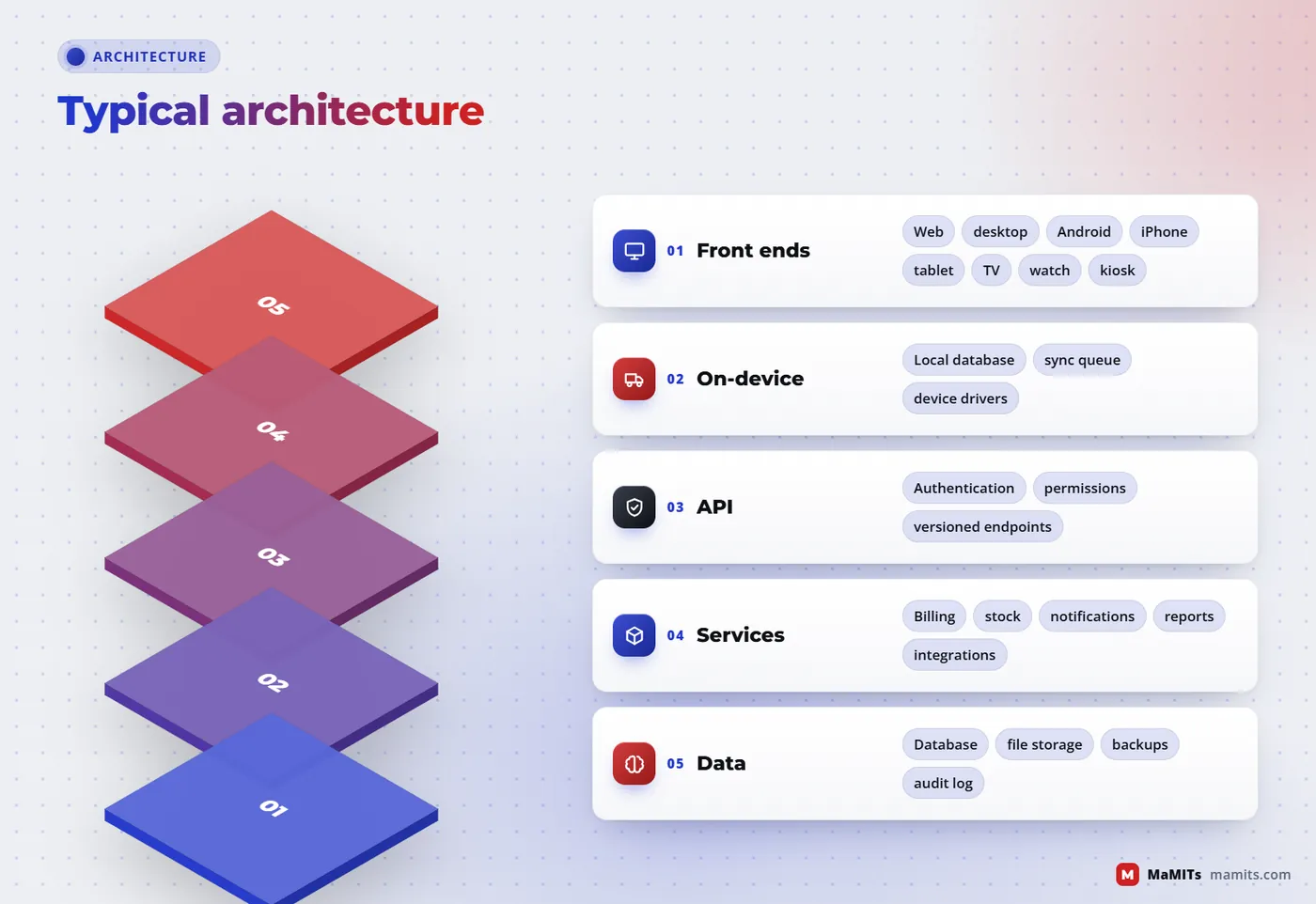
    Layered architecture of custom software with front ends, local storage and sync, API, services and database
    Offline-first apps keep a local store and sync through the same API.

    Old software, real data

    Legacy software modernisation: replacing VB6, FoxPro, Access and old desktop systems

    Many Indian businesses still run on software written fifteen or twenty years ago in Visual Basic 6, FoxPro or Microsoft Access. It usually works, which is exactly why it is risky. Microsoft still supports the VB6 runtime on current Windows, but the VB6 development environment has been unsupported since 2008, and Visual FoxPro 9 left extended support in January 2015. The real danger is usually not Windows; it is that the one person who understood the code has moved on.

    Legacy software modernisation works best in stages. We first read the old database and reports, because the data structure tells us the business rules that nobody wrote down. Then we rebuild module by module, run old and new side by side for a period, and reconcile totals until the numbers match. Only then do we switch off the old system.

    2008VB6 development environment support endsJan 2015Visual FoxPro 9 extended support endsTodayData and rules still worth keeping

    What to keep, what to change

    Keep

    your historical data, report formats staff rely on, keyboard shortcuts at busy counters

    Change

    single-PC limits, manual backups, no remote access, no audit trail

    Add

    a web or mobile view for owners, role-based access, automatic backups, an API for other tools

    Avoid

    a big-bang switch on the first day of a financial year

    Who we build for

    Who hires a custom software development company, and what each one needs

    Startups building an MVP

    Something real in users' hands quickly, without code that has to be thrown away

    We buildOne backend, one cross-platform app and a web admin, scoped to the few flows that prove the idea

    SMEs outgrowing spreadsheets

    Billing, stock, follow-ups and reports in one place

    We buildA focused business system; for ERP, CRM and inventory depth see our ERP and CRM software page

    Enterprises and corporates

    Integration with existing ERP, SSO, audit trails and approval chains

    We buildMiddleware, internal portals and mobile apps that sit beside current systems

    SaaS companies

    Multi-tenant architecture, subscriptions and a roadmap team

    We buildProduct engineering on your codebase or ours, with documented APIs

    Schools, colleges and institutions

    Admissions, fees, classes and parent apps

    We buildCovered on our education software page; we built a live online-classes platform for an education company in the UAE

    Clinics and hospitals

    Appointments, patient records and follow-ups

    We buildSee healthcare software development; we built a lead, costing and appointment system for a hair transplant clinic group

    Retail chains and distributors

    Multi-store control, counters and dealer ordering

    We buildCounter apps with scanners and printers; chain-level depth on our retail software page

    Factories

    Machine counts, weighbridges, labels and shop-floor screens

    We buildDevice gateways, tablet stations and TV dashboards

    Hotels and restaurants

    Ordering, room service and guest requests

    We buildKiosks, tablets and QR ordering; our QR menu software routes hotel room service orders to the intercom desk

    Logistics firms

    Driver apps, proof of delivery and scanning at the dock

    We buildRugged Android apps with offline sync; fleet depth on our logistics software page

    Overseas businesses

    A remote team that documents well and keeps overlap hours

    We buildProjects for the USA, UK, Canada and Australia run on online meetings; one example is an invoicing app for small businesses in Canada with province-wise GST, HST, PST and Quebec QST

    How a project runs

    Our custom software development process, step by step

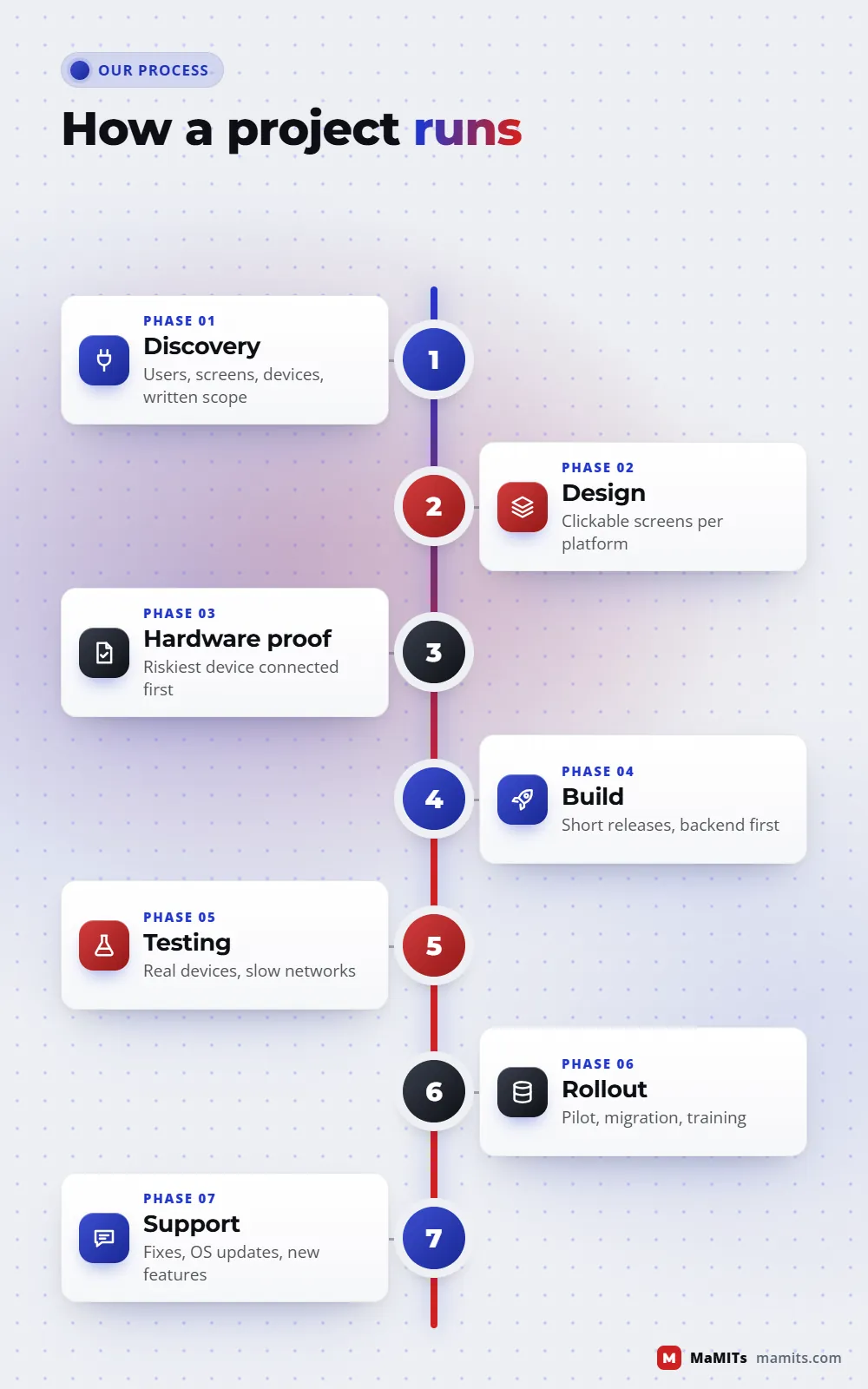
    1. Sprint 01

      Discovery call and device list

      We map users, screens, devices and existing systems. You get a written scope with open questions marked, not a guess.

    2. Sprint 02

      Clickable design

      Screens for each platform, reviewed with the people who will use them, including counter staff and drivers, not only owners.

    3. Sprint 03

      Hardware proof

      The riskiest device is connected in the first sprint: print a receipt, read a weight, pass a scan. If it fails, we find out early.

    4. Sprint 04

      Build in short releases

      Two-week cycles with a test build you can install. Backend and API first, then each front end.

    5. Sprint 05

      Testing on real devices

      Low-end Android phones, older Windows PCs, slow networks and the actual printers and scanners on site.

    6. Sprint 06

      Rollout and training

      Pilot at one branch or one counter, then staged rollout. Data migration from old systems is reconciled before go-live.

    7. Sprint 07

      Support and improvement

      Bug fixes, OS updates, security patches and new features under a support plan agreed in advance.

    Timeline of the custom software development process from discovery and design to hardware proof, rollout and support
    Hardware risk is tested early, not at the end.

    Trust, ownership and the long run

    Security, source code ownership and maintenance

    Security built on OWASP

    We design against the OWASP Top 10:2025, where broken access control still sits at number one and software supply chain failures are now a category of their own. That means server-side permission checks on every API call, not just hidden buttons; pinned and reviewed third-party packages; encrypted transport and storage for sensitive fields; and logs that record who changed what.

    Source code ownership

    Source code ownership should be written into the contract before work starts: who owns the code, where the repository lives, who holds the cloud and app store accounts and what happens if you change vendors. Ask any vendor for this in writing. If a company refuses to hand over code or keeps your app under its own developer account, you do not really own your product.

    Maintenance is part of the budget

    Android and iOS change every year, browsers update every few weeks, and printer drivers break after Windows updates. Software that is not maintained slowly stops working. Plan for a support arrangement covering fixes, OS compatibility, backups and small changes, rather than treating launch as the finish line.

    Vendor checklist

    How to choose the best custom software development company

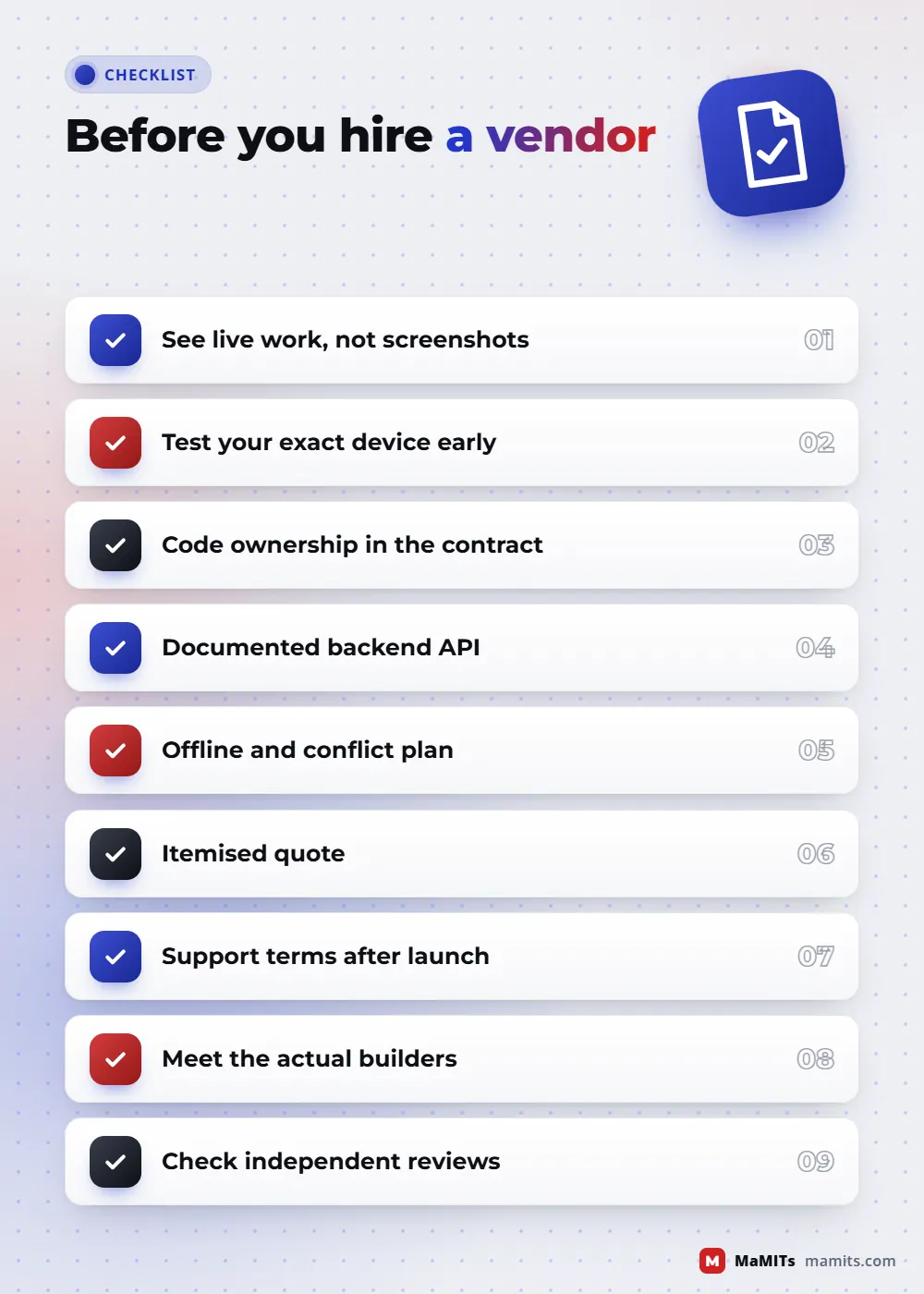
    People searching for the best or No. 1 custom software development company usually compare portfolios and prices. Those matter, but these checks predict a good outcome far better.

    Our longer guides on choosing a software company in Bhopal and why scratch development beats ready-made tools for some businesses go deeper on vendor selection.

    Checklist for choosing a custom software development company covering live work, hardware tests and code ownership
    Questions worth asking any vendor before you sign.

    Budget

    What decides the cost of custom software development services, and when not to build custom

    We do not publish a price list because two projects with the same name can differ tenfold in effort. Custom software development services are priced on scope, and MaMITs quotes after a scoping call. Small modules can often start after a short scoping call; larger systems need a paid discovery phase first.

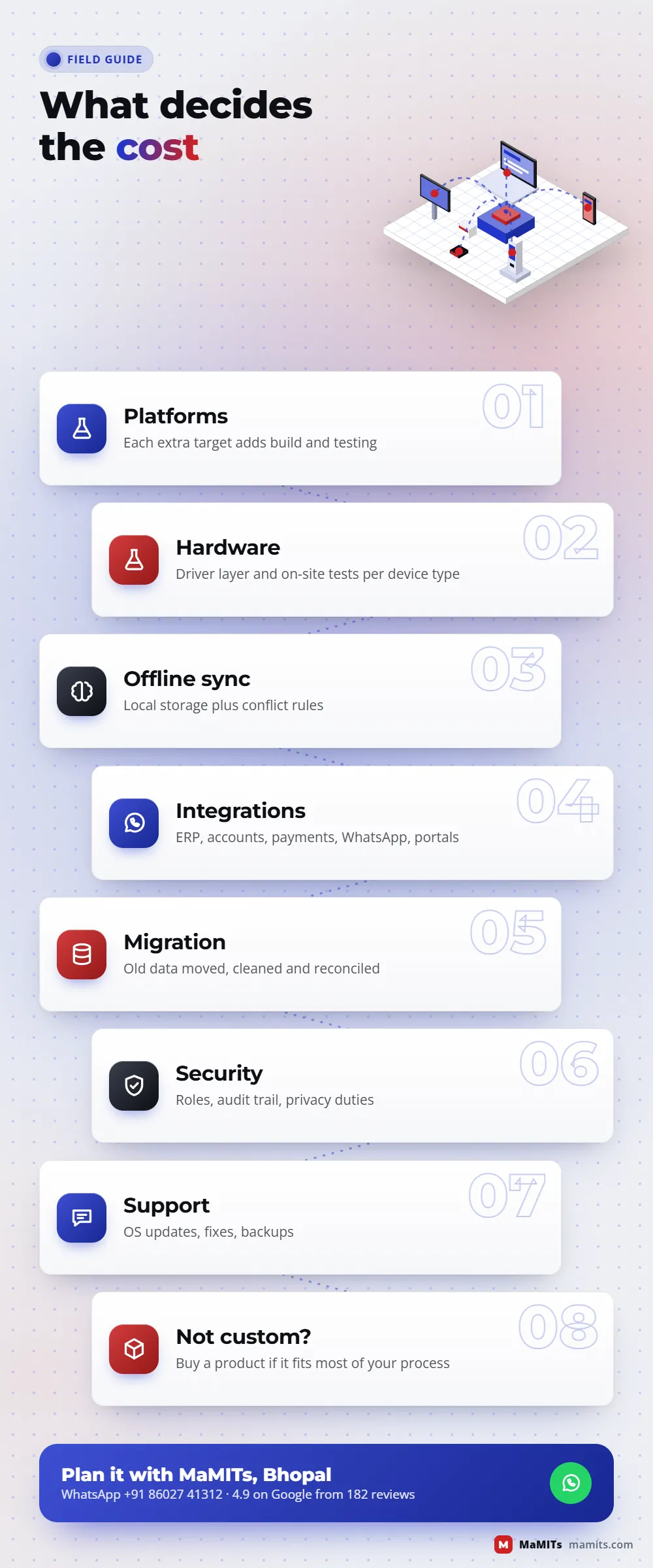
    Cost factors

    • Number of platforms: each extra target (iPhone, TV, watch, desktop) adds build and testing
    • Hardware: every device type needs a driver layer and on-site testing
    • Offline sync and conflict rules
    • Integrations with ERP, accounting, payment gateways, WhatsApp or government portals
    • Data migration from old software and the cleaning it needs
    • Security, audit and compliance needs
    • Number of user roles and approval steps
    • Support level after launch

    Bar length shows how much a factor usually moves effort, not a price.

    When NOT to build custom software

    If a ready product already fits 90 percent of your process and the remaining 10 percent is a habit you can change, buy the product. If you cannot name who will own the system internally, wait. If the process is still changing every week, write it down on paper or in a spreadsheet first. Custom software rewards businesses that know how they work; it does not decide that for them. Sometimes the right answer is one of our ready products, such as LiteMeet video meetings for teams that only need private meeting rooms, instead of a new build.

    Infographic of custom software cost factors including platforms, hardware, offline sync, integrations, migration and support
    What moves the budget, and when buying a product is wiser.

    Track record

    What MaMITs has shipped so far

    Beyond client work we run our own products, from LiteMeet to lead management, and we have built a news publishing CMS with its own ad server and analytics for a high-traffic news site. New AI features for existing software are covered on our AI development company in Bhopal page.

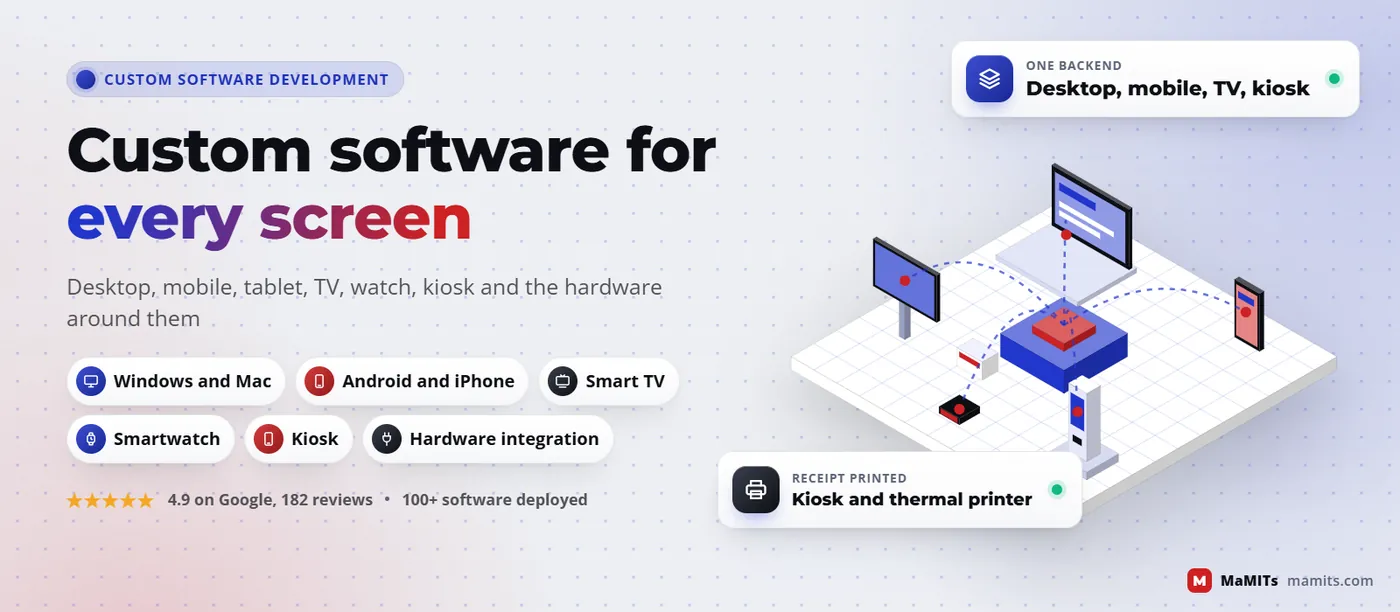
    Custom software development company banner showing desktop, phone, tablet, TV, watch and kiosk linked to one backend
    One backend, many screens: the core idea behind well planned custom software.

    Where we work

    A custom software development company in Bhopal, working with Indore, Delhi and clients abroad

    Our office is at Neerja Nagar, Ayodhya Nagar, Bhopal. Hardware projects benefit from being near: we can visit a counter, sit with a weighbridge operator or test a kiosk on site. Across Madhya Pradesh we meet in person with 3 days notice; Delhi NCR, Mumbai, Pune, the rest of Maharashtra and Uttar Pradesh with 7 days notice. Clients in the USA, UK, Canada, Australia and France work with us through online meetings, often on our own LiteMeet rooms.

    Madhya Pradeshin person, 3 days noticeDelhi NCR, Mumbai, Pune, UPin person, 7 days noticeUSA, UK, Canada, Australia, Franceonline

    Madhya PradeshIn person with 3 days notice

    Bhopal

    Our home base. Factories in Govindpura and Mandideep, clinics, schools and retailers can book a site visit for device testing.

    Indore

    Teams looking for a software development company in Indore, Pithampur or Dewas get the same people and site visits with 3 days notice. Usual first asks: dispatch screens, weighbridge links and salesman apps.

    Gwalior and Jabalpur

    Factories, transporters and shops in Gwalior and Jabalpur get in-person visits on 3 days notice, which helps when a kiosk or shop-floor screen has to be installed and tested on site.

    Ujjain, Sagar, Rewa and the rest of MP

    Hospitals, temple trusts, schools and dealers across the state ask for token screens, counters and simple Hindi-first apps. Custom software development in Madhya Pradesh rarely needs a big team, just someone who comes and sees the counter.

    Beyond Madhya PradeshIn person with 7 days notice in India, online abroad

    Delhi NCR

    Delhi, Noida and Gurugram clients meet us in person with 7 days notice; most sprint reviews run online.

    Mumbai and Pune

    In-person meetings with 7 days notice, common for SaaS and enterprise integration work.

    USA, UK, Canada, Australia

    As a custom software development company in India working online, we plan overlap hours: Australian afternoons, UK mornings and early North American mornings fall inside our working day.

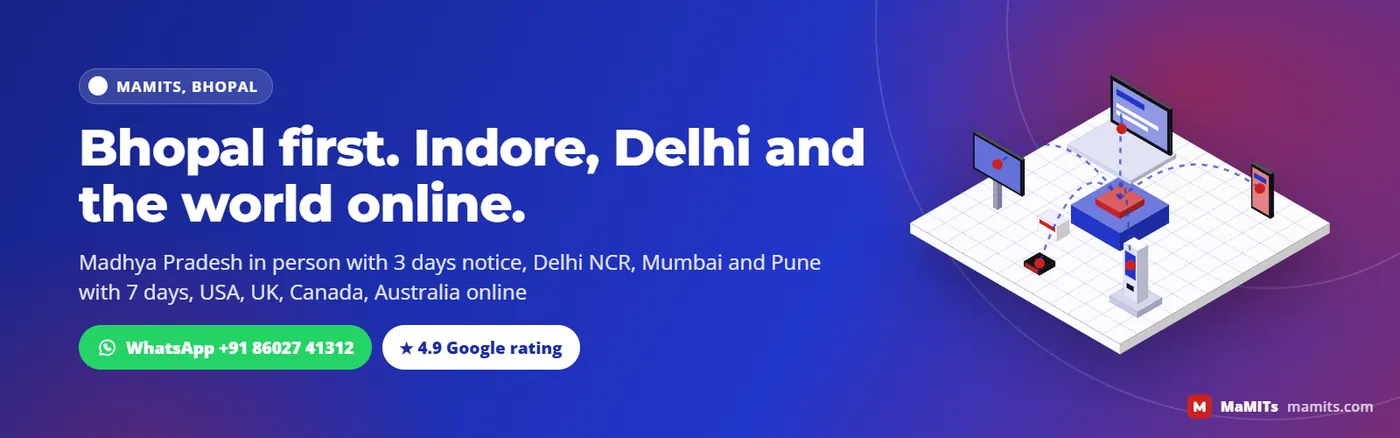
    Banner strip listing MaMITs meeting policy for Bhopal, Indore, Delhi NCR and online meetings for USA, UK, Canada, Australia
    In person across Madhya Pradesh, online worldwide.

    FAQ

    Custom software questions, answered

    What is a custom software development company?

    It is a firm that designs, builds and maintains software made for one organisation's process, rather than selling the same product to everyone. The work covers discovery, design, backend and API, the apps on each device, integrations with hardware and other systems, testing, rollout and ongoing support. You should end up owning the code and the data.

    Which is the best custom software development company in Bhopal?

    The best choice is the one that can show live work similar to yours, explains trade-offs clearly and puts source code ownership in the contract. Compare at least two vendors on the checklist above. MaMITs is based in Bhopal, is rated 4.9 on Google from 182 reviews and has deployed 100+ software and 30+ mobile apps.

    Can one app run on Android, iPhone, desktop and web?

    Partly. Flutter and React Native share most code between Android and iPhone, and a web app or PWA reaches any browser. Desktop can reuse web code through Electron or Tauri. What should always be shared is the backend and API. Device-heavy features such as Bluetooth printing or background location often still need some native code per platform.

    Can you build software for a kiosk machine?

    Yes. Kiosk work includes the touch interface, lockdown so users cannot leave the app, an idle reset that clears personal data, offline queues, and drivers for printers, scanners, card terminals and cameras. On Android we use lock task mode and on Windows Assigned Access, plus remote health monitoring so staff know when a kiosk needs attention.

    Can my software connect to a barcode scanner, thermal printer or weighing scale?

    Yes, and this is common. Scanners may work as a keyboard, a serial port or over Bluetooth; receipt printers usually understand ESC/POS commands; scales send readings over RS-232, USB or Ethernet. We need the exact make and model of each device and ideally test one unit in the first sprint before building the rest of the screens.

    Should I choose Flutter, React Native or native development?

    Choose cross-platform when your Android and iPhone screens are largely the same and hardware use is light, because one team ships both. Choose native when the app depends on camera processing, Bluetooth devices, background tasks or watch and TV targets. Many projects mix both: a cross-platform app with a few native modules where the device demands it.

    Can custom software work without internet?

    Yes, if it is designed offline-first. Work is saved on the device, given a unique ID and synced when the network returns. The real design effort goes into conflict rules, for example how stock movements, invoice numbers and customer edits from two offline devices are merged. Decide these rules during scoping, not after go-live.

    How do you replace old VB6, FoxPro or Access software?

    We study the old database and reports first, because they reveal the business rules. Then we rebuild in stages, move historical data, run old and new systems side by side and reconcile totals until they match. The old system is switched off only after staff are trained and figures agree. A big-bang switch is the riskiest option.

    Who owns the source code of custom software?

    Ownership depends entirely on your contract, so settle it before work begins. A fair contract states that you own the code after payment, names where the repository lives, and keeps cloud, domain and app store accounts in your company's name. Ask for repository access during the project, not only at the end.

    How much does custom software development cost in India?

    A fixed price without scope is a guess. Cost depends on the number of platforms, hardware devices, offline needs, integrations, data migration, security requirements and support level. MaMITs quotes after a scoping call; small modules can often start after a short call, while larger systems begin with a discovery phase that produces a written scope.

    Do you build smart TV and smartwatch apps?

    Yes, usually as part of a larger system. TV apps suit dashboards, signage and video on Android TV, Samsung Tizen and LG webOS, each packaged separately. Watch apps on Wear OS and watchOS work best as quick alerts and one-tap actions linked to a phone app. We will say so if a simple notification would do the job.

    Do you work with clients in the USA, UK, Canada and Australia?

    Yes. Overseas projects run on online meetings with agreed overlap hours, written sprint notes and test builds you can install. We have built an invoicing app for small businesses in Canada that handles province-wise GST, HST, PST and Quebec QST. Contracts, code ownership and support terms are agreed in writing before work starts.

    Next step

    Tell us your devices and your process, and we will map the software

    Send a list of the screens you need and the hardware you use, even a photo of the printer label helps. We will reply with questions, a suggested platform mix and the next step for a scoping call, in Bhopal, Indore or online. You can also reach us through the contact page or read our company FAQ.

    MaMITs, 144, Neerja Nagar, Durgesh Vihar, Ayodhya Nagar, Bhopal 462041 · ★ 4.9 on Google from 182 reviews

    TOP
    });