01Bi
Billing software
“What did I sell, to whom, and how much tax is on it?”
You need it whenEvery business that issues GST invoices. It is usually the first software anyone buys, and the one most often outgrown.

Website Designing and Mobile Apps Development in Bhopal, Digital Marketing, SEO Company - MaMITs
Phone No. +91-860-274-1312
Email: info@mamits.com
MaMITs
MaMITs, 144, Durgesh Vihar, JK Road, Bhopal, Madhya Pradesh, India 462022
MaMITs is an ERP software development company that builds custom ERP, CRM, inventory, GST billing, POS, purchase, renewal and multi-warehouse software on one shared database for businesses in Bhopal, Indore and across Madhya Pradesh. A sale, a stock movement and a ledger entry become the same fact, recorded once. And if Tally, Zoho, Odoo or SAP Business One will serve you better than a custom build, we will say so in the first call.
A sample day09:10
MaMITs at a glance
Quick summary
An ERP software development company designs one system where sales, purchase, stock, billing, accounts and customers share the same records. You need custom ERP when your process is your advantage, when boxed software forces costly workarounds, or when you must join branches, warehouses, mobile staff and GST portals in one place.
Quick facts
Eight names, one business
People reach this page looking for very different things. A shop owner wants billing software in Bhopal, a distributor wants inventory software in Indore, a service company wants AMC reminders. All of them are describing parts of the same system, which is why the eight sit together here.
“What did I sell, to whom, and how much tax is on it?”
You need it whenEvery business that issues GST invoices. It is usually the first software anyone buys, and the one most often outgrown.
“How much stock do I have, in which godown, and what is it worth?”
You need it whenStock sits in more than one place, or nobody trusts the stock register any more.
“How fast can the counter bill a customer, even with no internet?”
You need it whenYou sell across a counter, with barcodes, a weighing scale or a queue at 7 in the evening.
“Did we pay the rate we agreed, for the quantity we actually received?”
You need it whenMore than one person buys, suppliers give credit, and rate differences slip through unnoticed.
“Which enquiry needs a call today, and who promised it?”
You need it whenLeads come from calls, WhatsApp, IndiaMART and walk-ins, and follow-up depends on who remembers.
“Which AMC, warranty or subscription ends this month?”
You need it whenPart of your income comes from contracts that repeat every year.
“Which bin, which batch, and which route should the picker take?”
You need it whenOne building holds racks, bins and pickers, and a wrong batch on the truck costs real money.
“Do sales, stock, purchase and accounts agree with each other?”
You need it whenThree or more of the above already exist and your staff type the same order twice.
Most businesses do not need all eight on day one. They need two or three that share one item list and one party list, so that adding the fourth later is a new module and not a data migration.
Why one page covers eight software
Almost nobody starts with ERP. The path below is the one we hear most often from traders and distributors in Bhopal and Indore. Your order may differ; the way the problems pile up rarely does.
A wholesale shop in Bhopal starts with a billing app on one computer. GST invoices go out, the CA gets an Excel file every month, and for a while that is enough.
Stock now lives in two places. The billing app shows one number, the godown register shows another, and every Saturday disappears into counting. This is where inventory software comes in.
Orders arrive on WhatsApp late at night, rates are quoted from memory, and follow-ups depend on one person. A CRM and an order-booking app with party-wise rates settle this.
Prices must now match across counters, stock moves between branches, and the internet at the new shop drops twice a day. POS with offline billing and proper transfer documents is the answer.
Suppliers offer credit and schemes, three people place orders, and nobody can say whether the last bill matched the PO rate. Purchase management closes that gap before payment, not after.
A rented warehouse with racks changes the game. Picking from memory stops working once you cross a few thousand items. Bins, scanners and first-expiry-first picking need a warehouse system.
Many traders start selling installation and annual maintenance. A missed renewal date is missed income, so a renewal module with reminders earns its place quickly.
By now the business runs separate tools with separate customer lists, and the owner spends evenings matching them. This is the point where ERP makes sense: the same modules, joined on one database.
If you are at step two or three, you do not need a full ERP yet. You need the next module built on the right masters, so that step eight becomes an upgrade instead of a rebuild.
Outgrown Excel?
Excel is a fine tool until it becomes the system. These are the lines we hear most in first calls. Tick the ones that sound like your office.
Excel is probably still fine. Clean up your item list and look again in six months.
Start with one module, usually billing plus inventory, on proper masters.
You are already paying for an ERP in staff hours. It is worth scoping one.
The first question to ask
Many businesses do not need custom software. A good ERP software development company should say so in the first meeting, because a wrong build is far more expensive than a licence.
Start with how unusual your process really is. A trader who buys, stores and sells standard items with GST invoices is well served by Tally or Zoho Books plus an inventory add-on. Odoo and SAP Business One go further, with configurable warehouses, manufacturing and approvals, and both have partner ecosystems in India. If the software already matches about how you work, buy it, train people properly, and spend your money on clean data.
Custom ERP software development wins in a narrower set of situations, and they are worth naming precisely. Your pricing logic is complex (slab schemes, party-wise rates, rate contracts with expiry). Your stock is tracked in a way the package does not model well, such as batch and expiry across many godowns with FEFO picking. Field staff need a mobile app that works on poor networks. Several companies or branches must consolidate with inter-branch transfers at cost. Or you already pay for three tools that do not talk to each other and your team re-types the same order four times.
60-second check
Tick what is true for your business.
A package such as Tally, Zoho or Odoo is likely enough. Spend on clean data and training.
Hybrid fits: keep accounts in your package, build the operational layer around how you work.
Custom ERP is worth scoping. Start with the two modules that hurt most.
A rule of thumb, not a quote.You own the roadmap, which also means you own the bugs. A packaged product spreads maintenance across thousands of customers; a custom system spreads it across one. You depend on the vendor's documentation and code quality, so insist on source code ownership, a staging server and written handover notes. Statutory changes (a new GST field, a portal API version) must be updated by your vendor rather than arriving in a product update.
The most common good answer is hybrid: keep Tally or another accounting package as the books your CA trusts, and build the operational layer (orders, stock, warehouse, POS, field apps, renewals) as custom software that posts summarised vouchers into accounts. Finance keeps its comfort; operations gets software shaped around the floor.
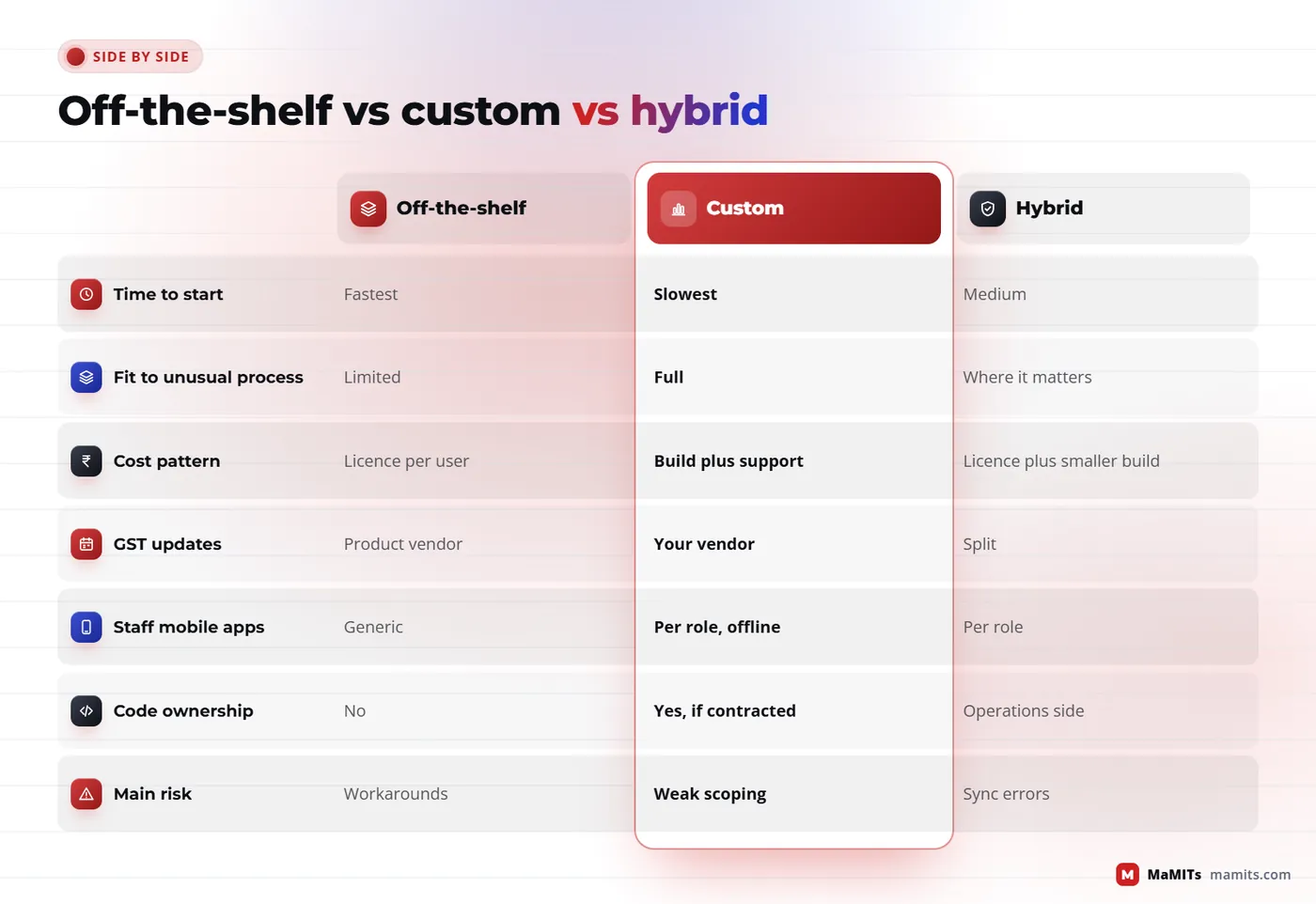
Side by side
| Criterion | Off-the-shelf (Tally, Zoho, Odoo, SAP B1) | Custom ERP software | Hybrid (packaged accounts + custom operations) |
|---|---|---|---|
| Time to first use | Fastest, days to weeks for standard setups | Slowest, built module by module | Medium, accounts live at once, operations follow |
| Fit to unusual process | Configure within limits, then workarounds | Built to the process you actually run | Custom where it matters, standard elsewhere |
| Cost pattern | Licence or subscription per user or company, plus partner fees | Build cost up front, then support and hosting | Licence for accounts plus a smaller build |
| Statutory updates (GST changes) | Usually shipped by the product vendor | Your vendor must update and test | Accounts updated by product, operations by vendor |
| Mobile apps for staff | Available in some products, generic screens | Designed per role, offline where needed | Custom apps on the operations side |
| Ownership and exit | Data export options vary by product | You should own code and database | Books stay portable, operations owned |
| Biggest risk | Bending the business to the software | Poor scoping and weak vendor discipline | Sync errors between the two systems |
Product capabilities change often. Check the current edition and partner terms of any package you shortlist; this table compares approaches, not specific versions.
Why ERP is not just many modules
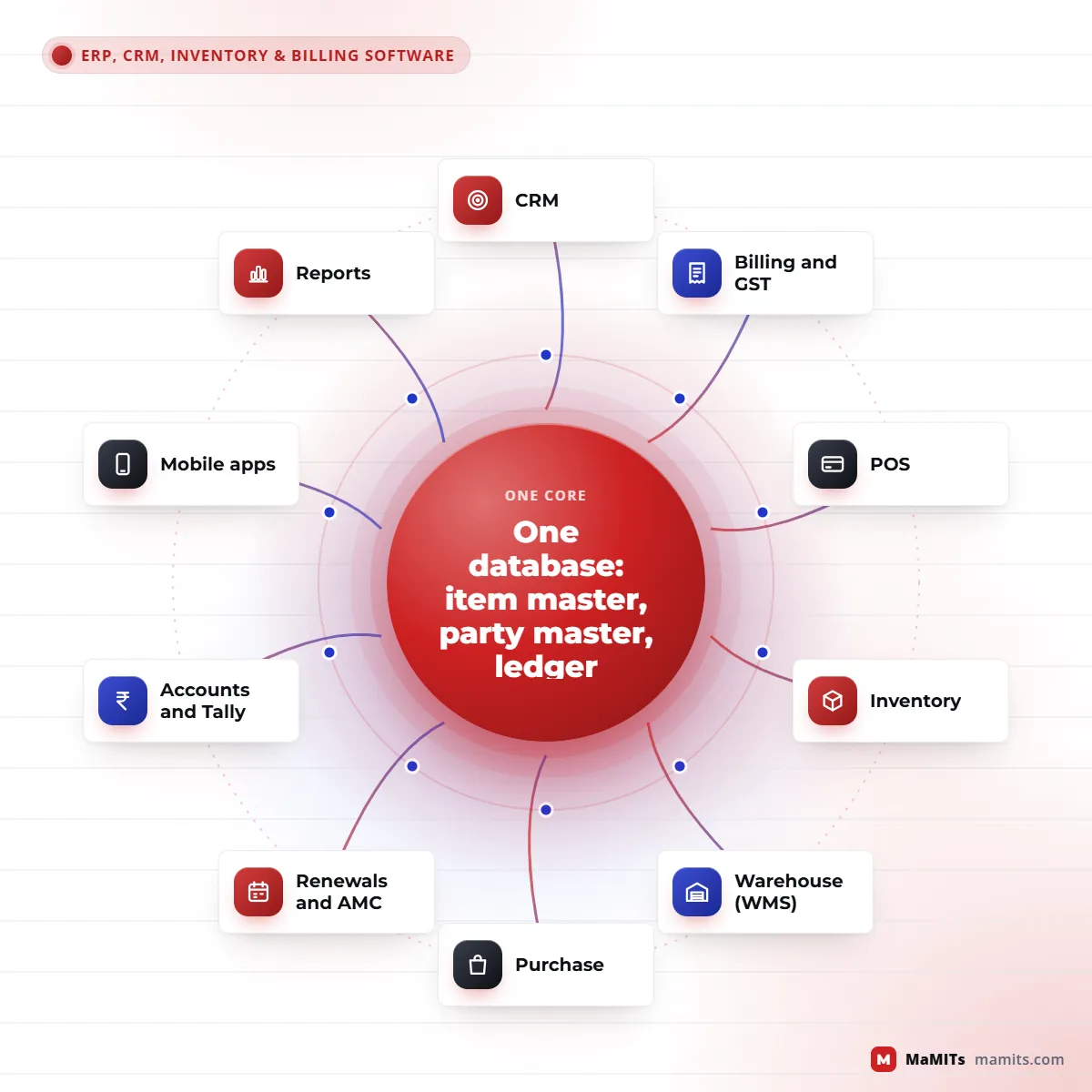
The difference between an ERP and a bundle of apps is the data model underneath. Three masters carry almost everything. The item master holds each product once: HSN code, tax rate, units and conversions (box to piece), batch and expiry rules, barcode, reorder level. The party master holds every customer, supplier, transporter and dealer once, with GSTIN, state, credit limit, price list and contact people. The ledger receives the financial effect of every document.
When a POS bill, a sales order from the field app and a warehouse dispatch all point to the same item and party records, reports stop disagreeing. Stock is one number, outstanding is one number, and the GST return is built from the same invoices the customer received. Most struggling systems we see break this rule: CRM had its own customer list, billing had another, and the warehouse used item names typed by hand.
Good design also separates documents from their effects. A sales invoice is a document; it creates a stock-out entry, a ledger entry and a tax entry. Cancelling it reverses all three with an audit trail instead of deleting rows. That one discipline makes audits, reconciliations and later integrations far easier.
Module by module
Pick the two to four modules that hurt most today. Each module below is designed to work alone first and then connect to the shared masters.
Company and branch setup, financial years, vouchers, cost centres, bank reconciliation and GST registers. Either full accounting inside the ERP or a clean posting bridge into Tally, depending on what your CA prefers.
Leads from website, WhatsApp, IndiaMART-style portals and calls, follow-up reminders, quotations that become sales orders without retyping, and a pipeline per salesperson. Our own MaMITs Lead Management Software shows how we think about follow-ups.
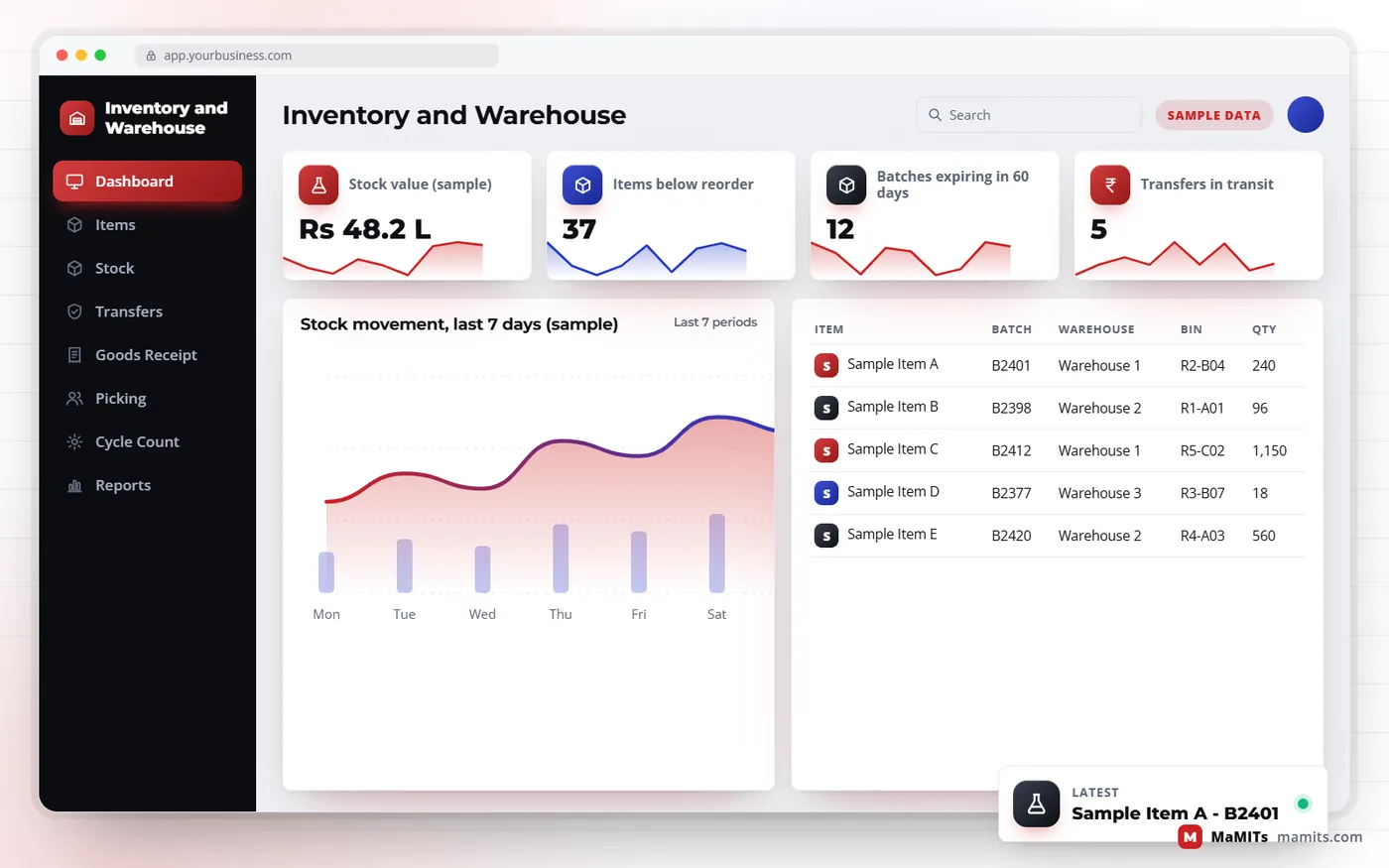
Stock by item, batch, godown and unit, with reorder levels, stock valuation, negative-stock controls and a clear ageing report of slow and dead items.
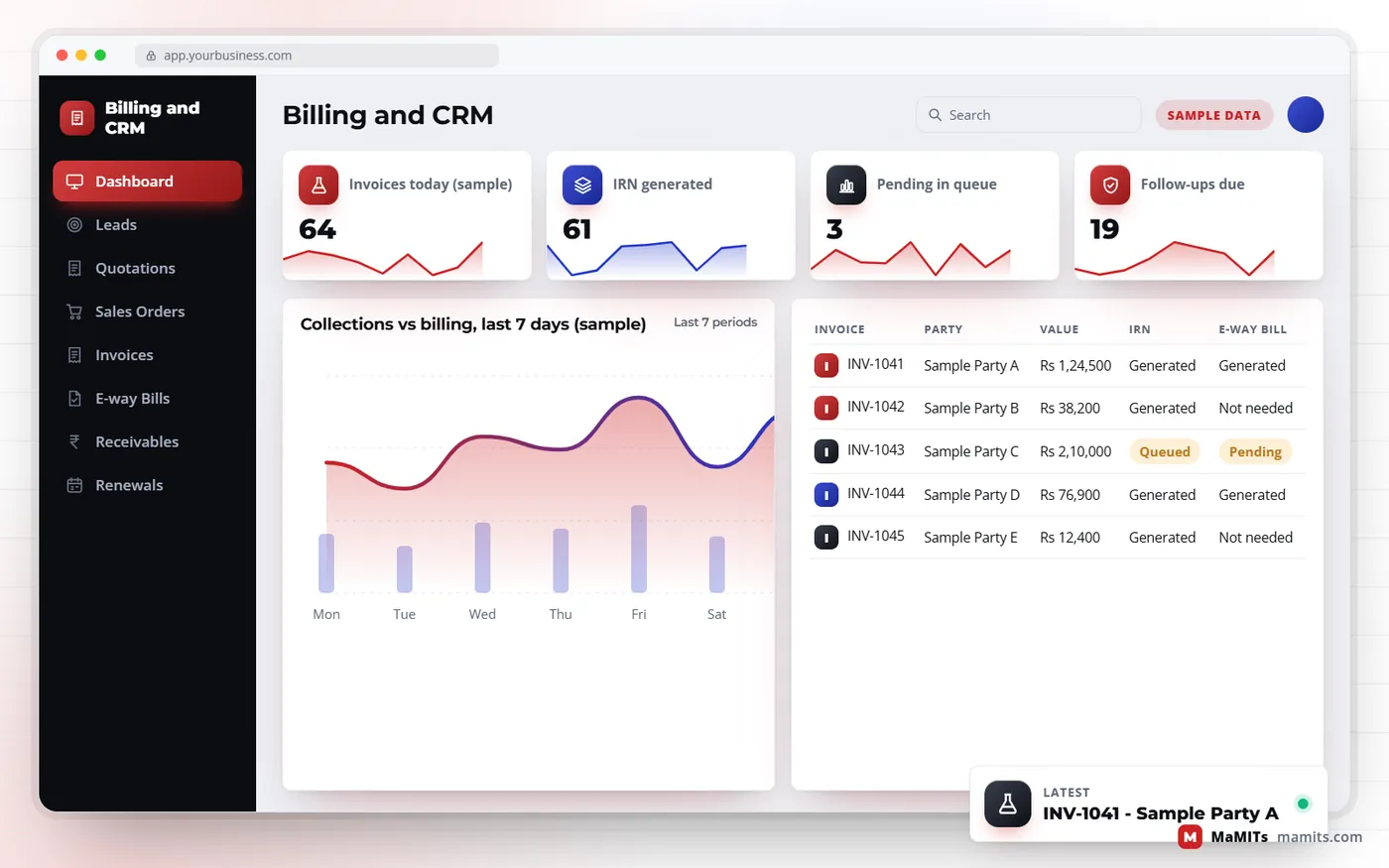
Tax invoices, bills of supply, credit and debit notes, party-wise price lists and schemes, IRN and QR code generation for e-invoices, and e-way bill creation from the same screen.
Fast counter billing with barcode scan, weighing-scale and thermal-printer support, split payments, returns against the original bill, shift closing, and an offline mode that syncs later.
Indents, approvals, purchase orders, goods receipt against the PO, quantity and rate variance checks, supplier ledgers and a three-way match before payment.
AMC contracts, subscriptions, warranties and licence renewals with due-date reminders by WhatsApp, SMS or email, service visits against the contract, and renewal quotations generated automatically.
Bins and racks, putaway rules, pick lists, FIFO or FEFO picking, barcode or RFID scanning, cycle counts and inter-warehouse transfers with goods in transit.
Sales by party, item and salesperson, margin after schemes, stock ageing, receivables ageing, purchase price trends and renewal pipeline, filtered by branch and company.
Where projects are won or lost
Pick route: bin by bin, FEFO first
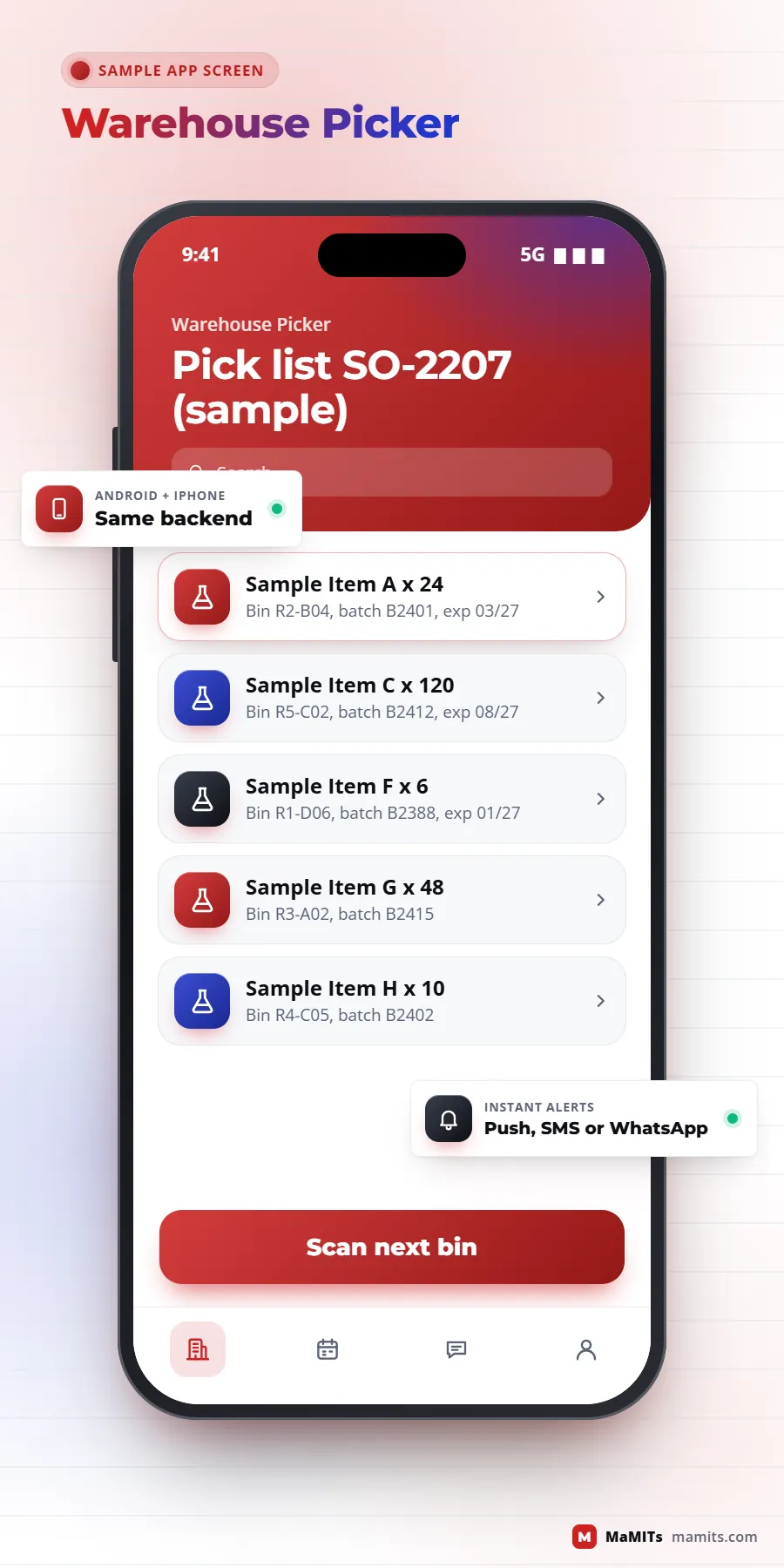
Most brochures describe inventory management software as "track stock in real time". The hard parts are units, batches, locations and timing. A pharma distributor buys in strips and boxes, sells in strips, and must never dispatch a batch closer to expiry than the customer accepts. A hardware trader sells pipes by the length and buys them by the bundle. Getting units and conversions right in the item master prevents most stock mismatches. This is where inventory management software development differs from buying a stock app: the rules for batches, units, reorder levels and transfers are written around your items, not a generic template.
Each warehouse is a location with its own bins, and stock moves between them through transfer documents, not by editing quantities. A transfer creates goods in transit, so stock is never counted twice or lost on the truck. With multi-warehouse inventory you also decide where an order is fulfilled from: nearest godown, the one holding the oldest batch, or the one with full quantity to avoid split shipments.
Purchase leakage usually hides in rate variance and short receipts. The software should hold the PO rate, flag a bill that differs, and block payment until the difference is approved. Renewal management software protects the other side: a service company with hundreds of AMC contracts loses revenue when a renewal date passes unnoticed. Reminders at 30, 15 and 7 days, a renewal quote created in advance and a dashboard of what expires this month turn that leak into a predictable pipeline. The same logic covers software licences, warranties and equipment calibration dates.
Counters cannot stop when the internet does. An offline POS keeps item prices and schemes on the device, issues bills with a series reserved for that counter so numbers never clash, and syncs when the connection returns. For restaurants and hotels, counter billing pairs well with our QR menu software for table and room orders.
Compliance built in
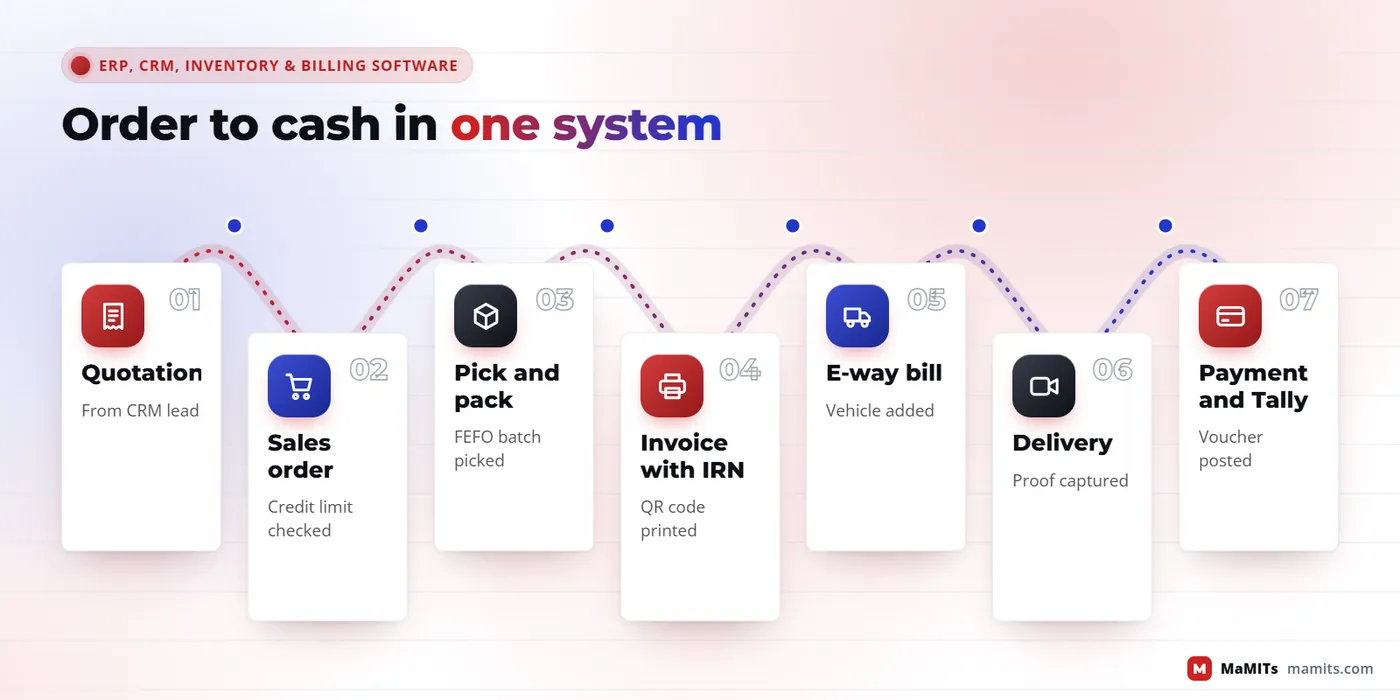
For B2B supplies, GST e-invoice generation is mandatory for taxpayers whose aggregate turnover exceeded Rs 5 crore in any financial year from 2017-18, under Notification 10/2023-Central Tax effective 1 August 2023. The ERP sends invoice data to an Invoice Registration Portal, receives an IRN and signed QR code, and prints them on the invoice. Since 1 April 2025, taxpayers with aggregate turnover of Rs 10 crore and above cannot report invoices, credit notes or debit notes older than 30 days, as per the GSTN advisory, so the software must push documents promptly and alert you to any stuck in a queue.
E-way bills are required when goods of consignment value above Rs 50,000 move, under Rule 138 of the CGST Rules; some states set their own rules for movement within the state, so the threshold is a setting, not hard code. A GSTN advisory effective 1 January 2025 also limits e-way bill generation to documents dated within 180 days and caps validity extension at 360 days from generation. Good ERP design generates the e-way bill from the invoice, adds vehicle details from the dispatch screen, and keeps e-invoice and e-way bill numbers linked to the same document.
For accounting sync, TallyPrime exposes data through XML over HTTP, so a custom ERP can post sales, purchase and receipt vouchers, and read ledger balances back, without manual export. Rules change, so we recheck the official portals before each release.
Under the hood
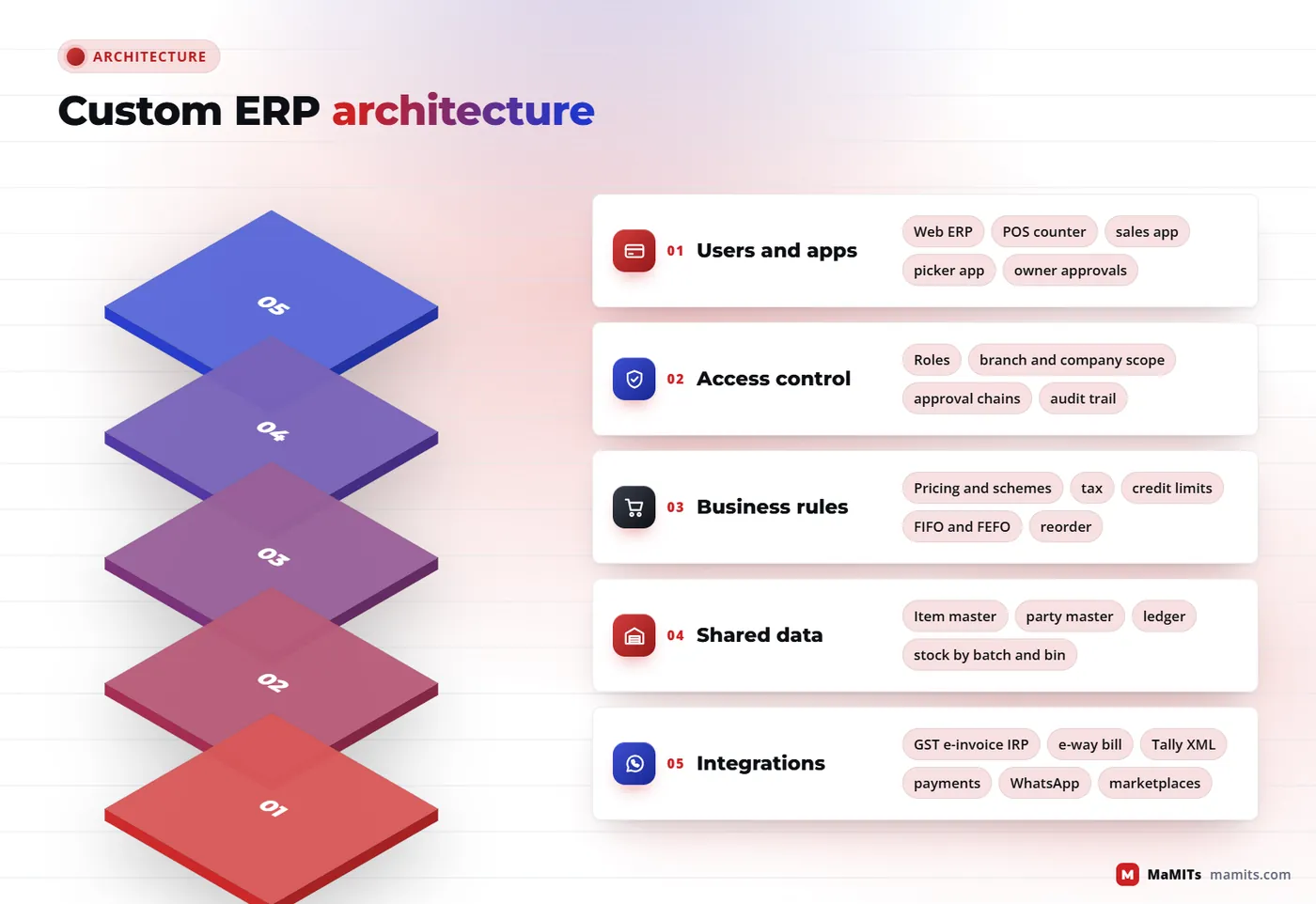
Multi-company means separate GSTINs and books inside one system; multi-branch means many locations under one company. Both need a clear rule for what is shared (item master, often party master) and what is separate (stock, numbering series, ledgers). Inter-company sales should create a matching purchase in the other company automatically, so consolidation is a report rather than a month-end exercise.
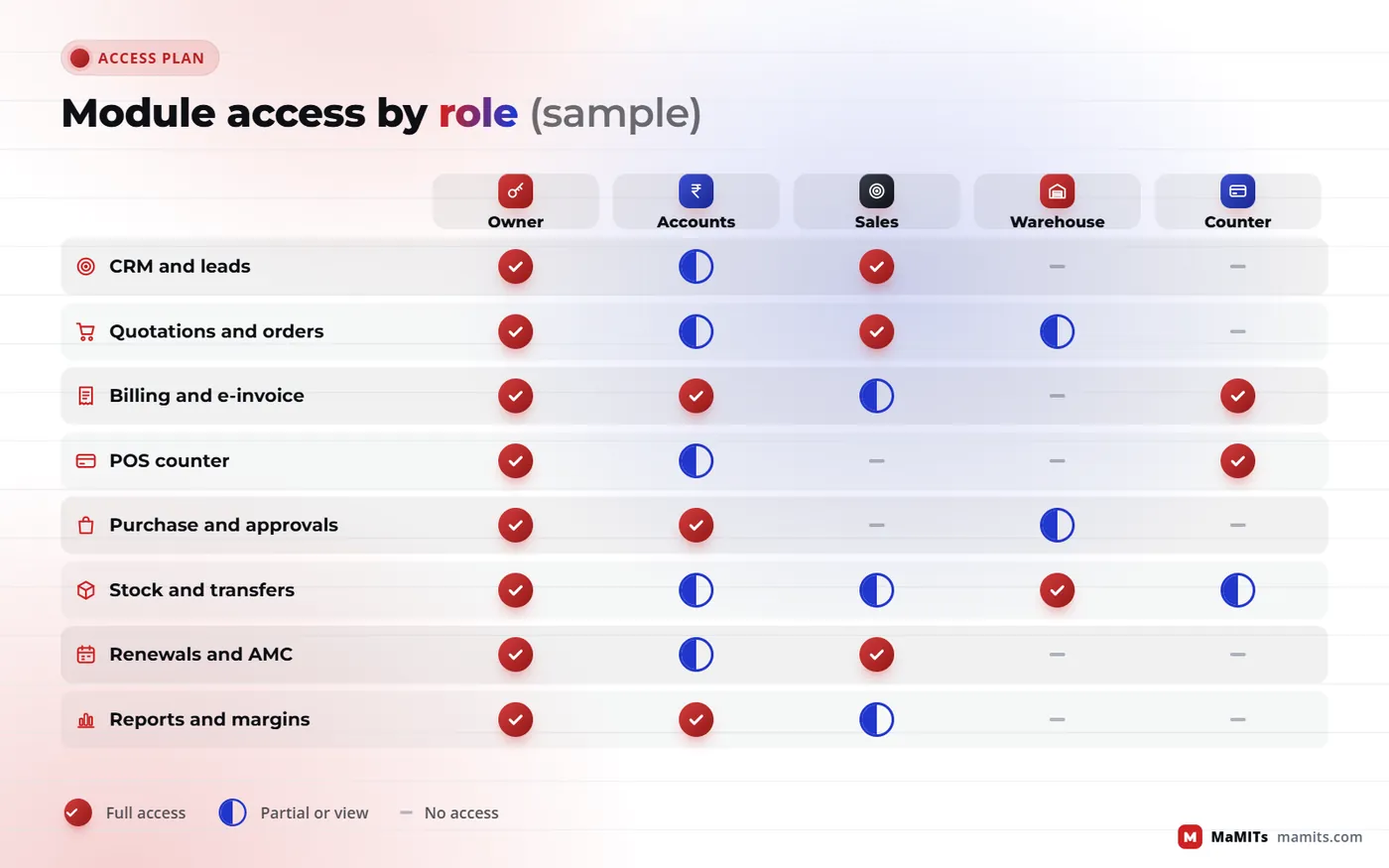
Roles decide who can see and do what. A salesperson sees their own parties and cannot change rates below a floor; a branch manager approves discounts up to a limit; accounts approves credit-limit overrides. Every approval should be recorded with time, user and reason. Our CA Management Software and a clinic system we built for a hair transplant clinic group (centre-wise access, costing with GST, quotations and invoices) both rely on this kind of location-wise permission model.
Mobile apps sit on the same API as the web screens: an order-booking app for sales staff, a picker app for warehouse staff, and an approval app for owners. If you plan mobile work, see our mobile app development page.
Who this is for
Madhya Pradesh first
Our office is in Bhopal, so most of our in-person work happens inside the state. Each belt of Madhya Pradesh tends to bring a different first problem to the table, which is why ERP software in Madhya Pradesh rarely looks the same from one city to the next.
3 daysnotice for an in-person meeting anywhere in Madhya Pradesh
ERP software in Bhopal usually starts with pharma and FMCG distributors, electrical and hardware traders, service companies with AMC contracts, and units in Govindpura and Mandideep. The first ask is often billing with batches plus stock across two godowns.
Indore is the trading capital of the state. Wholesale markets such as Siyaganj and Loha Mandi run on credit, schemes and same-day dispatch, while units in Pithampur and on Sanwer Road need purchase control and dispatch tracking. For ERP software in Indore, salesman apps and party-wise rates come up in nearly every first meeting, so CRM software in Indore is often the first module rather than the last.
Smaller manufacturers and stockists, often served by sales teams based in Indore. Route-wise order booking and outstanding collection matter more here than fancy dashboards.
Manufacturing units and distributors close to the Delhi and Agra markets. Multi-company setups and inter-state e-way bills are the usual starting points.
Readymade garment traders in Jabalpur need size, colour and lot-wise stock. Mineral and lime businesses around Katni need dispatch tied to weighbridge slips and vehicle details.
Building material dealers, cement and stone trade, and agri-input distributors. Credit control by party and season-wise sales reports are where most of these projects begin.
Two things come up across the whole state. Most teams want to keep Tally because their CA works in it, so a Tally sync is usually part of the plan. And many floor staff are more comfortable in Hindi, so screens for salesmen, pickers and counter staff can carry Hindi labels while reports stay in English for the owner and the CA.
Anywhere in Madhya Pradesh we can meet in person with 3 days notice. For a process walk-through, sitting at your counter for an afternoon teaches us more than a week of calls.
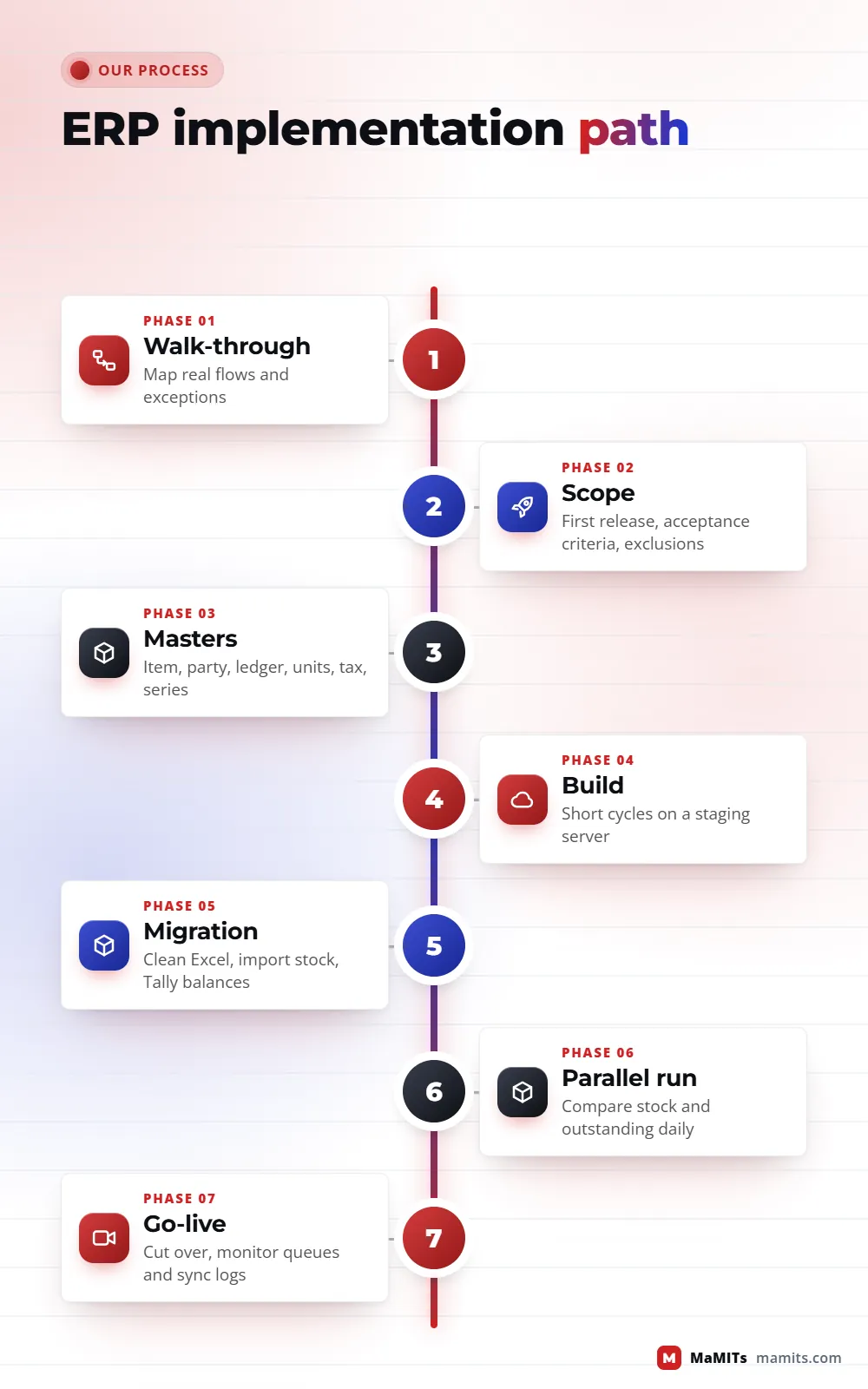
From first call to go-live
Timelines depend on scope, data quality and how quickly decisions are made, so we agree dates after scoping rather than promising them upfront.
Order of work, not duration. Dates are agreed after scoping.
We sit with people who bill, store, buy and collect, and map the real flow, including the exceptions that live in someone's notebook.
Pick the first release (often billing plus inventory, or CRM plus quotations), write acceptance criteria, and list what is deliberately left out.
Design item, party and ledger masters, unit conversions, tax rules and numbering series before any screen is built.
Working screens on a staging server every few weeks, tested by your own staff with your own sample documents.
Clean item and party lists from Excel, import opening stock by batch and location, and pull ledger balances from Tally through its XML interface or a verified export. Duplicates are merged before import, not after.
Run old and new side by side for an agreed period, compare stock and outstanding daily, and train by role, not by menu.
Cut over on a quiet date, freeze old entries, then monitor e-invoice queues, sync logs and user questions closely in the first weeks.
Money and risk
We do not publish a price list, because two ERPs with the same module names can differ ten-fold in effort. MaMITs quotes after a scoping call; small modules can start after a short scoping discussion. What you should compare across vendors is the total cost over several years, not the first invoice.
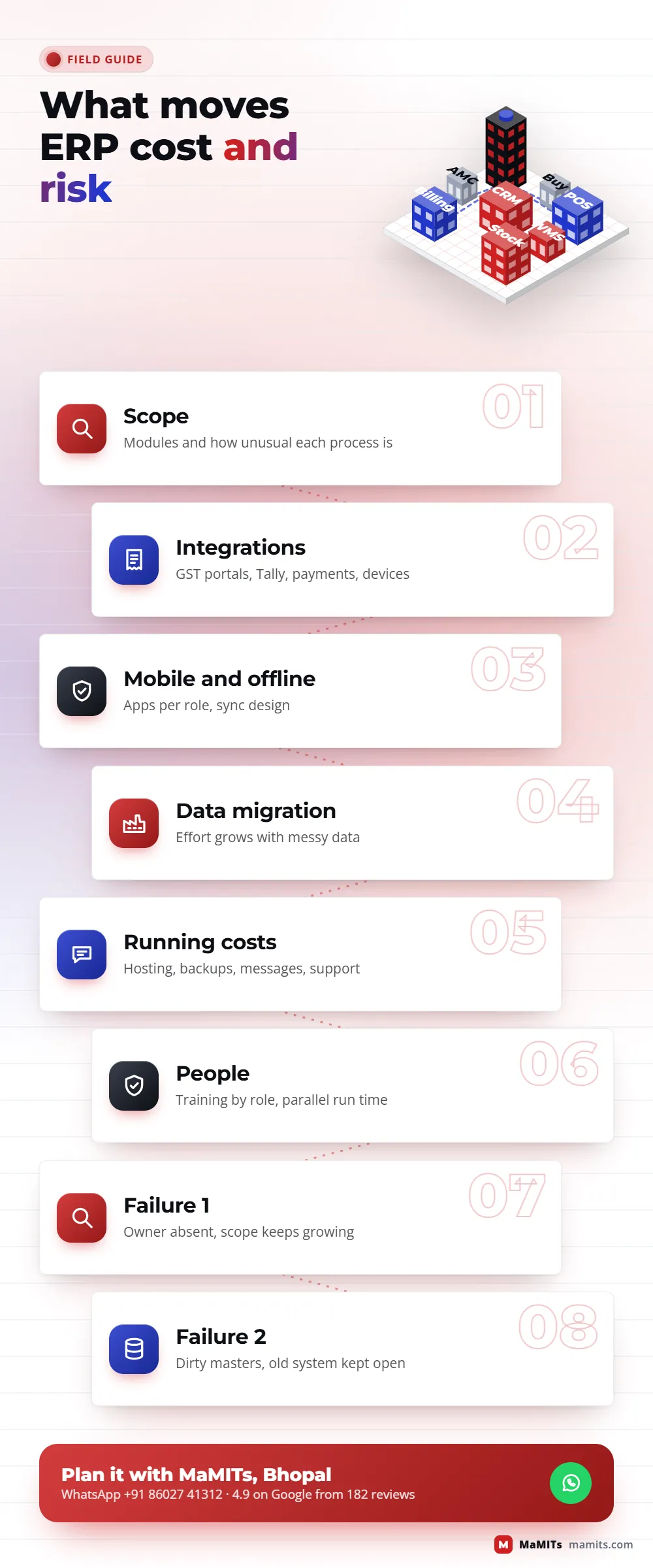
The causes repeat across industries.
Owners delegate the project to a junior and stop attending reviews, so decisions stall.
Scope grows every week because nobody wrote down what the first release excludes.
Masters are imported dirty, so the first stock report is wrong and staff lose trust in the system within a week.
Training is one demo for everyone instead of practice by role.
The old system stays open "just in case" and people keep using it.
And the vendor builds screens without a shared data model, which produces the same disconnected tools the business was trying to escape.
Before you sign
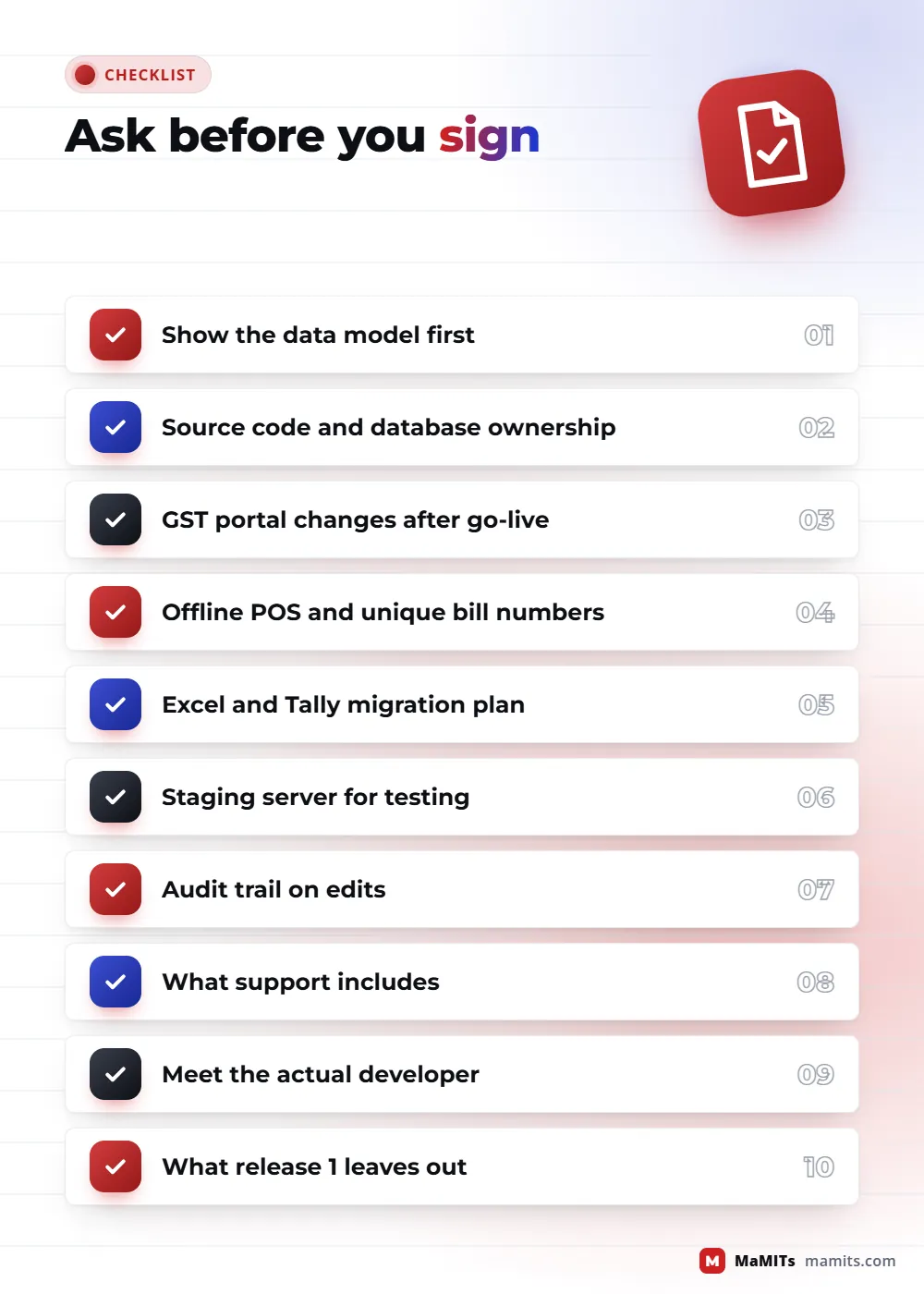
People searching for the top ERP software development company often compare portfolios and prices. These questions reveal more.
A vendor who answers these clearly usually gives realistic timelines too. Our broader guide to choosing a software company in Bhopal covers contracts and support terms.
The rule we design every ERP around
An ERP is not judged on the day it goes live. It is judged on the first stock count, the first GST return and the first month-end close: if all three agree with each other without manual adjustment, the data model was right.
Real work, not borrowed claims
MaMITs is a software company in Bhopal with 100+ software deployed and 30+ mobile apps, rated 4.9 on Google from 182 reviews. As an ERP software development company we reuse patterns proven in our own products and projects rather than starting from blank screens. Our Lead Management Software covers lead capture, follow-ups and pipeline, which is the CRM half of many ERPs. Our travel agency ERP handles bookings, invoicing and supplier payables for a specialised industry.
We built an invoicing app for small businesses in Canada with province-wise GST, HST and PST, Quebec QST, customers, invoices and analytics, which shows how tax rules can live in configuration instead of code. A clinic group in India uses a system we built for leads, costing with GST, quotations, invoices and centre-wise access. And a hotel uses our QR scan-to-order menu routed to room service, restaurant and reception.
Where your project needs special hardware or a desktop client, our custom software development team handles barcode, RFID, scale and printer integrations. For delivery fleets and transport, the logistics software page goes deeper. If you want AI on top of ERP data (demand hints, WhatsApp order capture, smart search), see our AI development company in Bhopal page. Clinics can read our healthcare software page, and institutes the education software page.
Beyond Madhya Pradesh
Most ERP work happens remotely with screen-share reviews, but process walk-throughs go better in person. Delhi NCR, Mumbai, Pune, Maharashtra and Uttar Pradesh get in-person meetings with 7 days notice; clients in the USA, Canada, Australia, the UK and France meet us online.
ERP software in Delhi, Noida and Gurugram projects tend to be multi-company or multi-branch, with heavier approval chains and e-invoice volumes.
Warehouse-heavy and e-commerce businesses needing multi-warehouse inventory and marketplace stock sync.
Invoicing, inventory and CRM builds with local tax rules configured, planned and reviewed over online meetings.
FAQ
The best choice is the company that understands your process, shows you its data model before building, gives you source code ownership and explains GST integration clearly. Compare at least three vendors with the same checklist. MaMITs is based in Bhopal, rated 4.9 on Google from 182 reviews, and builds ERP, CRM, inventory, billing, POS and warehouse software.
Buy if your process is standard and the package fits most of it; you save time and get statutory updates from the vendor. Build custom when pricing, batches, multi-warehouse rules or field apps cause constant workarounds. Many businesses choose hybrid: Tally for accounts and custom software for orders, stock, POS and warehouse operations.
Cost depends on the number of modules, how unusual your processes are, integrations such as GST e-invoice and Tally, mobile apps, data migration and support. Any fixed price quoted without a scoping session is a guess. MaMITs quotes after a scoping call, and a small first module can begin after a short discussion.
Yes. The billing screen sends invoice data to an Invoice Registration Portal, receives the IRN and signed QR code, and prints them. The same invoice can create the e-way bill, with vehicle details added at dispatch. E-invoicing applies to B2B supplies once aggregate turnover crossed Rs 5 crore in any year from 2017-18.
Inventory management software tells you how much stock you have, where, and what it is worth. A warehouse management system manages how stock moves inside the building: bins, putaway, picking routes, FIFO or FEFO, scanning and cycle counts. Small businesses need inventory first; a WMS pays off once one godown holds many locations or fast-moving orders.
Yes. TallyPrime accepts XML over HTTP, so the ERP can post sales, purchase, receipt and payment vouchers into Tally and read balances back. We add a daily reconciliation report listing anything not posted, so accounts and operations never drift apart silently. Your CA keeps working in the books they already trust.
A properly designed offline POS keeps prices, schemes and recent stock on the device, issues bills from a number series reserved for that counter, and syncs when the connection returns. Bill numbers cannot clash, and the head office sees every bill after sync. Card or UPI payments still depend on the payment terminal's own connection.
We first clean item and party lists, merge duplicates and fix units, then import opening stock by batch and location. Ledger balances come from Tally through its XML interface or a verified export. A parallel run follows, where stock and outstanding are compared daily until both systems agree.
Yes, if the data model is designed for it from the start. Masters can be shared while stock, numbering series and ledgers stay separate per company or branch. Inter-branch transfers create goods in transit, and inter-company sales can create the matching purchase automatically, so consolidated reports are always current.
Renewal management software tracks AMC contracts, subscriptions, warranties and licences with their due dates. It sends reminders before expiry, creates renewal quotations, and shows what renews this month. Service companies, IT resellers, equipment suppliers and agencies with recurring contracts use it to stop revenue lost through missed renewal dates.
Yes. Typical apps are order booking for salespeople with party-wise rates and outstanding, a picker app for warehouse staff that scans bin and batch, and an approval app for owners. They use the same API as the web ERP and can work offline where networks are weak.
Most failures come from people and data rather than code: owners stop attending reviews, scope keeps growing, dirty masters are imported, training is one generic demo, and the old system stays in use. A vendor who builds screens without a shared data model creates the same disconnected tools you wanted to replace.
We work across India and abroad. Clients in Madhya Pradesh, including Indore, can meet in person with 3 days notice. Delhi NCR, Mumbai, Pune, Maharashtra and Uttar Pradesh get in-person meetings with 7 days notice. Clients in the USA, Canada, Australia, the UK and France meet us online.
Separate products mean separate customer and item lists, and someone has to reconcile them every month. One ERP built in modules avoids that: you can start with billing and inventory alone and add CRM later on the same masters. Separate tools only work well when they sync properly, for example a CRM that pushes confirmed orders straight into billing.
Usually billing with GST, inventory by godown and batch, and receivables. Once those are stable, a salesman order app with party-wise rates and outstanding is the next big win, especially for routes covering Indore, Dewas and Ujjain. Warehouse and renewal modules come later, when volume or service contracts justify them.
Yes. Labels, buttons and messages can be in Hindi for counter staff, pickers and salesmen, while reports and accounts stay in English for the owner and the CA. Item names can be stored in both languages, and printed bills can carry Hindi text where your customers prefer it.
Cloud suits most small and mid-size businesses: no server to look after, access from every branch and phone, and backups handled by the host. On-premise makes sense when the internet at the main site is unreliable or a client contract demands local data. A common middle path is cloud ERP with offline POS at the counters.
Often, yes. If your current software has an API, or a database we can read safely, we can build the missing piece, such as a salesman app or renewal reminders, and keep it in sync. If the existing data is too broken to trust, we will tell you, because building on top of it only moves the problem somewhere else.
Typical signs: the same order typed in several places, more than one "final" stock sheet, GST matching that takes days, batch expiries nobody tracks, and outstanding that only the accountant knows. If three or more sound familiar, one module built on proper masters is usually worth scoping.
Next step
Send a short note on WhatsApp about your business, your current software or spreadsheets, and the one process that wastes the most time. We will tell you whether a package, a custom build or a hybrid fits, and what a first release could cover.