Station 01 of 8
Sales order
Promised only after the bottleneck capacity and raw material are checked.

Website Designing and Mobile Apps Development in Bhopal, Digital Marketing, SEO Company - MaMITs
Phone No. +91-860-274-1312
Email: info@mamits.com
MaMITs
MaMITs, 144, Durgesh Vihar, JK Road, Bhopal, Madhya Pradesh, India 462022
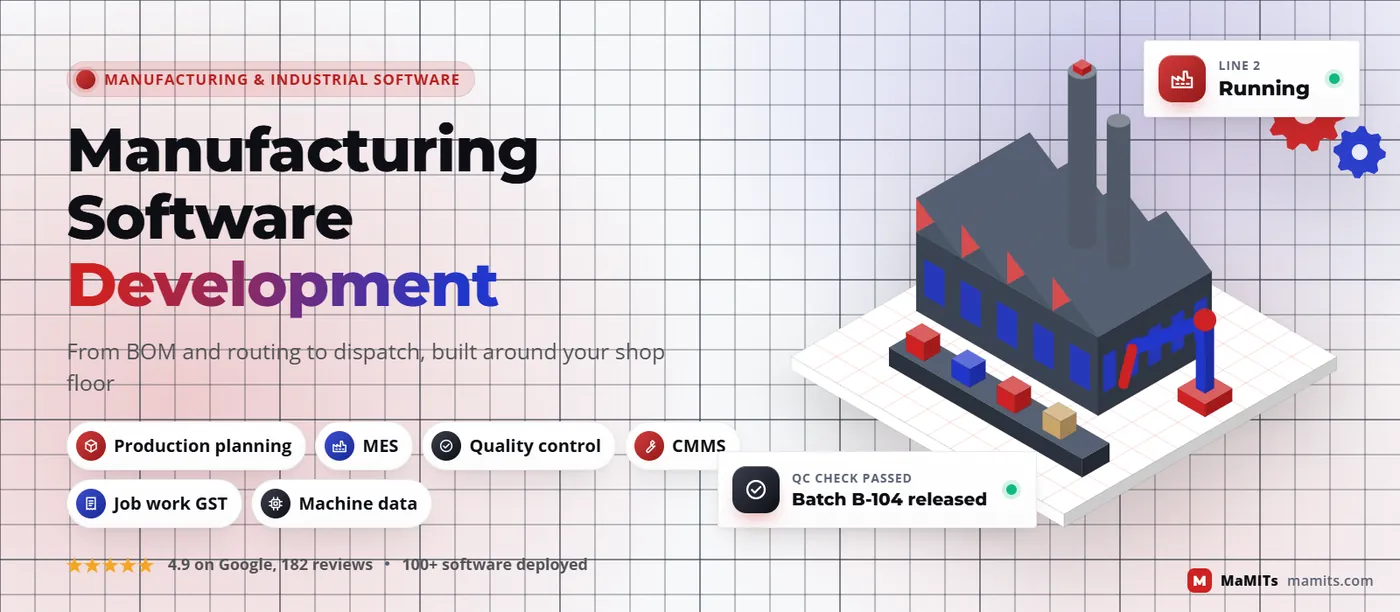
Our manufacturing software development covers production planning, MES, quality and maintenance, built around the way your plant actually runs: routings, machines, shifts, batches and job work challans. We map the floor first, connect what is worth connecting, and keep accounts in Tally or SAP where they already work.
Sample data. Lights come from machine signals, not shift-end entry.
Quick summary
Manufacturing software development is building software for a factory's own processes: bills of material, routings, production plans, work orders, machine data, quality checks, maintenance and dispatch. Unlike a packaged ERP, it is shaped around your products and shop floor, and it connects to the accounting system and machines you already use.
MaMITs · Spec plate
Made in Bhopal · MP, India
The real problem
Most plants we speak to do not lack software. They have Tally for accounts, a WhatsApp group for the shop floor, three Excel files for planning and a register at the gate. The trouble is that none of these know about each other. A sales order is promised for Friday without anyone checking whether the CNC is booked, the raw material is in stock or the paint shop has capacity.
Packaged manufacturing ERP software fixes part of this, but it usually stops at the office. It records what was planned and what was invoiced; it rarely knows what happened at machine 7 on the night shift. That gap between plan and reality is where scrap, overtime and late dispatches hide.
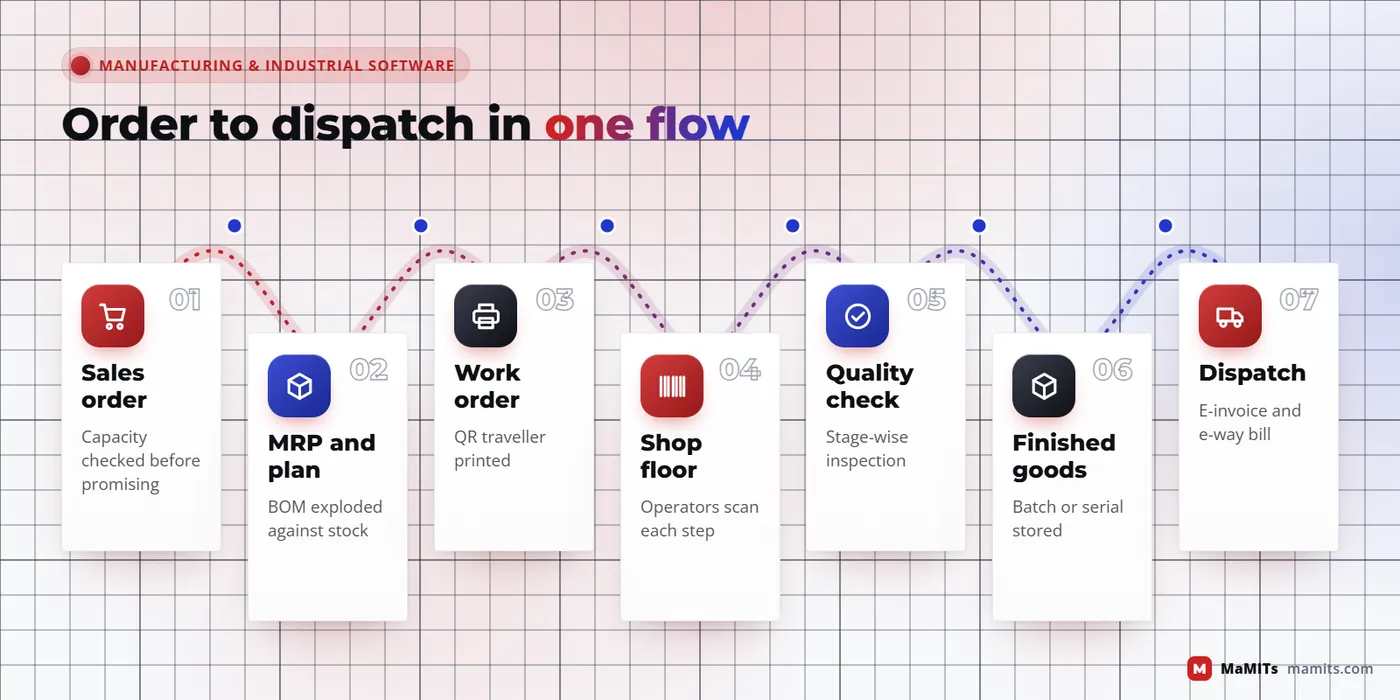
Manufacturing software development closes the gap by building the missing layer around your real flow, from enquiry to dispatch. The picture beside this text shows the chain we usually map first. Each arrow is a handover where information is lost today.
Where information is lost today
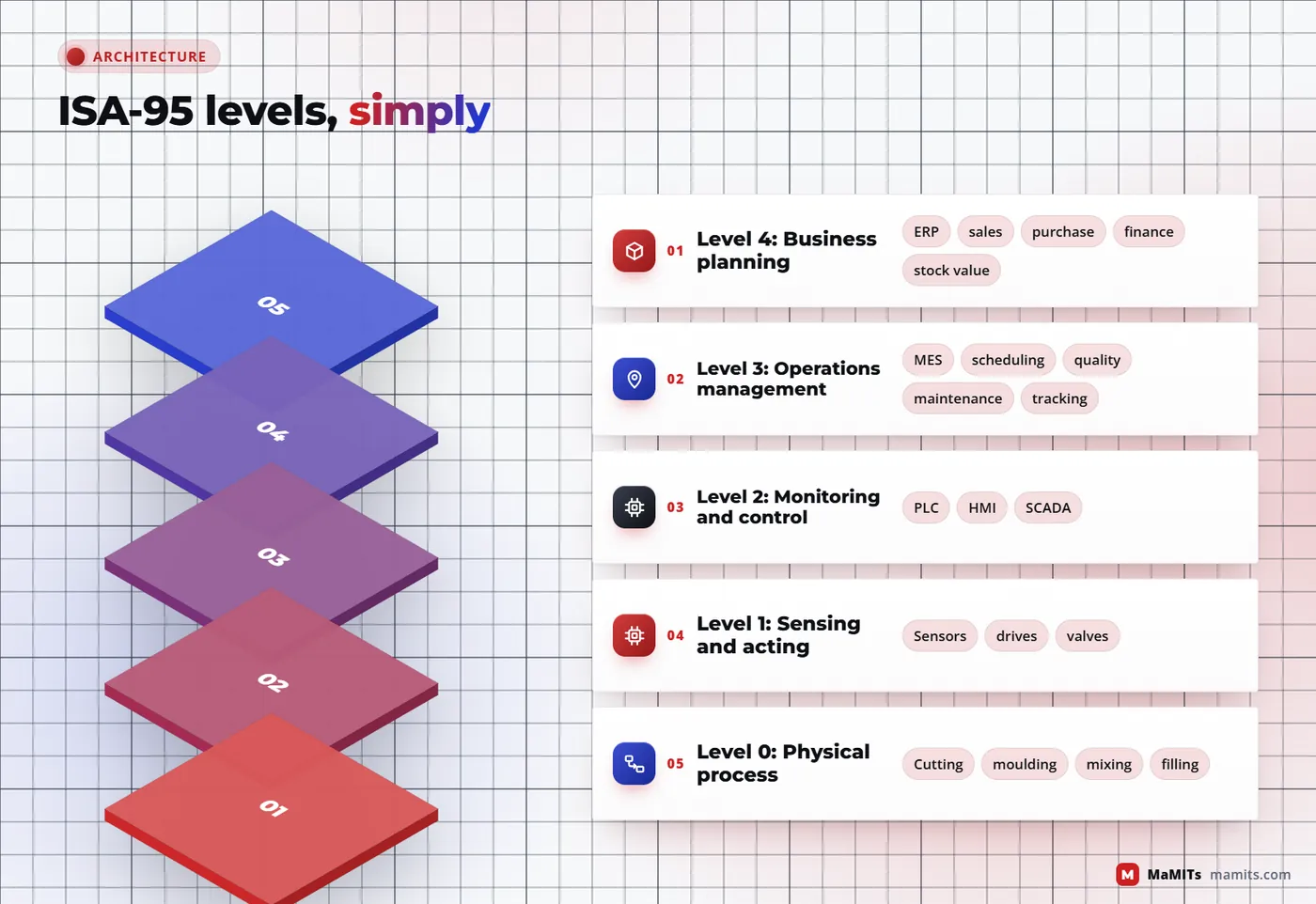
The map
ISA-95 (also published internationally as IEC 62264) is the standard most engineers use to describe how business systems and plant control systems fit together. You do not need to read it to buy software, but its levels give everyone in the room the same vocabulary.
Why it matters to you: most failed projects try to make one level do another's job. An ERP stretched down to Level 3 becomes a data-entry burden for supervisors. A PLC stretched up to Level 4 cannot price an order. Good industrial software development respects the boundary and builds clean handovers between levels.
Sales, purchase, finance, inventory valuation. Days and weeks.
Work orders, scheduling, quality, maintenance, tracking. Minutes and shifts.
PLCs, HMIs and SCADA that keep a line running second by second.
Sensors, drives and valves.
Metal being cut, dough being mixed.
Tap a level. MES lives at level 3, ERP at level 4.
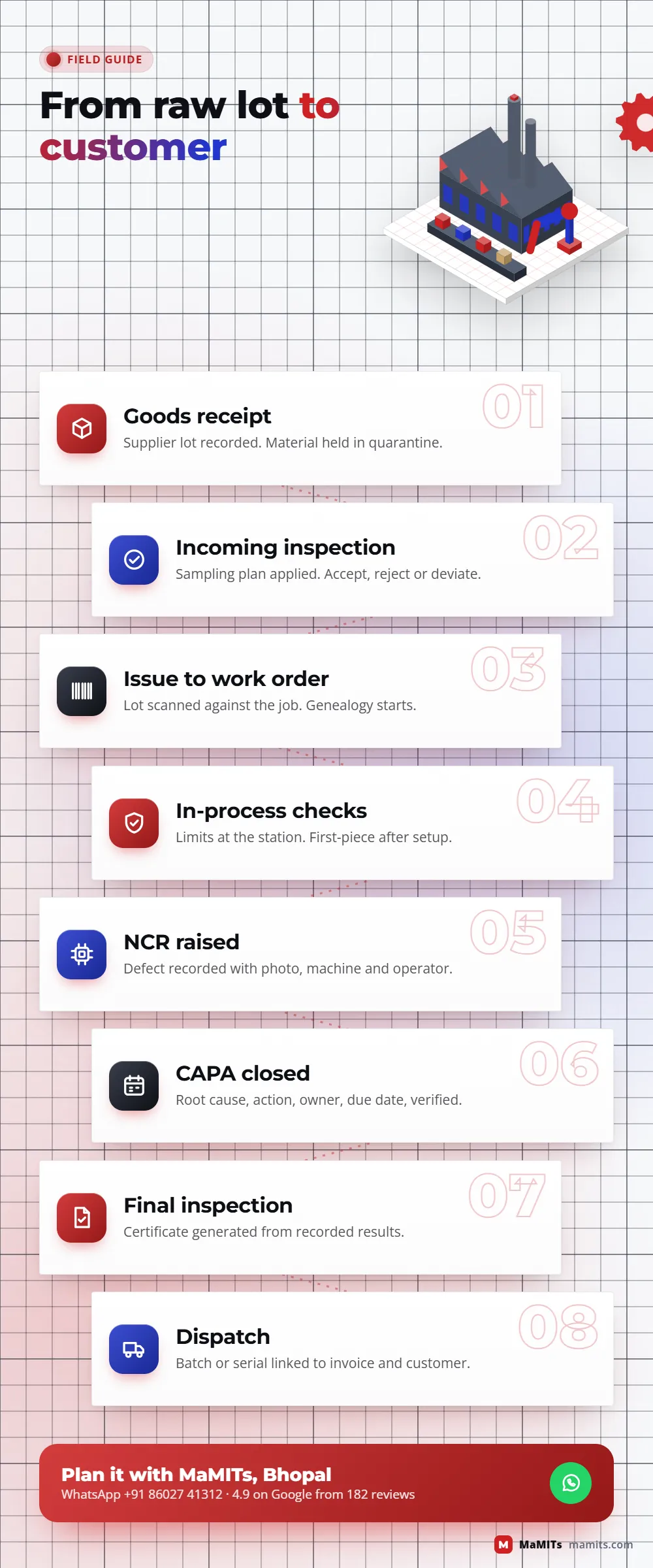
One work order, end to end
Station 01 of 8
Promised only after the bottleneck capacity and raw material are checked.
Station 02 of 8
The recipe and the path: what goes in, which work centre, setup and run time per piece.
Station 03 of 8
BOM exploded against stock and open POs; operations placed on the bottleneck first.
Station 04 of 8
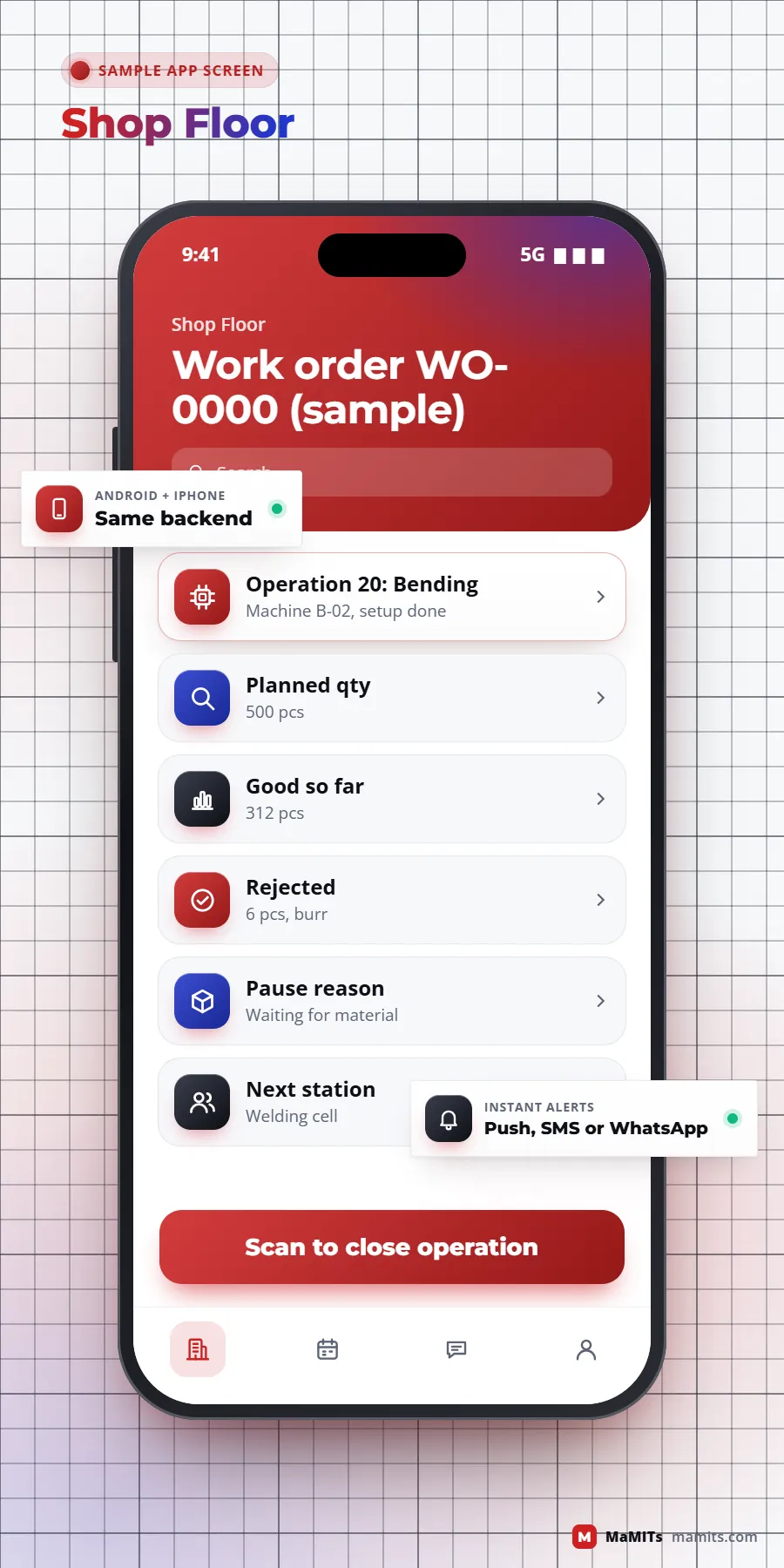
A QR traveller moves with the job. Operators scan to start, pause with a reason and close.
Station 05 of 8
Run, idle, alarm and cycle count read from the PLC. Read-only, safety stays in the PLC.
Station 06 of 8
Check sheet at the station. Out of tolerance stops the job here, not at the end.
Station 07 of 8
Certificates come from recorded results. Batch and serial link back to every lot and machine.
Station 08 of 8
E-invoice and e-way bill from the dispatch screen. Tally gets the entry, nobody retypes.
Core build
These are the modules that carry most of the value. Not every plant needs all of them on day one.
A bill of material (BOM) lists what goes into a product, level by level: a fabricated frame needs sheet, tube, fasteners and paint. A routing lists the operations in order, the work centre for each, setup time and run time per piece. Get these two right and planning, costing and capacity all become calculable. Get them wrong and every report downstream is fiction.
Process plants (food, pharma, chemicals, plastics) work with formulas or recipes instead, often with yield losses and batch sizes that change by grade. The software must handle both styles if you make both.
Material requirements planning takes confirmed orders and forecasts, explodes the BOM, subtracts stock and open purchase orders, and tells you what to buy or make and when. Scheduling then places operations on real machines against real shifts. Our production planning software usually starts with finite capacity at the bottleneck only, because modelling every machine on day one creates more argument than accuracy.
A work order travels with the job as a printed traveller or a QR code. Operators scan it on a tablet or phone at each station, tap start, pause with a reason, and close with good and rejected quantities. Screens use large buttons, local language and as little typing as possible, because a gloved hand on a noisy floor will not fill a 20-field form. Shop-floor data capture done this way gives live WIP without anyone walking the floor with a clipboard.
Machine connectivity
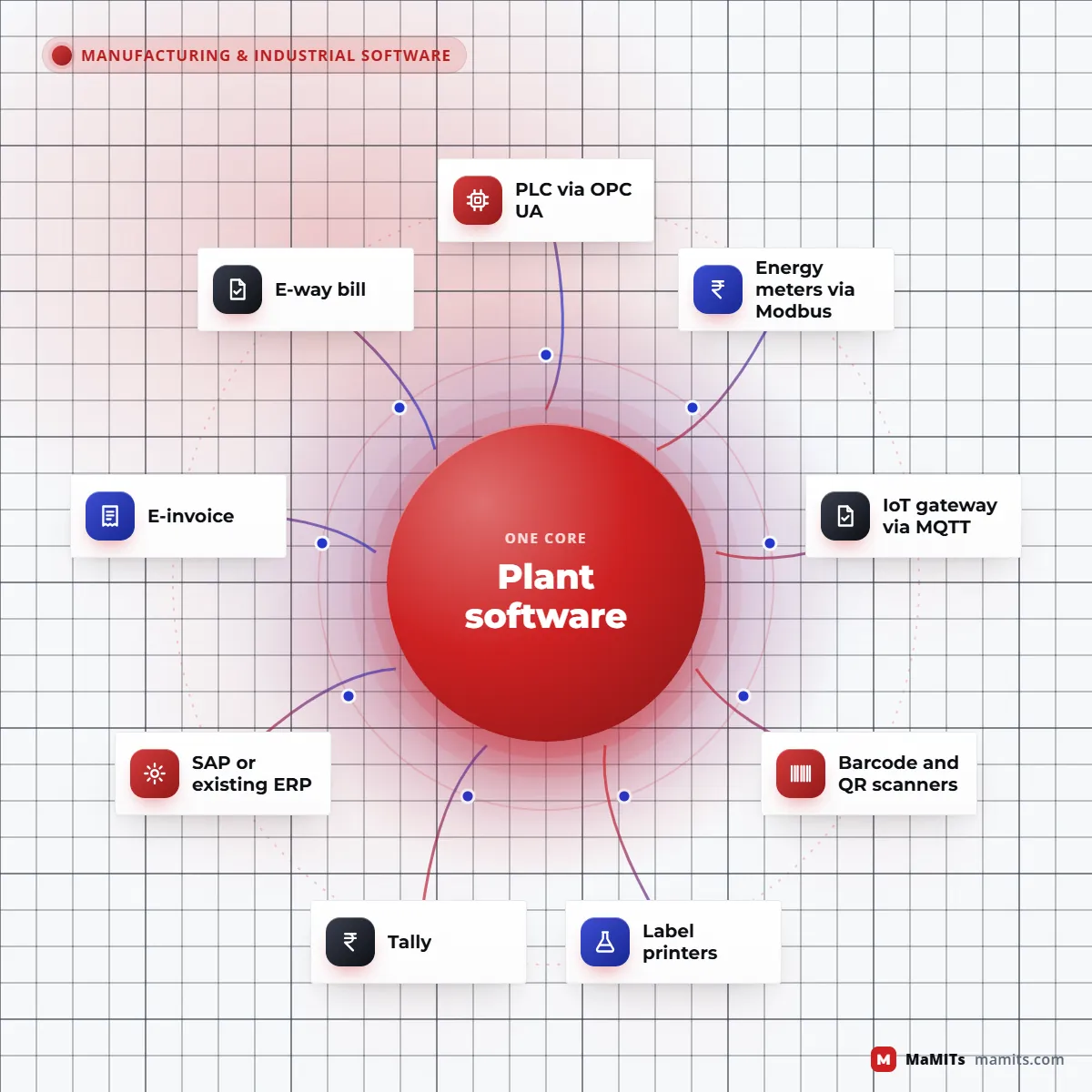
Machine monitoring means collecting signals such as run, idle, alarm, cycle count and temperature directly from equipment instead of asking an operator to report them. The source is usually a PLC (programmable logic controller), the small industrial computer that runs the machine.
Older machines without a usable controller can still be monitored with a current sensor or a proximity switch on an IoT gateway. The gateway and sensor work is hardware integration, which we cover in more depth on our custom software development page.
Measuring the floor
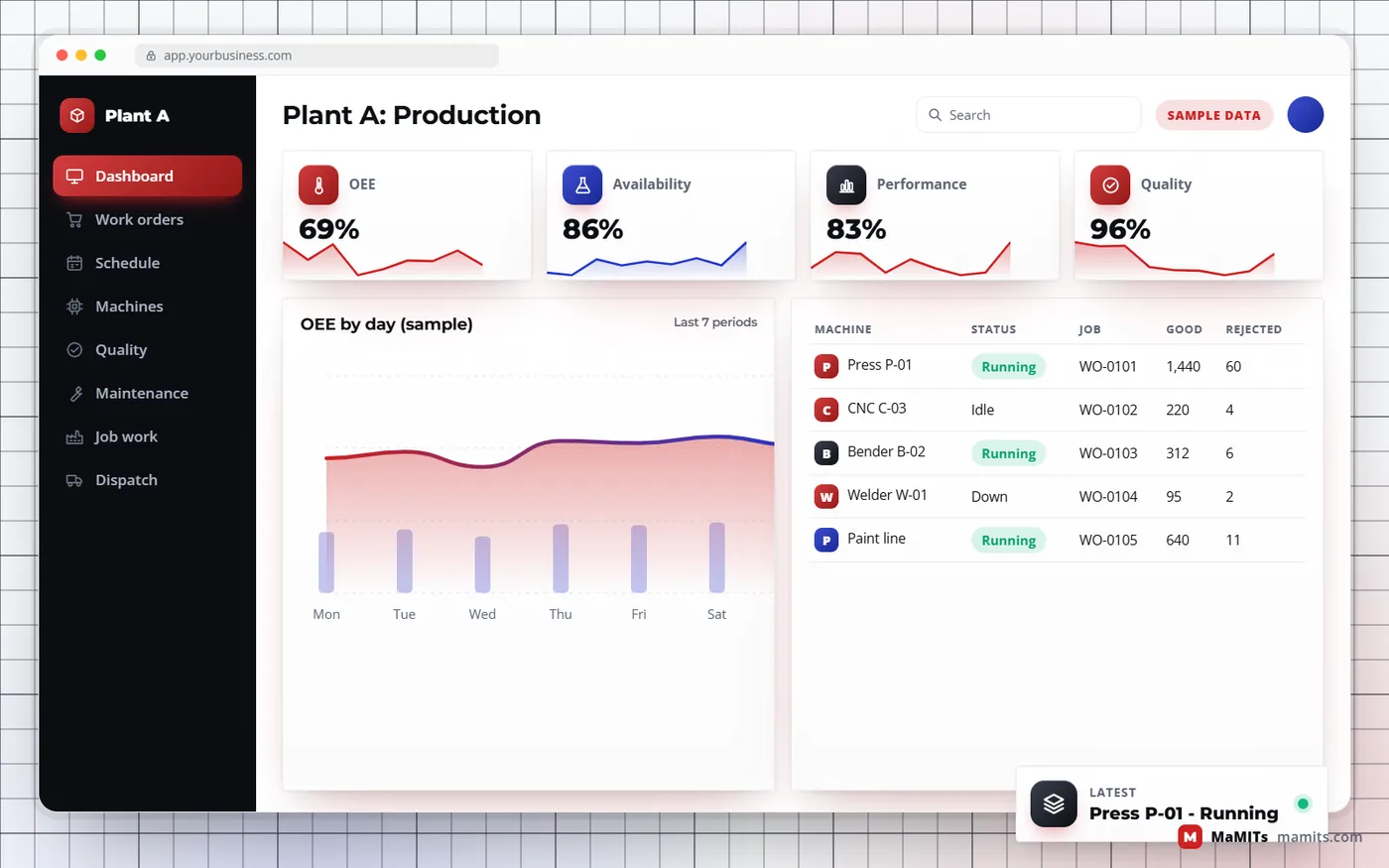
OEE (overall equipment effectiveness) is Availability multiplied by Performance multiplied by Quality. Availability is the share of planned production time the machine actually ran. Performance compares actual output with what the ideal cycle time would have produced in that run time. Quality is good units divided by total units produced. The definitions are standardised in ISO 22400-2, which helps when two plants want to compare numbers fairly.
A worked example: a press planned for 420 minutes runs 360 (availability about 86 percent), makes 1,500 parts against an ideal of 1,800 in that time (performance about 83 percent), and 1,440 are good (quality 96 percent). OEE is roughly 69 percent. The single number matters less than which of the three factors is pulling it down.
Two traps to avoid. First, decide before go-live whether changeovers and planned maintenance count as planned time, or the number will be argued about forever. Second, an OEE fed by manual entry at shift end is optimistic by nature; machine signals make it trustworthy.
Try it with your numbers
The lowest bar is where to look first.
Quality and maintenance
Quality and maintenance are where good factory management software pays for itself by preventing the expensive day rather than reporting it.
Sampling plans per supplier and item, results recorded against the goods receipt, and material held in a quarantine location until accepted. Rejected lots link straight to a debit note.
Check sheets at the station with limits, so an out-of-tolerance reading stops the job there instead of at the end. First-piece approval after every setup is the habit that saves the most scrap.
Final checks before packing, and test certificates generated from recorded results rather than typed again. Export units and OEM suppliers get the formats their customers ask for.
A non-conformance report captures what went wrong; CAPA (corrective and preventive action) tracks root cause, owner and due date until closed. Our quality control software keeps the loop visible to management.
Every finished batch or serial number links back to raw material lots, machines, operators and inspection results. When a customer complains, you answer in minutes which lots are affected.
Maintenance management software (often called a CMMS) schedules preventive tasks by calendar, running hours or cycle count, logs breakdowns with cause and repair time, and feeds downtime into OEE.
Critical spares per machine with minimum stock, issue against a maintenance job, and alerts before the one bearing that stops a line runs out.
Job work and dispatch
This is where plant software in India differs from software built for another country: material leaves the plant without tax, and somebody has to watch it come back.
Warned before each clock runs out. ITC-04 data ready.
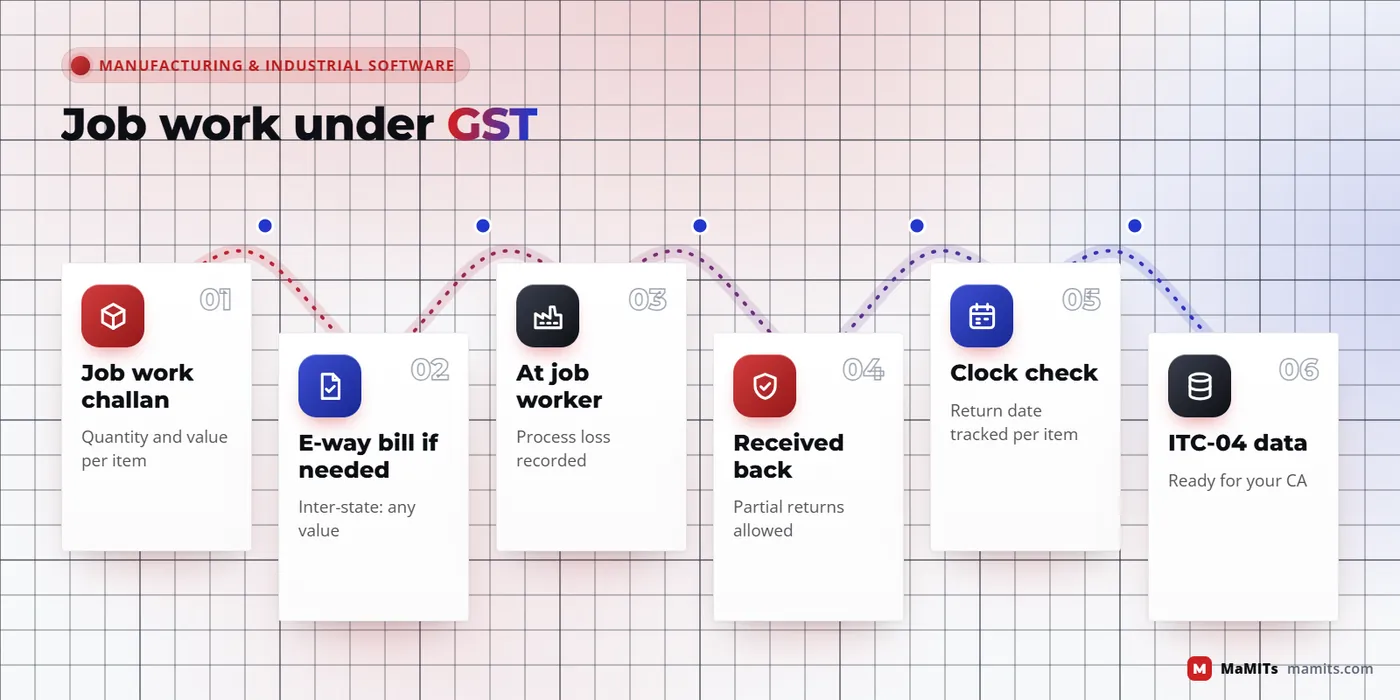
Material sent to a job worker has a date by which it must come back or be accounted for. In most plants nobody watches this clock until the accountant asks at year end.
So the software must issue job work challans, track quantity sent, received back, lost as process waste and still outstanding per challan, and warn before each clock runs out. It should also prepare the job work return data your CA files. Contract manufacturers on the other side need the mirror view: customer material received, consumed and returned.
Every B2B invoice above the e-invoice threshold needs an IRN from the GST e-invoice system. Goods movement needs an e-way bill, including for inter-state job work. Generating both from the dispatch screen, through the government APIs or a GST suvidha provider, removes retyping at the gate. Fleet, route and proof-of-delivery work belongs to logistics software, which we build separately.
Manufacturing adds a stock state that trading software ignores: work in progress, valued at material plus the operations completed so far. Raw material and finished goods sit in stores, WIP sits on the floor, and a few items sit at job workers. Multi-warehouse depth, bin locations and stock valuation are covered on our ERP, CRM and inventory software page; here we make sure the floor feeds it accurately.
Decision
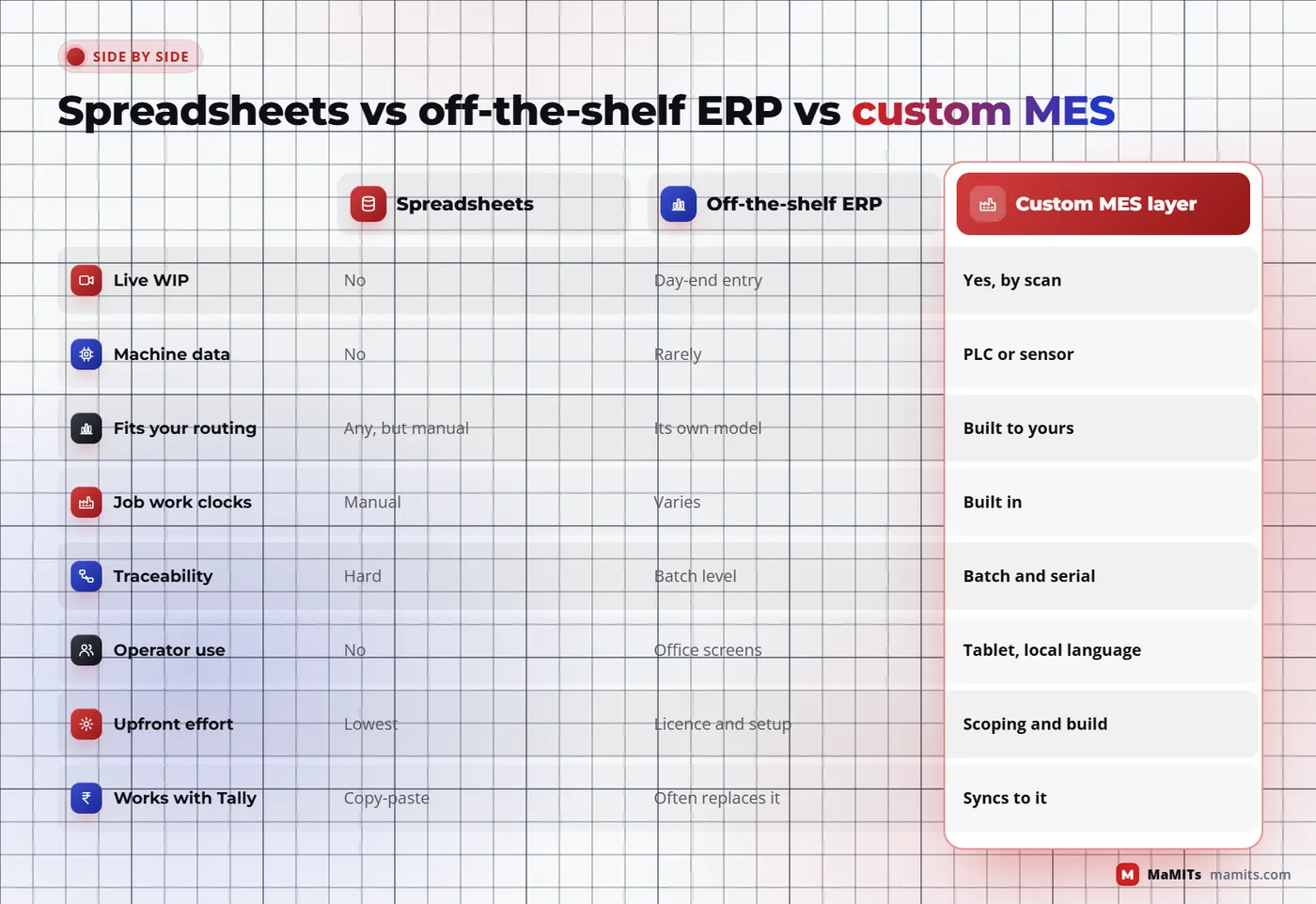
Short version: ERP answers what should happen and what it cost; MES answers what is happening right now on the floor. Many plants need a thin version of both.
| Question | ERP manufacturing module is enough | Custom MES layer is worth it |
|---|---|---|
| How often does the plan change? | Weekly, stable products | Daily or every shift, many changeovers |
| How do you learn what was produced? | Day-end entry is acceptable | You need live WIP and machine status |
| Traceability demand | Batch on the invoice is enough | Customers or regulators ask for full genealogy |
| Machines | Mostly manual | PLCs or CNCs worth connecting |
| Routing complexity | Few operations, one plant | Many operations, rework loops, job work hops |
| Quality records | Final inspection only | Stage-wise checks, NCR and CAPA |
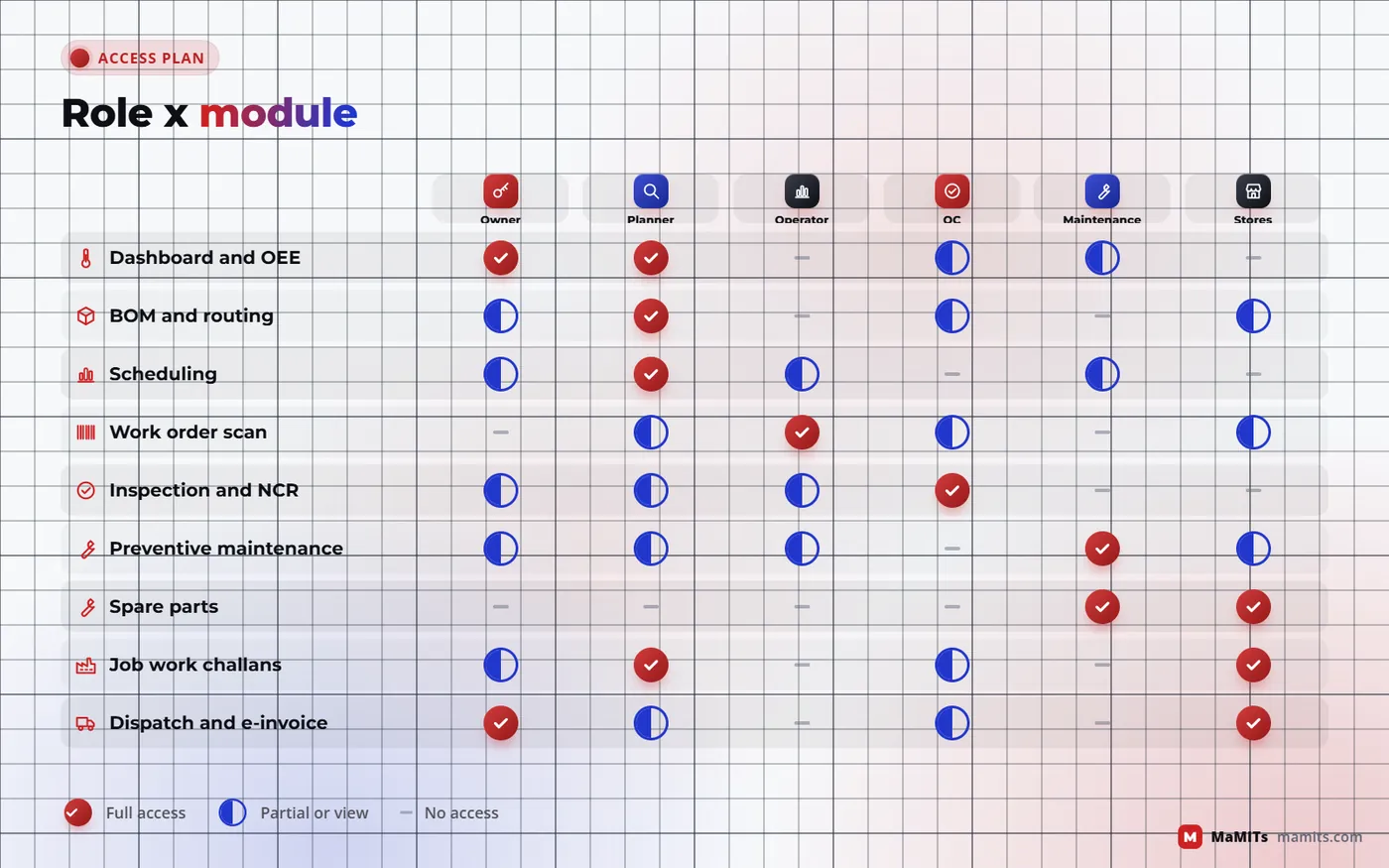
| Who uses it | Office staff | Operators, supervisors, maintenance and QC |
If most answers fall in the middle column, extend the ERP you have. If they fall in the right column, MES software development usually returns more than another ERP licence.
Who it is for
NeedsMulti-level BOMs, routings with setups, serial or heat number traceability, customer PPAP-style records
We buildRouting-based scheduling, operator tablets per machine, first-piece approval, serial genealogy
NeedsRecipes with yield, batch records, shelf life, lot-wise quality release
We buildBatch manufacturing records, recipe scaling, QC release before dispatch, expiry-aware FEFO picking
NeedsVisibility without an army of data-entry staff, budget control
We buildA small first module (often work orders plus WIP) linked to Tally, extended in phases
NeedsCustomer-owned material accounting and per-customer rates
We buildInward challans, consumption and return tracking, job work billing
NeedsPacking lists, certificates, lot traceability that foreign buyers audit
We buildFinal inspection with certificate output, export packing and labelling
NeedsOne view of capacity, stock and quality across sites
We buildPlant-wise data with a group dashboard and inter-plant transfers
NeedsOrders from dealers feeding production, warranty claims back to serials
We buildDealer order portal tied to planning and serial-based warranty lookup
Go-live without a shutdown
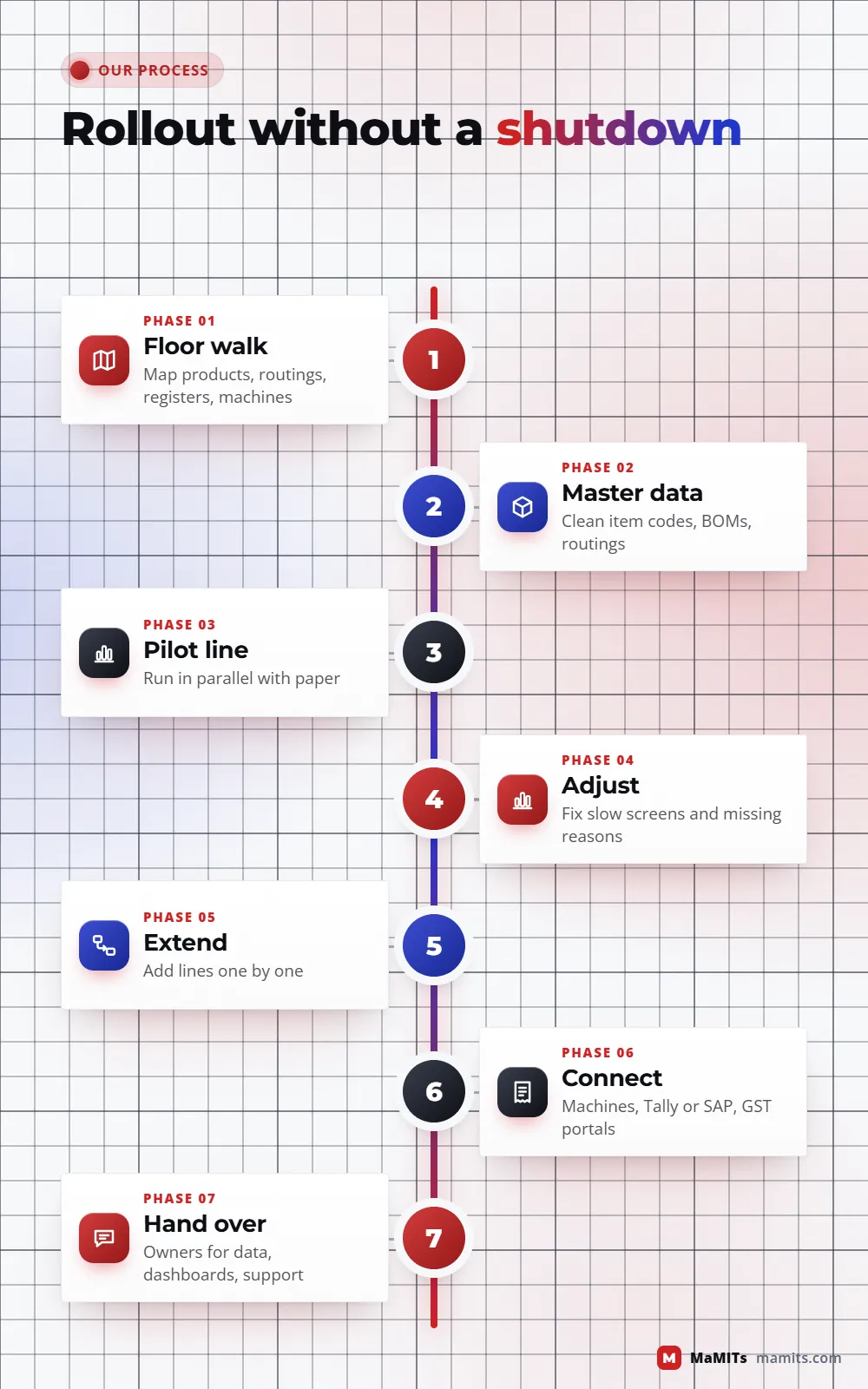
Factories cannot pause for an IT project. The rollout is designed so that the old way keeps working until the new way has proved itself.
Two to three days at the plant (or video walk-throughs for plants outside MP) mapping products, routings, registers, machines and the real reasons work gets delayed.
Item codes, BOMs, routings and machine lists are cleaned before any screen is built. This is the slowest step and the one that decides success.
Pick the bottleneck area, run the software in parallel with the existing register for a few weeks, and compare numbers daily.
Operators find the screens that are too slow or the reasons that are missing. Adjust before expanding.
Add areas one at a time; retire each paper register only when its digital version has matched for a full cycle.
Machine signals and Tally or SAP sync come once the manual flow is trusted, so automation reinforces a working process.
Supervisors own the dashboards, a named person owns master data, and support terms are written down.
Integration and cost
Plants rarely live alone. A factory with a training centre may need LMS and assessment software for operator certification, a pharma or food unit often shares batch logic with healthcare software, and a brand that sells through dealers usually needs distributor and retail software on the sales side.
We rarely ask a plant to replace its accounts. Purchase receipts, production entries, stock journals and sales invoices can be posted into Tally through its XML or ODBC interfaces, and into SAP through its standard interfaces where your SAP partner opens them. The rule we follow: one system is master for each piece of data. Items might be mastered in the plant software, ledgers in Tally, and the sync never edits both sides of the same record.
A fixed price without seeing the plant is a guess. MaMITs quotes after a scoping call, and a small first module can start after a short scoping exercise. The factors that move cost the most are listed below.
Vendor check
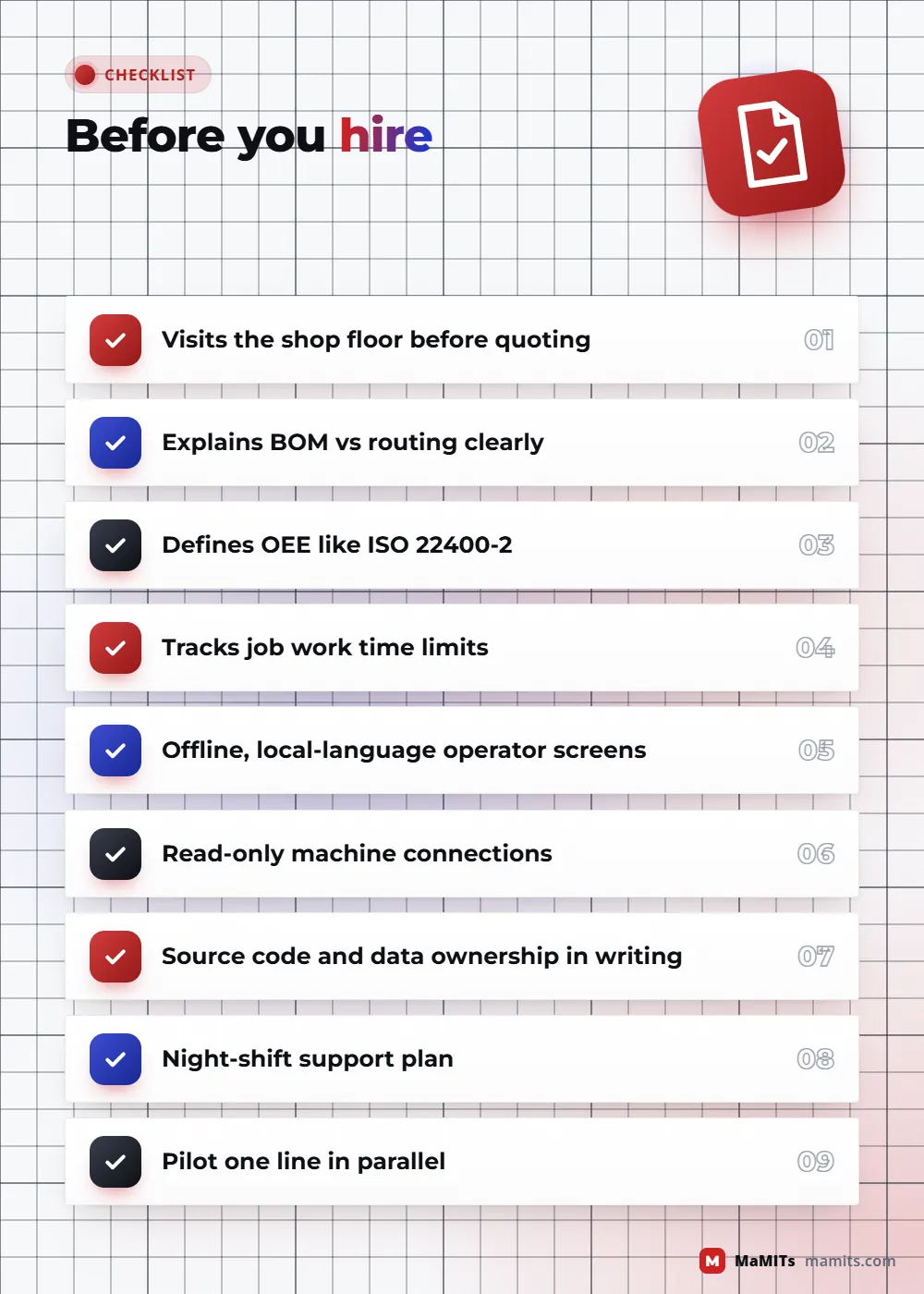
People searching for the top manufacturing software company often compare feature lists. Feature lists look identical. These questions separate vendors who understand factories from those who only build forms.
A manufacturing software company that cannot answer the last two clearly will struggle after go-live, however good the demo looks.
The one lesson that repeats across plants
Software does not fix a factory's discipline; it makes the existing discipline visible. If routings are not followed on paper, they will not be followed on a tablet. The first win is usually data you can trust, and the savings follow from acting on it.
Limits
Where we work
MaMITs is based in Bhopal and works with plants across India, with online meetings for units in the USA, Canada, Australia and the UK. Within Madhya Pradesh we visit in person with 3 days notice; for Delhi NCR, Mumbai, Pune, Maharashtra and UP, with 7 days notice.
Madhya PradeshIn person with 3 days notice
Close to the Govindpura industrial area in the city and Mandideep on the Raisen side, so a floor walk can be scheduled quickly and repeated during the pilot.
For units in Indore and the Pithampur industrial area near it, we plan in-person scoping visits with 3 days notice and run the rest online.
Units in Malanpur near Gwalior and in the Richhai area of Jabalpur get in-person visits with 3 days notice, so the floor walk happens before the scope is written.
Engineering, food processing and packaging units across the state get the same 3 days notice for an in-person floor walk, wherever the plant is in Madhya Pradesh.
Beyond Madhya PradeshIn person with 7 days notice in India, online abroad
Plants in Delhi, Noida and Gurugram get in-person meetings with 7 days notice, with daily progress online during the build.
In-person meetings with 7 days notice for engineering and process units in Maharashtra.
FAQ
ERP manages business planning: sales, purchase, stock value, finance and overall production plans, usually in days and weeks. MES manages execution on the floor: which job runs on which machine now, who is running it, what was rejected and why, measured in minutes and shifts. In ISA-95 terms, ERP is Level 4 and MES is Level 3.
Not a full MES. Most MSMEs get the biggest benefit from work orders, scan-based production entry and live WIP linked to Tally. That small layer gives most of the visibility of an MES at a fraction of the effort. Machine connectivity, OEE and stage-wise quality can be added later once the basic flow is being used every day.
Often yes. Many PLCs expose data over Modbus or OPC UA, sometimes after enabling a module or with the machine maker's help. Where the controller is locked or very old, a current sensor or proximity switch on an IoT gateway can report run, idle and cycle counts. We keep these connections read-only so the software never controls the machine.
OEE equals Availability times Performance times Quality. Availability is run time divided by planned production time, Performance compares actual output with ideal-cycle output in that run time, and Quality is good units divided by total units. ISO 22400-2 defines these terms. Agree upfront whether changeovers and planned maintenance count as planned time.
It issues job work challans and tracks quantities sent, received back, wasted and outstanding per challan. It warns before material sent out for job work is due back, and prepares the job work return data your CA files. Your CA should still confirm tax positions.
When goods move to a job worker in another state, an e-way bill is usually needed whatever the value, and within a state the normal threshold applies. The software creates it from the job work challan, so nobody types the same details twice, and your CA confirms the rule for your case.
Yes. Production entries, stock journals, purchase receipts and sales invoices can be posted to Tally through its XML or ODBC interfaces, so accounts stay where your accountant is comfortable. We define one master for each type of data, for example items in the plant software and ledgers in Tally, so records never conflict.
It depends on modules, master data quality and the number of lines. A focused first module piloted on one line is the usual start, run in parallel with the existing registers until numbers match. MaMITs gives a phase plan after the scoping visit rather than a fixed promise, because data cleaning time varies widely between plants.
Cost depends on modules, routing and BOM complexity, machines to connect, integrations such as Tally, SAP, e-invoice and e-way bill, number of plants and users, and offline or hardware needs. MaMITs quotes after a scoping call, and a small first module can start after a short scoping exercise, so you can see value before committing to more.
Yes. Operator screens are designed for tablets or phones with large buttons, barcode or QR scanning, short pick lists for downtime and rejection reasons, and local language labels. They can work offline and sync when the network returns, which matters in sheds where Wi-Fi drops near heavy machines.
It means every finished batch or serial number can be traced back to the raw material lots, machines, operators and inspection results used to make it, and forward to the customers who received it. When a complaint arrives, you can identify affected lots and dispatches quickly instead of searching registers.
Yes. MaMITs is based in Bhopal and visits plants anywhere in Madhya Pradesh, including Indore and Pithampur, with 3 days notice, and Delhi NCR, Mumbai, Pune, Maharashtra and UP with 7 days notice. Plants in the USA, Canada, Australia and the UK are handled through online meetings and video floor walks.
Next step
Send a photo of your current production register or planning sheet on WhatsApp. We will tell you which module would remove the most manual work first, and what a pilot on one line would involve.
MaMITs, 144, Neerja Nagar, Durgesh Vihar, Ayodhya Nagar, Bhopal 462041 · ★ 4.9 on Google from 182 reviews