MaMITs Travel ERP Features: Every Module, Explained in Detail
This page walks through every module of MaMITs Travel ERP version 1.1.0 in the order a travel business actually works. First you win the customer (CRM and quotations). Then you deliver the trip (bookings, vouchers, cabs, hotels). Then you collect the money (GST invoices, payment links, reminders). All the while your website brings in new enquiries (website builder, SEO Center, analytics).
Each section states what the module does, who uses it and what it looks like in practice. For the click-by-click steps, the public User Manual covers every screen. For the full list with screenshots, download the Feature Guide.
Last updated: 30 September 2026Product version 1.1.0
IWin the customer
IIDeliver the trip
IIICollect the money
IVBring in enquiries
Act I
First you win the customer.
Module 01 Act I · Win the customer
Leads and CRM: travel lead management software
Who uses it: the owner and the sales team, every day.
The sales pipeline is a Kanban board with one column per stage. Default stages are New, Contacted, Quote Sent, Follow-up, Negotiation, Won and Lost. You can add stages and change their order. The system stages New, Won and Lost are protected so reports never break.
Each card is one enquiry and shows the customer name, a priority badge (Hot, Warm or Cold), phone, source, travel date with a “flexible” note if dates can move, number of adults and children, and the assigned staff member. Call and WA buttons on every card open the phone dialler or WhatsApp with the customer’s number. Each column shows its true total and the top 50 cards, hot leads first, with a link to the full list. (Figure 2.1)
Lead form. Name, phone (10 to 15 digits), email, city, source, assigned to, destination interest (several destinations allowed), approximate travel date with a “dates flexible” tick, adults, children and infants, budget range in rupees, priority and notes.
Duplicate protection. If the phone number already belongs to an open lead or an existing customer, the software warns you and links to that record. You can still choose “Create anyway”.
Follow-ups. Mode (Call, WhatsApp, Email, Meeting), next follow-up date and time, and a note. Follow-ups due today or overdue appear on the dashboard.
Lead sources. Website, WhatsApp, Instagram, Facebook, Walk-in, Referral, JustDial and Other by default. Add your own.
Lost reasons. Price too high, Plan cancelled, Booked with competitor, No response, Other. Dropping a card on Lost asks for the reason.
Website leads. Every enquiry form on your website creates a lead automatically: package pages, destination pages, contact page, home page call-back, lead popup and hotel enquiries. The lead records the visitor’s source: Google, Facebook, Instagram, a UTM campaign, a referral website or direct. A repeat enquiry from the same phone is added to the existing open lead as a “Repeat enquiry” note instead of a duplicate.
Automation. When a booking is created from a quotation, the linked lead moves to Won on its own.
Fig. 2.1The Leads pipeline.Fig. 2.3Adding a lead: contact details, source, assigned staff, destinations of interest, travel date.
Module 02 Act I · Win the customer
Customers: one complete profile
Who uses it: sales, operations and accounts.
Phone number is the customer’s identity, so it is unique. The profile holds alternate phone, a separate WhatsApp number, email, company, address, city and state, date of birth and anniversary, GSTIN for B2B customers, and tags such as vip, repeat or corporate.
Saved travellers. Family members or colleagues with date of birth, gender, ID type (Aadhaar, PAN, Passport, Voter ID, Driving Licence) and ID number. When you create a booking, Prefill from Saved copies them in one click.
Documents. Upload passport, Aadhaar or visa copies as JPG, PNG, WEBP, SVG or PDF with a title. Deleting a document needs a special permission.
Birthdays and anniversaries. The dashboard shows today’s dates with a one-click Send Wish WhatsApp message.
History. Every lead, quotation and booking for this customer, matched by customer link or phone number. Customers are created automatically from website bookings, portal sign-ups, lead conversion and the quick-add box inside a quotation.
Fig. 3.3Customer page: contact card, quick actions, document uploads, saved travellers and history.
Module 03 Act I · Win the customer
Quotations: travel quotation software
Who uses it: sales.
The quotation builder is where most agencies see the biggest time saving. Instead of typing a proposal in Word, you build it from your catalogue.
Option A StandardOption B DeluxeOption C Premium
Options A, B and C. Offer Standard, Deluxe and Premium versions side by side. Each option shows its sell total, cost, margin and per-person price live as you type. (Figure 4.1)
Item types. Package, Add-on, Hotel, Taxi and Custom. Choosing a package fills in its lowest price and cost automatically, and per-person packages multiply by the number of travellers. Choosing a hotel fills in the lowest room rate per night.
Cost visibility. Cost and margin appear only to staff whose role has the “See cost price and margin” permission. Sales staff without it see selling prices only.
Inclusions, exclusions, terms and notes are pre-filled from Booking Defaults and editable per quotation.
Valid till. Default today plus seven days. After that date the quotation is marked Expired automatically.
Numbering. QTN-0001 style with the prefix set in Invoice and GST settings.
Send by WhatsApp and email. One click marks the quotation as Sent, emails the link (if SMTP is set up) and prepares a WhatsApp message from your template, for example “Hello Vikram, your quotation QTN-0001 is ready: link”.
Tracking. When the customer opens the link, the status changes to Viewed. Your team knows the best moment to call.
Revisions. Revise creates v2, v3 and so on with the same quotation number. The old version stays unchanged, so you have the full negotiation history.
Decision. Mark Accepted or Mark Rejected for decisions taken over the phone. The customer can also accept online from the quotation page.
Customer’s quotation page. A clean public page with each option, inclusions, exclusions and terms, a Save PDF button and a WhatsApp button. (Figure 4.3)
Convert to Booking on any option creates a booking with all items, travellers and totals, and moves the lead to Won.
Fig. 4.2Quotation builder: customer, validity, travellers and several options side by side.Fig. 4.3The public quotation link the customer receives.
Act II
Then you deliver the trip.
Module 04 Act II · Deliver the trip
Bookings and operations: travel booking management software
Who uses it: operations and accounts.
Header bar. Booking number (BKG-0005 style), status, and live Total, Paid and Balance. Paid counts verified payments only.
Booking details. Customer, package, fixed departure (seats are reserved and released automatically), travel dates, adults, children and infants, operations staff, status and special requests.
Items. Quantity, rate, cost (for permitted roles) and margin. A coupon code is checked against every coupon rule and the discount is applied automatically.
Travellers. Names with ID details, or Prefill from Saved.
Room allocation. When the Hotels module is on: hotel, room type, check-in, check-out, meal plan (EP, CP, MAP, AP) and guest names for each room.
Payment schedule. Milestones such as “Advance 30 percent” and “Balance before travel” with due dates. These feed the Reminders Due page.
Documents checklist. Created from your default list (for example Aadhaar card, PAN card, passport). Upload each file to mark it Received.
Cancellation. Reason, cancellation charge, refund amount, refund status (Requested, Approved, Refunded) and refund reference. Cancelling releases fixed-departure seats.
Vouchers. A voucher PDF for the customer and a separate hotel voucher grouped by hotel with address and contacts. (Figure 5.2)
GST invoice. The “+ GST Invoice” button creates an invoice pre-filled from the booking.
WhatsApp menu. Ready messages for booking confirmation, payment received, trip reminder and review request.
Website bookings. A booking made on your website already contains the customer, travellers, items, coupon, a GST invoice and a payment link. Seats are reduced, the confirmation email is sent, and your operations team only has to arrange the trip.
Fig. 5.2A booking with totals bar, items, travellers, room allocation, payment schedule and document checklist.Fig. 5.3The Booking Confirmation Voucher.
Act III
Then you collect the money.
Module 05 Act III · Collect the money
GST invoicing: travel invoice software for India
Who uses it: accounts.
Correct Indian GST invoices without a separate accounting app.
GST type per invoice: CGST plus SGST (same state), IGST (other state) or No GST.
GST percent per line, default from settings (usually 5 percent), with your SAC code (for example 998555 for tour operator services).
Discount as flat rupees or percent. GST is calculated on the value after the discount.
Automatic numbering such as INV-1001, INV-1002 with your prefix and starting number.
Status updates on its own from verified payments: Unpaid, then Partial, then Paid.
Credit notes for refunds and corrections, subtracted from the booking receivable and from the GST summary.
Amount in words, bank and UPI details, terms and signature on the invoice.
Email the invoice with line items, GST, total, amount due and a Pay Now link.
Example. A 10,000 rupee tour service at 5 percent GST for a customer in the same state: taxable value 10,000, CGST 2.5 percent is 250, SGST 2.5 percent is 250, invoice total 10,500. For a customer in another state the invoice shows IGST 5 percent, 500, instead.
Same state · CGST plus SGST
BaseTaxable value₹10,000
+2.5%CGST₹250
+2.5%SGST₹250
Invoice total₹10,500
Another state · IGST
BaseTaxable value₹10,000
+5%IGST₹500
Invoice total₹10,500
Fig. 6.3The printed tax invoice: GSTIN and PAN, place of supply, SAC, CGST/SGST rows, amount in words.
Module 06 Act III · Collect the money
Payments and collections: travel payment management
Who uses it: accounts and sales.
Record a payment against a booking, an invoice or both: amount, mode (UPI, cash, bank, card, cheque, Razorpay, Cashfree, other), date and UTR or reference. If you pick only the booking, the payment links to the oldest unpaid invoice of that booking.
Receipts. RCPT-00001 style with the amount in figures and words, ready to print or save as PDF.
Payment links. For any amount and purpose, for example “Advance for Goa trip”.
Online payments. Razorpay (cards, UPI, net banking, wallets) and Cashfree in test or live mode. Webhooks record a verified payment automatically, never twice for the same transaction, and update the invoice.
Offline options. UPI deep link that opens GPay, PhonePe or Paytm, UPI QR code, UPI ID and bank details.
Customer claims. “I have paid, notify agency” lets the customer enter their UTR. The payment shows as unverified until your accounts team checks it.
Reminders Due. Every payment milestone coming up, with a WhatsApp reminder button. (Figure 7.3)
Unpaid
Partial
Paid
Fig. 7.4Reminders Due: booking milestones and invoices due within your reminder window.
Percent or flat discounts, with a maximum cap on percent coupons, minimum order value, valid from and to dates, total usage limit, per-customer limit and new-customers-only. Codes work at website checkout with a live Apply button and in the admin booking form. Active coupons appear on the public Offers page. A used coupon can be deactivated but not deleted, so reports stay correct.
Fig. 8.2Coupon settings: type, value, minimum order, maximum discount cap, validity and limits.
Module 08 IV · The catalogue
Destinations
The master list of places you sell, such as Goa, Manali, Kerala or Dubai. Each destination has a name, a unique slug, domestic or international type, state or country, best season (for example Oct to Mar), cover image and gallery, short and long descriptions, a Popular badge and an Active switch, plus a full SEO panel. Each destination gets its own landing page showing every package, hotel and cab service available there. Changing a slug creates a 301 redirect automatically. A destination used by packages cannot be deleted by mistake.
Fig. 9.3The public destination page: hero, stats, packages, upcoming group dates and hotels.
Module 09 IV · The catalogue
Tour packages, hotels, taxi and cabs
These three business lines are covered in depth on their own pages.
Dynamic Fare Engine: travel package pricing on rules
Who uses it: the owner or pricing manager.
Change prices automatically across packages, hotels and cabs without editing each product.
Dynamic Fare Engine rule types, when they apply, and examples
Rule type
Applies when
Example
Season
The travel date falls in a season’s date ranges
Peak season plus 15 percent for 20 Dec to 5 Jan
Day of week
The travel date is one of the chosen weekdays
Weekend hotels plus 10 percent on Fri and Sat
Early bird
The customer books X or more days before travel
Book 60 days ahead: minus 8 percent
Last minute
Travel is within X days of booking
Travel within 3 days: minus 5 percent
Demand or occupancy
A fixed departure is X percent or more sold
80 percent seats sold: plus 10 percent
Festival
The travel date is within the festival window
Diwali week plus 12 percent
Flash sale or promo
The booking date is within the sale window, with a badge
“Weekend Flash Sale” minus 20 percent
Taxi fuel surcharge
Every cab fare
Plus 150 rupees per trip
Scopes: everything, one business line, one destination, or specific packages, hotels or vehicle types. Priority decides the order. “Stack all” combines rules, “Highest priority only” applies one. Rounding: none, prices ending in 9 (12,499) or ending in 99 (12,999). The customer sees a transparent breakdown of base price, each rule and rounding in the booking box. A preview tool tests a price, and a price change log records before and after values with the staff member’s name.
Fig. 14.2Rule editor: type, adjustment (percent or flat), priority and scope.
Module 11 IV · The catalogue
Media Library
All images in one place, automatically optimised. Upload JPG, PNG, WEBP, GIF or SVG files up to 4 MB each. SVGs are cleaned for safety. JPG and PNG are converted to WebP automatically. Add alt text and see every place an image is used.
Fig. 15.1The Media Library: upload several images at once, add alt text, and see where every image is used.
Act IV
All the while your website brings in new enquiries.
Module 12 V · The website
Website builder and CMS: travel agency website builder
Who uses it: the owner or marketing person, without a developer.
Home page builder with 15 section types. Cinematic Hero (image or video slides), Smart Search (Holidays, Hotels and Cabs tabs with a budget slider), Featured Journeys, Destination Atlas, Stay Collection, Mobility (cab tiles with live “from” fares), Popular Cab Routes, Curated Collection, Upcoming Departures with live seats, Limited-Time Offers, Traveller Stories, Why Book With Us, Travel Inspiration (blog), Final Booking CTA with a call-back form, and Custom HTML. Most sections have separate desktop and mobile layouts. Sections can be scheduled between two dates. Empty sections and sections for switched-off modules hide themselves. The home page is cached for speed and refreshed when you save.
Pages with 5 layouts. Classic, Hero banner, Legal document (with a contents sidebar and print), Wide and Card. Ready-made starters for About, Privacy, Terms, Cancellation and Refund, and Book and Pay are pre-filled with your agency name, email, phone and city. Renaming a page address creates a 301 redirect and updates menu links.
Page texts. Every sentence on the website is editable. The {agency} placeholder becomes your agency name.
Menus and footer. Drag and drop header menu with parents and children linking to pages, packages or any URL. Footer builder with branch addresses, CTA strip, copyright and mobile call, WhatsApp and email buttons with live preview.
Lead popup and banners. A popup with your own fields, a thank-you step and a reminder button. Popup leads are counted and listed in the CRM.
Branding. Colour themes, 157 font pairs or a custom mix of 257 Google Fonts, 10 templates each for header, footer, hero and package card, and PWA settings so the site can be installed on a phone with your icon and splash colour.
Fig. 16.3The home page as visitors see it: cinematic hero, smart search and featured journeys.Fig. 16.1The home page builder.
Module 13 V · The website
Blog
Categories, tags, scheduling (set a future date and the post goes live on its own), author boxes from staff profiles with author schema, automatic table of contents from H2 and H3 headings, reading time, related posts, previous and next links, an RSS feed at /blog/feed and AMP pages for fast mobile loading.
Pages on the public website, their addresses and what visitors can do
Page
Address
What visitors can do
Home
/
Everything from the home page builder
Tour packages
/packages
Filter by destination, theme, duration, budget, type and booking mode, sort, grid or list
Package detail
/package/goa-beach-holiday
Gallery, itinerary, price calculator, add-ons, book or enquire
Destinations
/destinations, /destination/goa
Browse places and everything available there
Fixed departures
/departures
Upcoming group tours with seats
Hotels
/hotels, /hotel/name
Filter by destination, stars and budget, book rooms online
Cabs
/taxi, /taxi-cab
Live fares by city, map-based booking
Offers
/offers
Active coupons and offer banners
Blog
/blog
Articles, categories, tags, RSS
Reviews
/reviews
All reviews and a review form
Contact and pages
/contact, /p/about
Contact form and CMS pages
Search
/search?q=goa
Search packages, destinations, hotels and pages
Customer portal
/account
Bookings, invoices and vouchers
Online checkout. Pay in full online, pay an advance percent online, or pay by bank transfer or UPI. Online options appear once Razorpay or Cashfree is set up. On submit the software creates the customer, the booking with items and travellers, the coupon usage, the seat reservation and a GST invoice, then sends a confirmation email. The thank-you page shows the booking ID, the amount payable and your bank or UPI details with a QR code.
Mobile. Every page is mobile-first. A floating WhatsApp button with your custom first message is on every page.
Customers sign up or log in with email or mobile. After a website booking, a customer can set a password with their mobile number and booking ID, no email needed. They see bookings, open vouchers and invoices as printable pages, pay the balance through a payment link for the exact amount due, and update their profile. Forgot password by email with a link valid for two hours. Too many wrong passwords lock the login for ten minutes.
Fig. 19.3Booking detail in the portal: items, travellers, invoices, payments, paid and balance.
Module 16 V · The website
SEO Center and reviews: travel website SEO built in
Who uses it: the owner or marketing person.
Page audit. Checks titles (too long or too short), descriptions, duplicates, thin content, missing share images, missing keyphrases and noindex pages. Every page gets a health score and the worst pages are listed first, with a 16-point site health checklist.
Live analysis on packages, hotels, destinations, pages and blog posts as you type: keyphrase in title, description, slug and introduction, density, subheadings, image alt text and uniqueness across pages. Title 30 to 60 characters, description 110 to 160 characters, enough words, links and images, AEO checks for FAQs or question headings, and readability (reading ease, long sentences, transition words, passive voice, paragraph length). Social tab for Open Graph, FAQ tab, and Advanced tab for canonical, schema type, noindex, nofollow and custom JSON-LD.
Structured data. Schema.org JSON-LD for TravelAgency or LocalBusiness, products, hotels, FAQ, breadcrumbs, articles, authors, aggregate ratings and a sitelinks search box.
Sitemaps and AI discovery. XML sitemap with images, robots.txt, and llms.txt, a summary of your business for AI assistants.
Redirects and 404 monitor. 301, 302, 307 and 308 redirects with hit counts, automatic 301s on slug changes, and a list of broken links visitors hit with one-click “create redirect”.
Reviews. For packages, hotels, cab services and your business, with star ratings on the website and in Google results. Anti-spam with captcha, a limit of three reviews per hour per visitor and optional approval. Verified badge for reviews from real customers.
Page audit · health score
Fig. 20.1The SEO Center dashboard.Fig. 20.4Reviews moderation: approve, reject, verify, reply.
Module 17 V · The website
Analytics and business intelligence: travel agency analytics
Who uses it: the owner, every morning.
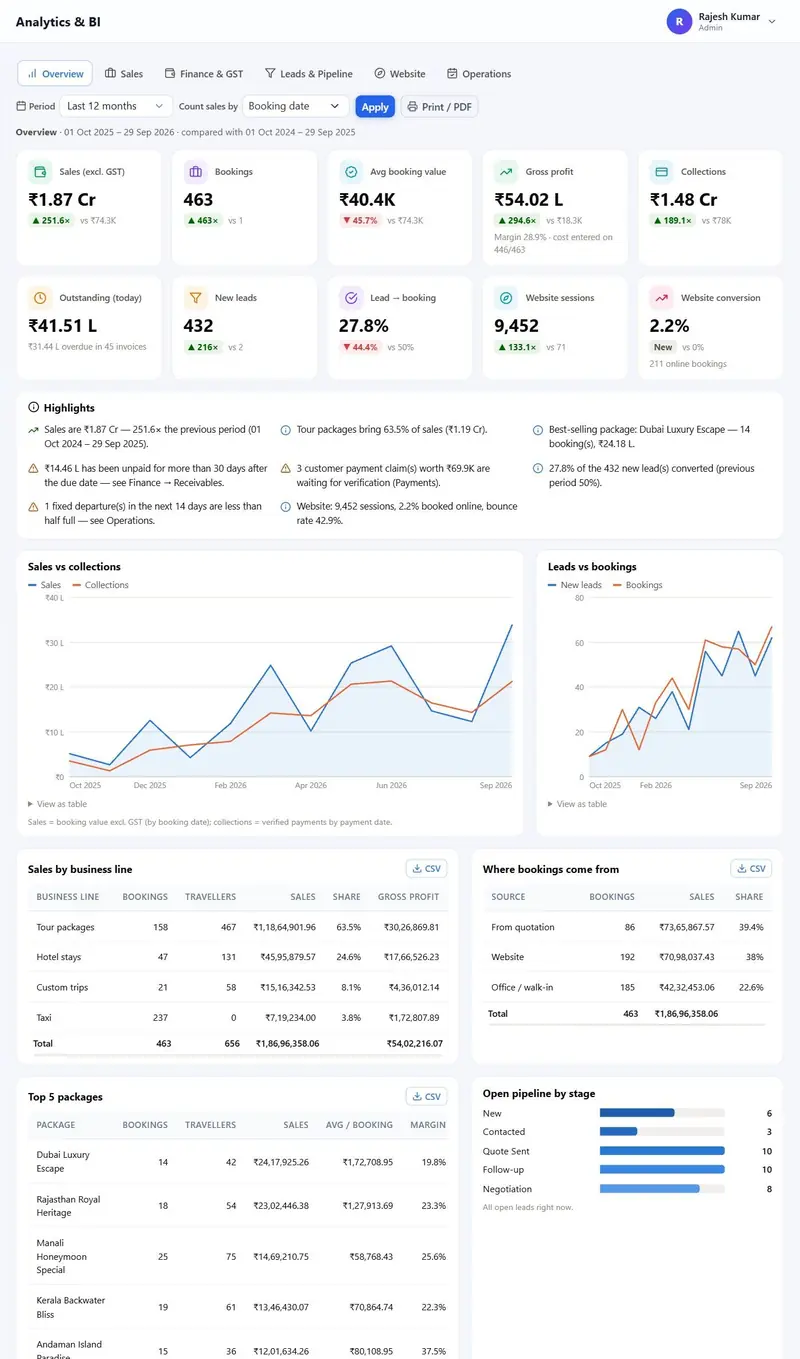
Six dashboards answer the questions an owner asks daily. Period presets: today, yesterday, last 7, 30 or 90 days, this month, last month, this quarter, this and last financial year, last 12 months, or a custom range. Each period is compared with the one before it. Date basis: booking date or travel date. CSV export for every table and print or PDF for any tab. Cost, profit and margin show only to roles with the cost permission.
Overview. Key figures, plain-language insights, sales vs collections, leads vs bookings, pipeline by stage, sales by business line, booking sources and top packages.
Sales. Sales by business line, booking sources, package performance, destinations, hotel room-nights, top customers, sales by staff, coupon performance and cancellations.
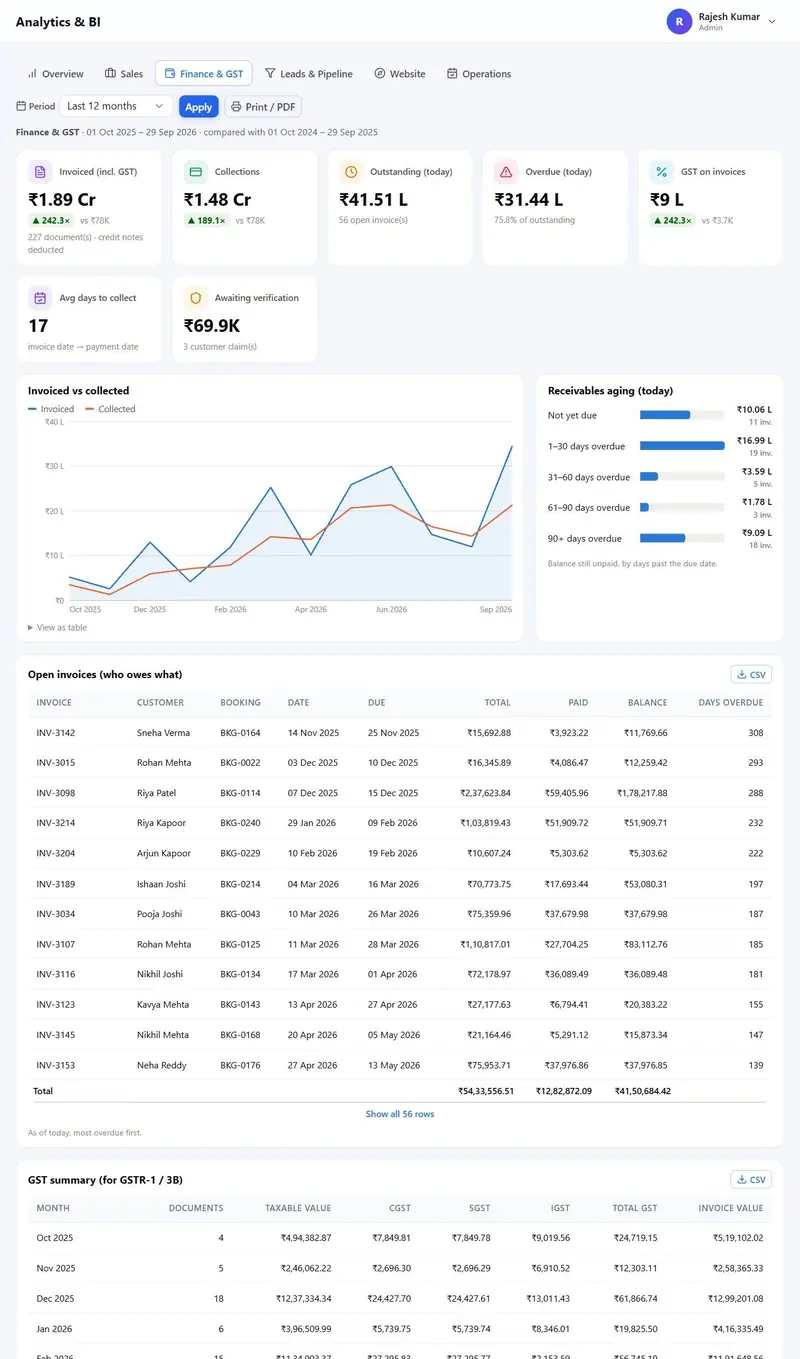
Finance and GST. Invoiced vs collected, receivables ageing (0 to 30, 31 to 60, 61 to 90, 90 plus days), open invoices, a monthly GST summary for GSTR-1 and 3B, collections by mode and claims awaiting verification.
Leads and pipeline. Lead funnel, sources, team performance, current pipeline, lost reasons and quotation statistics.
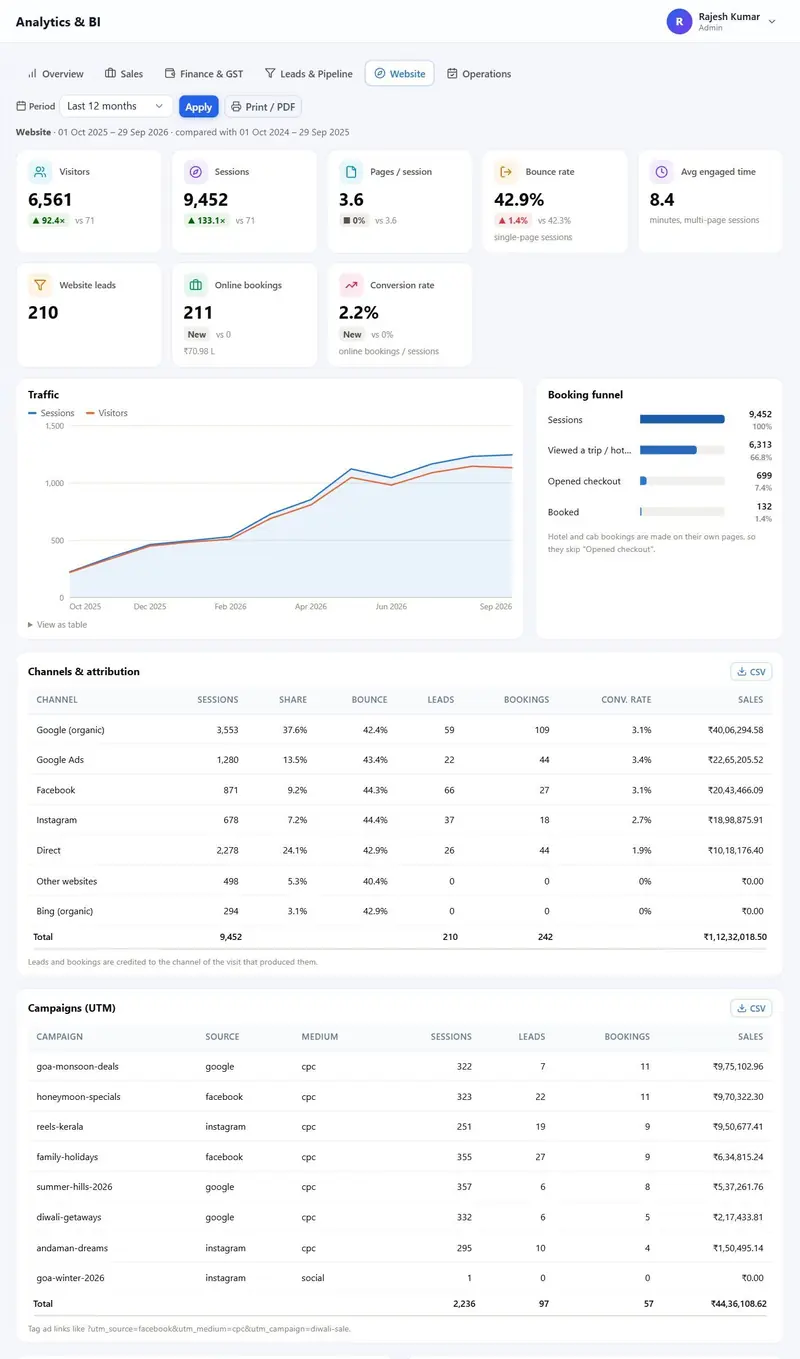
Website. Visitors, sessions, bounce rate, engaged time, booking funnel, devices, browsers, channels, UTM campaigns, landing pages and referrers, all first-party with no Google Analytics required.
Operations. Trips in the next 30 days, balance due before travel, departure seat fill, cab pickups and cab usage by vehicle.
Fig. 21.1–21.3 Overview, Finance and GST, and Website dashboards from a real installation of version 1.1.0.
Behind the scenes
One settings screen with grouped tabs.
Module 18 VI · Behind the scenes
Team, roles and security
Ready roles: Admin, Sales, Accounts and Operations, and any others you create. View, add, edit and delete per module. Special permissions for seeing cost price and margin, deleting records and exporting data. Activity log of logins, settings changes, bookings, payments and quotations, filterable by staff, module and date. Staff profiles with photo, job title and bio double as blog author boxes.
Security: CSRF protection on every form, admin login lock after five wrong attempts for 15 minutes, one-time password reset link valid for one hour, captcha of your choice (built-in picture maths, Google reCAPTCHA v2 or v3, Cloudflare Turnstile, hCaptcha, Friendly Captcha) switchable per form, honeypot fields, secure session cookies, security headers, protected folders, no PHP execution in uploads, and friendly error pages with a reference number while technical details go to a private log.
ViewAddEditDeleteper module
Fig. 22.2Role editor: View, Add, Edit and Delete permissions for each of the 23 modules, plus special permissions.Fig. 22.3Activity log.
Module 19 VI · Behind the scenes
Settings and integrations
One settings screen with grouped tabs and an explanation next to every field.
Settings tabs and what you configure in each
Tab
What you configure
Business Modules
Which business lines you sell, presets or switches
Business Profile
Agency and legal name, tagline, emails, phones, WhatsApp, address, GSTIN, PAN, time zone, logos, favicon, social links, About texts
Home meta, Google Analytics 4, Tag Manager, Meta Pixel, Bing UET, verification codes, custom head and body code
Maps
OpenStreetMap (free) or Mapbox
Spam protection
Captcha provider, keys, per-form switches, key test
Payment Gateways
Razorpay and Cashfree (test or live, keys, webhooks), offline UPI, bank and QR, default advance percent
Invoice and GST
Prefixes for invoices, quotations and bookings, starting number, GST percent, SAC, bank details, terms, signature
Booking Defaults
Advance percent, reminder days, document checklist, cancellation policy and terms
Email (SMTP)
Quick setup for Gmail, Hostinger, Outlook and Zoho, and a test email
WhatsApp Templates
Eight message templates with placeholders
Automatic emails. Booking Confirmed (with trip, travellers, GST, amount payable and pay link or bank details), Taxi Booked, Your Quotation, Invoice with Pay Now link, password reset, and SMTP test.
Fig. 23.2WhatsApp templates with clickable placeholders.
Module 20 VI · Behind the scenes
Installation, updates and performance
Install. A three-step web installer: server check, database (it can create the database and explains errors in plain words), then agency and admin account.
Update. Upload the new version ZIP in Updates. The software backs up the current code (last five backups kept), protects config and uploads, and runs database migrations automatically.
Hosting. PHP 8.0 or newer, MySQL 5.7 or newer or MariaDB 10.2 or newer, Apache (cPanel, Hostinger, XAMPP) or LiteSpeed. Pretty URLs detected automatically with a fallback to plain index.php links.
Scale. Tested with 10,000 tour packages, 10,000 hotels, 10,000 cab rate cards and 1,00,000 quotations. Paginated lists, database indexes, cached filter counts and search pickers that load as you type keep every screen fast. In MaMITs tests every admin screen loaded in under 0.8 seconds.
1Server check2Database3Agency and admin
Fig. 24.2Step 3: agency name, admin account and the business lines you sell.
1,00,000quotations tested
under 0.8severy admin screen, in MaMITs tests
Questions
Feature questions answered
Does the CRM work with WhatsApp?
Yes. Every lead card, quotation, booking and taxi booking has WhatsApp buttons that open WhatsApp with a message prepared from your templates. No WhatsApp API subscription is needed because the message is sent from your own phone or WhatsApp Web.
Can sales staff see my supplier costs?
Only if their role has the “See cost price and margin” permission. Without it they see selling prices only, in quotations, bookings and reports.
Can I send a quotation with two or three price options?
Yes. Options A, B and C sit side by side in one quotation, each with its own total and per-person price, and the customer can accept any one online.
Does it replace my accounting software?
It handles GST invoices, credit notes, receipts, receivables ageing and a monthly GST summary for GSTR-1 and 3B. Your CA still files the returns. You can export every table to CSV.
Do I need Google Analytics?
No. The Website dashboard is first-party and records visitors, sessions, bounce rate, channels, UTM campaigns and the booking funnel on its own. You can still add Google Analytics 4, Tag Manager, Meta Pixel and Bing UET from the SEO and Tracking tab.
Can I switch modules on and off later?
Yes, at any time in Business Modules. Switching a module off hides its menus, pages and reports. Nothing is deleted.
How many staff accounts can I create?
There is no per-user fee, so create as many staff accounts and roles as your team needs.
Aggregate rating of MaMITs Travel ERP: 4.5 out of 5, based on 256 ratings.
Starter Gold
₹1,999
Per Month
Gold Royal
₹2,999
Per Quarter
Royal Platinum
₹4,999
Per Half Of The Year
Platinum SEO Pro
₹9,999
Per Year
MaMITs Travel ERP has made managing our travel operations much easier. We can handle tour packages, hotels and cab bookings from one place, which saves a lot of time for our team. The overall system is simple and practical for day-to-day travel agency work.
We were looking for a travel agency software that could bring our package and booking operations together. MaMITs Travel ERP has been very useful for our team, especially for managing tour packages and hotel details. The workflow feels much more organized now.
Before using MaMITs Travel ERP, we were managing many things manually. Now our team can manage travel packages, hotels and cab-related information in a structured way. It has reduced a lot of repetitive work and made our daily operations smoother.
What I liked about MaMITs Travel ERP is the way different travel operations are brought into a single system. Managing packages and coordinating hotels and cabs is much more convenient. It has given our team better visibility over our regular work.
MaMITs Travel ERP is a practical solution for travel agencies handling multiple services. We especially found the tour package and hotel management features useful. The system has helped us keep our information organized and reduce dependency on spreadsheets.
Our agency needed software that could simplify everyday travel management. MaMITs Travel ERP helped us organize tour packages, hotel information and cab services in one platform. The interface is easy for our staff to understand, and onboarding the team was straightforward.
Managing multiple tour packages and travel services can become complicated very quickly. MaMITs Travel ERP has helped us bring everything into a more structured workflow. Having package, hotel and cab information accessible through one system has been convenient for our operations.
We were searching for a travel ERP that could support our growing agency operations. MaMITs Travel ERP has helped us manage package details and coordinate hotel and cab services more systematically. It has made our internal process much more organized.
MaMITs Travel ERP has been a useful addition to our travel business. The software helps us manage our tour packages and supporting hotel and cab services without keeping information scattered across different files. It has improved the way our team handles daily tasks.
We needed a centralized travel agency software for managing our packages and associated services. MaMITs Travel ERP provides a structured way to manage tour packages, hotels and cabs. Overall, it has helped us streamline our workflow and keep our travel operations better organized.
See the admin panel and the public website working on a real installation. Call, WhatsApp or email us, tell us whether you sell tours, hotels, cabs or all three, and we will set up the demo with the right modules switched on.